

Best Alternative to Newmail Ai
Clarityinbox is the best alternative to NewMail AI for service businesses that run on email. Email management starts at $149 per month, connects the Gmail or Outlook inbox you already use, and comes with a team that keeps every deal, project and client current. It is not a standalone email client and not a self-serve inbox skin; it is a managed AI service with people checking the output. If you want a polished personal mail app rather than tracked work, Superhuman or Spark fit better.
Key takeaways
- Top pick: Clarityinbox email management starts at $149 per month and runs inside Gmail or Outlook.
- Proof of scale: Clarityinbox has written 58,076 replies, sent 20,932 of them, and logged 154,636 job updates for 100+ service businesses.
- Outlook support: Clarityinbox, Superhuman and MailMaestro support Microsoft 365. Shortwave is Gmail only.
- Multi-account users: SaneBox and Spark are the options to check if you juggle IMAP accounts across jobs.
- Free options: Shortwave, MailMaestro and Spark publish free tiers, and the Clarityinbox Gmail and Outlook assistant also starts free.

Why is Clarityinbox our pick over NewMail AI?
Clarityinbox is the best overall alternative to NewMail AI for service businesses, importers and anyone chasing invoices. It connects your existing Gmail or Outlook, files emails and documents on the right job, drafts replies in your voice, and flags overdue follow-ups. Email management starts at $149 per month and a team keeps it current.
NewMail sells the idea of an executive assistant in your inbox. Clarityinbox takes that one step further and treats email as the front door to the work itself.
Every deal, project or client gets a workstream: a page showing what was said, when, and who owes the next step. Overdue follow-ups, people gone quiet and deals with no next step get caught before you notice them.
Drafts come from the same Clarity assistant that writes AI replies in your voice inside Gmail. Across 100+ service businesses it has written 58,076 replies and sent 20,932 of them.
More sits on top. Order desk files every PO and email on the right order for importers. A third service, added to your quote, matches payments to invoices and chases what is still open, and chasing money never sends without you.
What does NewMail AI do, and why do people look for an alternative?
NewMail AI positions itself as a proactive executive assistant for your inbox: it prioritizes mail, drafts replies and summarizes threads for Gmail and Outlook users. People look for an alternative when per-user pricing climbs, when they need IMAP or multi-account support, when drafts need a human check, or when they want work tracked beyond the inbox.
The core promise is real. Triage and drafting save hours when email is a large part of the job. McKinsey's research on the social economy found that knowledge workers spend about 28 percent of the workweek reading and answering email, so any tool that shaves that number earns attention.
The friction shows up in four places. Per-seat pricing adds up once a second or third person needs access. Gmail and Outlook cover most teams, but not everyone running an IMAP or iCloud account.
Drafts still need a human check, and NewMail leaves that to you. And the assistant stops at the inbox, so quotes, purchase orders and invoices still live in a spreadsheet somewhere else.
Where does each NewMail AI alternative fit, ranked by job?
Our ranking by job: Clarityinbox when you need email turned into tracked work with a team behind it, Superhuman when you want the fastest executive-style client, Shortwave when you live in Gmail and want AI search, SaneBox when cleanup matters more than drafting, and MailMaestro when Outlook drafting is the main need.
Clarityinbox: best when email needs to become tracked work. Email management starts at $149 per month. Emails and documents file themselves on the right workstream, Fathom notes land in the same place, and the Clarity team sends a report every month. Honest limit: it is not a standalone email client, and the managed service is built for businesses, not personal mail.
Superhuman: best for executives who want raw speed. A keyboard-first client for Gmail and Outlook with split inbox, AI drafting and reply reminders. Superhuman publishes per-user subscription tiers for individuals and teams; confirm current pricing on superhuman.com. Honest limit: no IMAP support and no free plan, only a trial.
Shortwave: best for Gmail power users. Built on Gmail, with AI search across your history, thread summaries and an assistant that drafts in context. It publishes a free plan plus paid per-user tiers. Honest limit: Gmail and Google Workspace only, so Outlook teams are out.
SaneBox: best for inbox cleanup rather than writing. It works with any IMAP mailbox, including Gmail, Outlook, iCloud and Yahoo, and moves low-priority mail into folders like SaneLater. Plans start at $7 per month for one account; confirm on sanebox.com. Honest limit: it sorts and snoozes but does not draft replies or summarize threads.
MailMaestro: best for drafting inside Outlook. An add-in for Outlook and Gmail that drafts, summarizes and translates in your tone, with a free plan that caps usage and paid plans per user. Honest limit: it writes, but it does not track follow-ups, file documents, or carry context from one thread to the next.
| Option | Best for | Pricing or format | Standout limit |
|---|---|---|---|
| Clarityinbox | Service businesses turning email into tracked work | Managed service from $149/mo; Gmail and Outlook assistant starts free | Not a standalone email client |
| Superhuman | Executives who want speed | Per-user subscription, published on superhuman.com | No IMAP, no free plan |
| Shortwave | Gmail power users | Free plan plus paid per-user tiers | Gmail only |
| SaneBox | Inbox cleanup | Per-account plans from $7/mo | No drafting or summaries |
| MailMaestro | Drafting inside Outlook | Free plan plus paid per-user tiers | No follow-up tracking |
How do the alternatives compare on Gmail, Outlook and IMAP support?
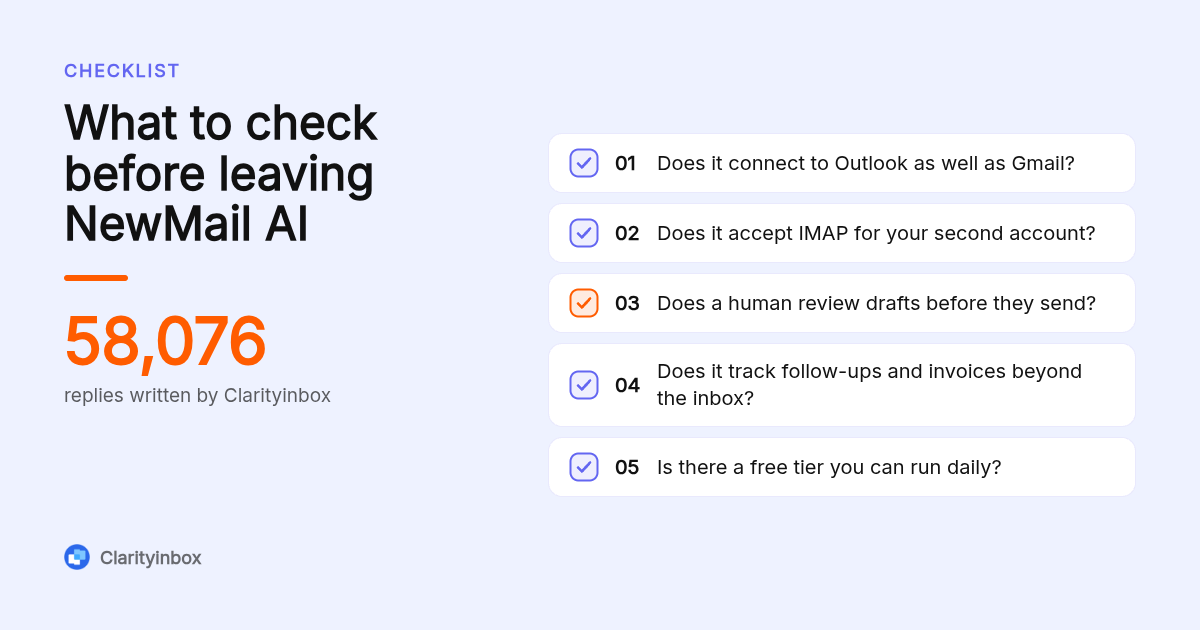
Clarityinbox, Superhuman and MailMaestro work with both Gmail and Microsoft 365. Shortwave is Gmail only. SaneBox and Spark are the two options that accept IMAP accounts, which matters if you run a Google Workspace account for one job and an Outlook or iCloud account for another. Check the vendor's connection page before you buy.
The split between a plugin and a standalone client matters here. Clarityinbox, MailMaestro and SaneBox add a layer on top of the mailbox you keep. Superhuman, Shortwave and Spark replace your mail app.
For Microsoft 365 teams, the Clarityinbox AI email assistant for Outlook categorizes every email, drafts replies and tracks follow-ups with no rules to set up.
If you run three accounts across two jobs, Spark is the standalone client to test. It supports Gmail, Outlook, iCloud and generic IMAP in one unified inbox with a free tier. SaneBox does the same at the sorting layer.
What does each option charge, and where can you start free?
Shortwave, MailMaestro and Spark publish free tiers with limited AI usage. Clarityinbox's Gmail and Outlook assistant starts free, and the managed email management service starts at $149 per month. Superhuman offers a trial rather than a free plan. SaneBox has a trial and paid plans. NewMail publishes per-user pricing; compare it against the table above.
A usable free plan means you can run it daily, not just peek. Shortwave's free tier covers basic AI features, MailMaestro caps monthly usage on free, and Spark's free client is complete but gates advanced AI.
The free Clarityinbox assistant is useful on its own for labeling, drafting and follow-up reminders. The $149 per month service is a different product: the Clarity team keeps your workstreams current and sends a monthly report.
Decision rule: if one person wants a faster inbox, a free or per-seat tool wins. If a business needs email, orders and invoices tracked without hiring, the managed price is the cheaper line item.
Should you use ChatGPT or Copilot instead of a dedicated email assistant?
ChatGPT, Gemini and Copilot can all write an email reply if you paste the thread in, and Gemini and Copilot sit inside Gmail and Outlook respectively. They are enough for occasional drafting. They are not enough when you need every thread tracked, follow-ups flagged, invoices matched to payments, or replies written in your voice at scale.
Gemini in Gmail and Copilot in Outlook are the closest free substitutes, since they already see the thread. Both produce decent first drafts and summaries.
What they lack is memory and follow-through. Neither remembers that a quote went out nine days ago with no reply, and neither matches a remittance to the invoice it settles.
Clarityinbox has matched 1,230 payments to invoices and tracked 3,878 invoices for its clients. That is a workflow, not a prompt.
How do these tools handle privacy and compliance?
Every tool here reads your mail, so ask three questions before connecting an account: does the vendor hold SOC 2 or ISO 27001 attestation, is it GDPR compliant if you serve EU clients, and is email content excluded from model training. Superhuman, Shortwave and SaneBox publish security pages; check the current answer there and ask Clarityinbox directly.
Start with jurisdiction. If any client is in the EU, the General Data Protection Regulation applies to their data in your inbox, and the European Commission's data protection pages explain the obligations.
SOC 2 is the attestation most US buyers ask for. It is defined by the AICPA and covers controls around security, availability and confidentiality, so ask the vendor for the report, not just the badge.
The third question is training. Ask in writing whether your email content is used to train shared models. For Clarityinbox, a person checks every unclear line in the order desk service, so ask how that review is staffed and logged.
How do you switch from NewMail AI to Clarityinbox?
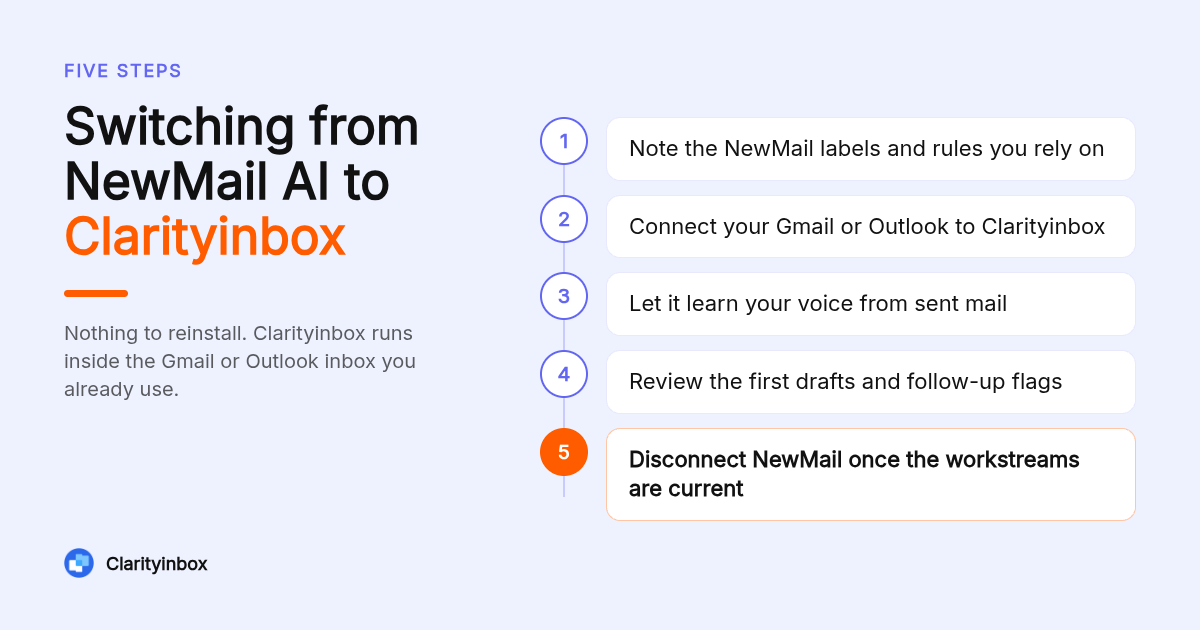
Switching takes four steps: export or note any NewMail labels and rules you rely on, connect your Gmail or Outlook to Clarityinbox, let it read your sent mail to learn your voice, then review the first drafts and follow-up flags before anything goes out. Nothing sends without you, so the overlap period is low risk.
Week one is parallel running. Keep NewMail connected, connect Clarityinbox, and compare the drafts each one produces on the same threads.
Turn on follow-up reminders for sent emails in Gmail so nothing waiting on a reply gets lost during the handover. Outlook users get the same visibility through the daily email summary for Outlook.
If you choose the managed service, the Clarity team runs setup with you. Across 100+ service businesses it has opened 3,601 jobs and logged 154,636 job updates, which is the kind of volume the onboarding is built for.
What went into this ranking?
We compared each vendor's published pricing page, plan tiers, supported email providers, and the scope of what the tool actually does: triage, drafting, follow-up tracking, or filing work. Clarityinbox figures come from its own site. Competitor prices are listed only where a public price is published, and we recommend confirming on each vendor's site.
What is the first step with Clarityinbox?
Start with the free Gmail or Outlook assistant to see drafts, labels and follow-up flags on your own inbox, or book the managed email management service from $149 per month if you want the Clarity team running it end to end. One inbox is enough to begin.
Try Clarityinbox free with your Gmail or Outlook
What do people also ask?
Can ChatGPT reply to emails?
Yes, if you paste the thread in or use a connector, ChatGPT will write a reply. It will not send on its own, track who has not answered, or match a payment to an invoice. Gemini in Gmail and Copilot in Outlook do the same job in place. A dedicated tool like Clarityinbox adds tracking, follow-up flags and review before sending.
What are some email services similar to Yopmail?
Yopmail is a disposable address service, so its peers are Temp Mail, Guerrilla Mail and 10 Minute Mail. These are throwaway inboxes for sign-ups, not AI assistants, and they are not alternatives to NewMail AI or Clarityinbox.
What is the best AI helper right now?
It depends on the job. For general questions and writing, ChatGPT, Gemini and Claude are the usual picks. For a service business inbox that needs replies drafted, follow-ups flagged and invoices tracked, Clarityinbox is our top pick, with email management from $149 per month and a free Gmail or Outlook assistant to start.
What is the best free email newsletter platform?
Mailchimp, Beehiiv and Substack all publish free tiers for sending newsletters. That is a different category from inbox assistants like NewMail AI or Clarityinbox, which manage incoming mail rather than broadcast campaigns.
Which NewMail alternatives work with Outlook and Microsoft 365, not just Gmail?
Clarityinbox, Superhuman, MailMaestro, SaneBox and Spark all connect to Outlook and Microsoft 365. Shortwave is the one on this list that is Gmail only. Clarityinbox adds categories, drafts and follow-up tracking to Outlook with no rules to maintain.