

How to Know If a Supplier Order Is Stuck
How to know if a supplier order is stuck comes down to two tests: the order has passed its confirmed ship date, or the supplier has gone quiet beyond its normal reply time, and nothing in your records proves physical progress. For importers and trading companies that run on purchase orders, we recommend Clarity's Order desk, which files every PO and email on the right order and flags stalled ones: missed deposits, silent factories, unpaid invoices. It is not a freight tracker and not an ERP. It reads the inboxes you already use and tells you which orders need a push today.

Key takeaways
- Stuck has a number: 3 business days past the confirmed ship date with no booking confirmation, or 2 business days past a promised update with no reply.
- Status fields describe your records, not the factory: Unfulfilled, Open and In process can all be true while goods sit untouched, and a fully received PO can stay open because nobody closed it.
- Proof beats promises: dated production photos, a booking confirmation, a container number or courier tracking are the only evidence an order is actually moving.
- Clarity's Order desk files every PO and email on the right order and flags silent factories, missed deposits and unpaid invoices, with a person checking every unclear line.
What are the first signs a supplier order is slipping?
The earliest signs show up in the supplier's behaviour, not in your ERP. Reply times stretch from hours to days, answers turn vague, a sample or milestone date slips without a new date, and "next week" is repeated more than once. Any two of these together, before the due date, mean the order deserves a direct status check.
Here are the seven signs we see most often, in the order they usually appear:
- Reply time doubles. Four hours becomes two days.
- Answers stop containing dates. "We are working on it" replaces "ships on the 14th".
- A sample or milestone date passes with no replacement date.
- "Next week" is said twice. Once is normal. Twice is a pattern.
- The deposit invoice or draft packing list arrives late, or not at all.
- A question about one line item gets a vague answer about the whole order.
- Your contact changes without explanation.
One sign is noise. Two in the same week is the trigger for the status-check email further down this page.
Spotting that pattern means logging reply dates, which nobody does by hand. That is why we built follow-up reminders that flag when a supplier has not replied.
How many days past the ship date counts as stuck?
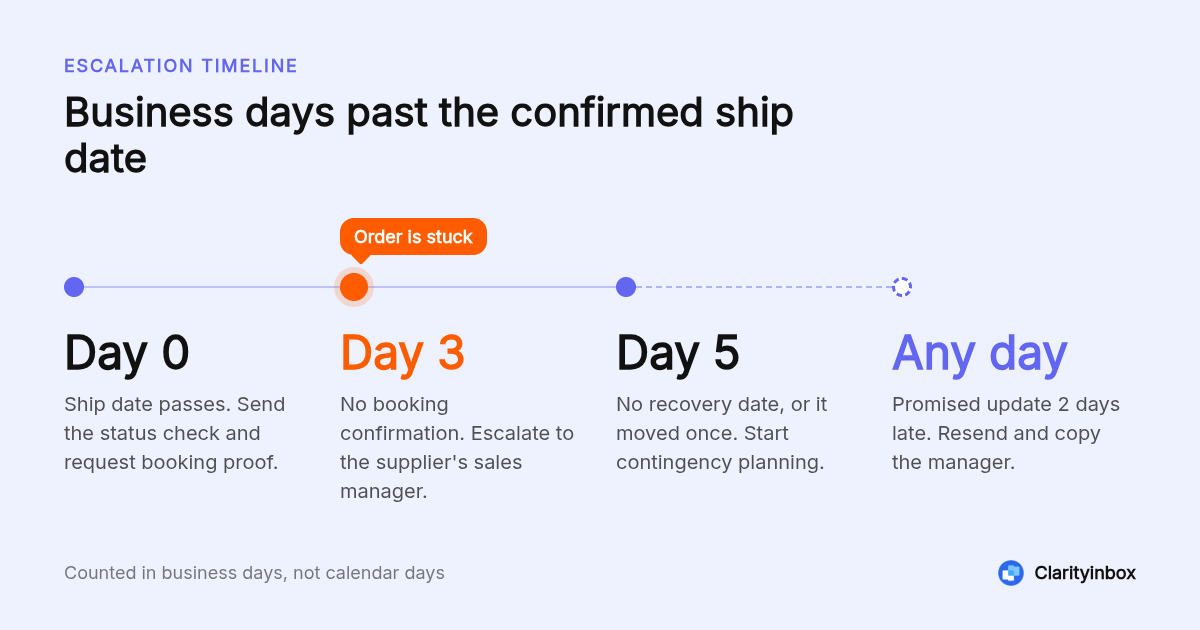
Treat an order as stuck when it is 3 business days past the confirmed ship date with no booking confirmation, or 2 business days past any promised update with no reply. Before the ship date, 7 days of silence on an active order is the trigger. These are thresholds, not contract terms, so tighten them for short lead times.
Counted in business days from the confirmed ship date, here is the decision flow we use:
- Day 0: the ship date passes. Send the status-check email and ask for booking proof.
- Day 3: no booking confirmation. Escalate to the supplier's sales manager and ask for a written recovery date.
- Day 5: no recovery date, or it has already moved once. Start contingency planning.
- Any day: a promised update is 2 business days late. Resend the status check and copy the manager.
Shorten every step for domestic suppliers on 10-day lead times. A 3-day slip there is 30 percent of the whole lead time, not a rounding error.
What do "unfulfilled", "open" and "in process" actually mean on an order?
Status fields describe your system's paperwork, not the factory floor. Unfulfilled in Shopify means no shipment has been recorded against the order. Open on a purchase order means at least one line has not been fully received or billed. In process usually means the supplier acknowledged the order, nothing more. None of them confirm that goods physically moved.
| Status | Where you see it | What it means | What it does not mean |
|---|---|---|---|
| Unfulfilled | Shopify orders | No fulfillment has been created for the order | That stock exists or a supplier shipped |
| Open | QuickBooks Online purchase orders | The PO has not been linked to a bill or manually closed | That goods are still outstanding |
| Pending Receipt / Partially Received | NetSuite purchase orders | No lines, or only some lines, have been received into inventory | That the supplier is late |
| In process | Supplier portals and email updates | The supplier has acknowledged the order | That production has started |
| Received, not closed | Most ERPs | Goods were booked in but a line, quantity or bill is still outstanding | That anything is physically missing |
Platforms differ. Shopify also has On hold and Scheduled states that pause fulfillment with no supplier involved. Check your platform's help pages before treating a status as an alarm.
Is it a data problem or a real delay?
Run two checks before you chase anyone. First, does the warehouse or receiving log show the goods arrived? If yes, the open status is a closing error, not a delay. Second, is there a dated proof of movement in the email thread, such as a booking or tracking number? If neither exists, treat the delay as real.
A fully received PO stays open for boring reasons. In QuickBooks Online a PO remains Open until a bill is created from it or someone marks it Closed. In NetSuite, one short-shipped line keeps the whole PO from reaching Fully Billed until that line is closed.
So the first fix for a stale status is often a two-minute clean-up, not a call to the factory. Close the short line, link the bill, and the order leaves the open list.
The reverse mistake costs more. An order marked In process for three weeks with no dated proof in the thread is a real delay dressed up as a status.
Where do supplier orders get stuck in the handoff chain?
Orders stall at six handoffs: sample or spec approval, production, final QC, freight booking, customs clearance, and warehouse receiving. Each handoff has a different owner, which is why nobody notices. Ask which handoff the order is sitting at right now, and who owns the next step, before you ask when it will ship.
- Sample or spec approval: the supplier is waiting on your sign-off and the clock has quietly stopped on your side.
- Production: material shortages, or a bigger customer jumping the line. Ask for the line schedule.
- Final QC: a failed inspection triggers rework nobody mentions until the ship date.
- Freight booking: no booking means no vessel space. Ask for the booking number.
- Customs: one missing document holds the container. U.S. Customs and Border Protection's basic importing guidance lists what an entry needs.
- Warehouse receiving: goods arrived but were never booked in, so a finished order looks late.
Freight and customs delays also move with the market. The New York Fed's Global Supply Chain Pressure Index tracks delivery times and backlogs monthly, useful context when a forwarder says everything is slow right now.
Which quality red flags show up before a delay?
Quality signals usually move before dates do. Watch for deviation responses that creep from 24 hours to 72 hours, a sudden request to add 100 percent inspection, or a corrective action (8D) request on a running order. Each one means the supplier is handling a problem internally, and the ship date is already at risk.
Deviation response time is the earliest signal. A supplier who answered non-conformance queries inside 24 hours and now takes 72 has a quality team busy with something, and it is often your order or the one ahead of it.
An added 100 percent inspection means sampling failed. It is a responsible move, but it adds days and usually means rework is already running.
An 8D request means a defect was serious enough to document. Ask directly whether the affected lot includes your PO.
What should you ask a supplier to prove the order is moving?
Ask for dated evidence, not reassurance. For production, request photos with today's date, a line schedule, or a packing list draft. For shipping, request the booking confirmation, container number, bill of lading, or courier tracking. A supplier who is genuinely on schedule can send at least one of these within one business day.
Proof to request, by stage:
- In production: dated photos of your SKU on the line, or the production schedule showing your PO number.
- Ready to ship: final QC report, packing list, commercial invoice.
- Shipped: booking confirmation, container and seal numbers, bill of lading or air waybill, or courier tracking.
Here is a status-check email you can copy. Keep the subject specific; our list of follow-up email subject lines for when nobody replied has more options.
Subject: PO 4471, status and proof of progress by Thursday
Hi Mei,
PO 4471 had a confirmed ship date of 14 March. We have not received a booking confirmation. Could you reply by end of day Thursday with:
- The current stage (production, QC, booking or shipped)
- One dated proof for that stage (line photo, QC report or booking number)
- A revised ship date, if 14 March no longer holds
If we do not hear back by Thursday we will need to plan around a later arrival. Thank you.
A supplier who is on schedule answers this within one business day. A supplier who replies with reassurance and none of the three items has told you the order is stuck.
How can you track supplier orders so delays are visible earlier?
Stuck orders surface early only when every PO has a confirmed ship date, a last-contact date and an owner in one place. A spreadsheet works until the order count passes what one person can scan daily. Clarity's Order desk files each PO and email on the right order and flags stalled ones automatically, with a person checking unclear lines.
The minimum tracker is one row per PO with five columns: confirmed ship date, last contact date, current stage, owner of the next step, and a stuck flag tied to the thresholds above. It works until nobody has time to update it, which is exactly when orders slip.
Busy periods are not rare. McKinsey's research on risk and resilience in global value chains found companies can expect disruptions lasting a month or longer every 3.7 years, so the tracker has to survive them.
Clarity's Order desk, which works with or without an ERP, does the filing and flagging for you. Across all clients we have logged 154,636 job updates this way.
For smaller teams, a daily email summary of who is still waiting on you catches silent threads before they become late orders.
When should you escalate a stuck order or switch to a backup supplier?
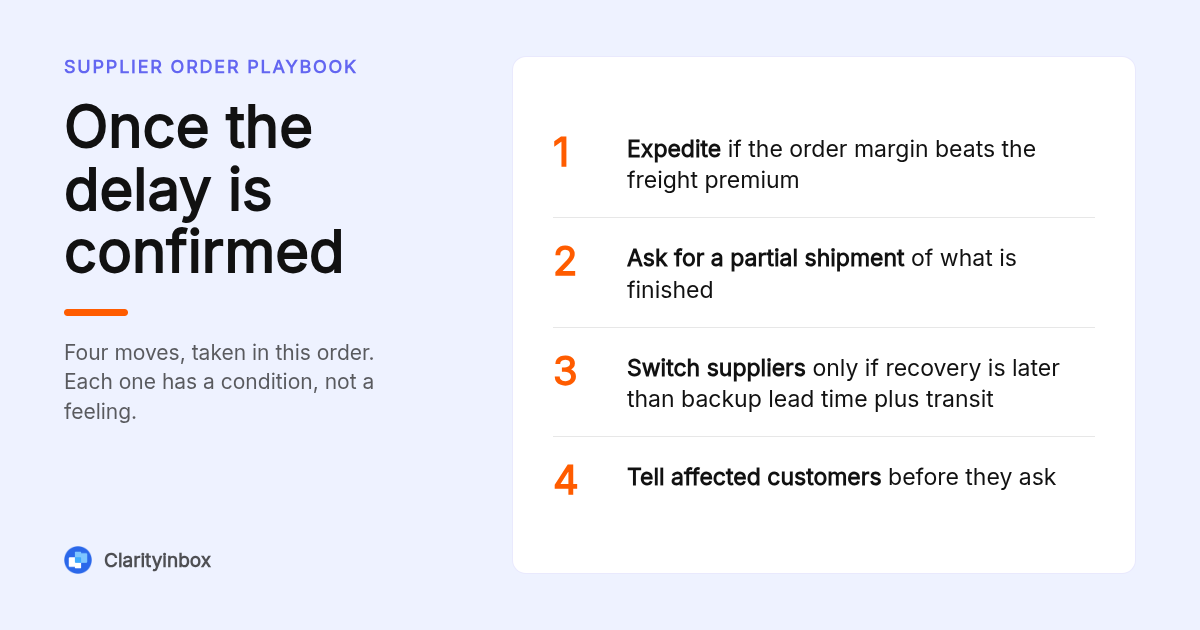
Escalate inside the supplier after two unanswered status checks or 5 business days past the confirmed ship date. Involve your own management when the delay threatens a customer commitment. Switch to a backup supplier only when the recovery date is later than the backup's quoted lead time plus transit, otherwise expedite or take a partial shipment.
Once a delay is confirmed you have four moves, in rough order of cost:
- Expedite: air freight or a priority slot, worth it when the order margin exceeds the freight premium.
- Partial shipment: ship what is finished now. Most suppliers agree if the balance is big enough to book.
- Alternate supplier: only when the recovery date is later than the backup's lead time plus transit, and the backup has made this SKU before.
- Customer notification: tell affected customers before they ask, with the new date and a cancel option.
Escalate internally when a customer commitment is at risk, not when the container is on the water. Management can approve expedite spend in an hour; it cannot recover a lost account.
How did we put this checklist together?
We built this checklist from three sources: the published status definitions in Shopify, NetSuite and QuickBooks, the standard sequence of handoffs in an import order, and the way Clarity's Order desk flags stalled orders for importers and trading companies. No surveys were run. Thresholds are working rules we recommend, not industry benchmarks.
Where platforms define a status differently, we said so rather than averaging them. More notes on orders, email and getting paid are collected on our blog.
How do you get started with Clarityinbox?
Getting started means connecting the inboxes you already use. We learn how your orders run, file every PO and email on the right order, and flag the ones that stall. Order desk works with or without an ERP.
Talk to us about Order desk at clarityinbox.com and we will show you what a flagged order looks like using your own POs.
What do people also ask?
How do you handle a supplier delay?
Confirm it is real first: check receiving logs and the email thread for dated proof. Then send a status check asking for stage, proof and a revised date. Escalate to the supplier's manager after 3 business days with no booking confirmation, and choose between expedite, partial shipment, an alternate supplier or customer notification based on cost and the recovery date.
What are the first signs a supplier order has stalled before the due date?
Reply times doubling, answers with no dates, a sample or milestone date passing with no replacement, "next week" repeated twice, a late deposit invoice or packing list, and an unexplained change of contact. Two of these in the same week justify a direct status check.
Why does a fully received PO still show as open, and how do I close it?
Most ERPs keep a PO open until every line is received and billed. In QuickBooks Online a PO stays Open until a bill is linked or it is marked Closed; in NetSuite a short-shipped line blocks Fully Billed until that line is closed. Close the line or link the bill and the status updates.
What should I ask a supplier to prove an order is in production or shipped?
For production, dated photos of your SKU on the line or a schedule showing your PO number. For shipping, the booking confirmation, container and seal numbers, bill of lading or air waybill, or courier tracking. A supplier on schedule can send at least one within one business day.
How long past the confirmed lead time should an order be before it counts as stuck?
Use 3 business days past the confirmed ship date with no booking confirmation, or 2 business days past a promised update with no reply. Before the ship date, 7 days of silence on an active order is the trigger. Tighten these for short domestic lead times.