

How to Respond to an Email Introduction Professionally
To respond to an email introduction professionally, reply all within 24 hours, thank the introducer in your first line, add one sentence on who you are, and propose a specific next step with two time options. If you run a service business and these replies pile up, we recommend Clarity, which drafts replies in your voice inside the Gmail or Outlook you already use, from $149 per month. Clarity is not a template library and not a new inbox; it writes the draft, and you review and send.

Key takeaways
- Who replies first: the person who asked for the introduction, and within 24 hours. The other party is not expected to open the thread.
- Reply all, then BCC: reply all once so both people see your thanks, then move the introducer to BCC in the next message and say so.
- Four parts, not forty lines: thanks, one line of context, a concrete proposed time or action, and one easy question.
- Clarity's track record: 58,076 replies written and 20,932 sent for 100+ service businesses, each drafted in the owner's voice for review before sending.
What is the best way to respond to an email introduction?
The best way to respond to an email introduction is a short reply all that thanks the introducer, states who you are in one line, and proposes a concrete next step with two time options. Send it within 24 hours, keep the original subject line, and move the introducer to BCC once the new contact answers.
Here is the sequence we use, step by step.
- Hit reply all so the introducer sees you followed through.
- Thank the introducer by name in the first sentence.
- Add one line on who you are and why the connection makes sense.
- Propose a call or action with two specific times.
- Keep the subject line and sign off with full contact details.
McKinsey found that knowledge workers spend about 28 percent of the workweek on email, which is why we hold this reply to five sentences. If introductions land weekly, Clarity can draft the reply in Gmail in your voice so you only review and send.
Who should respond first to an introduction email, and how fast?
The person who asked for the introduction responds first. In a double opt-in intro, the introducer already checked that the new contact is willing, so the ball is in your court. Reply within 24 hours, and within the same business day if the contact is senior to you. Waiting longer reads as low interest.
If nobody asked and the introducer simply connected two peers, the decision rule is simple: whoever benefits more goes first. That is usually the person seeking advice, a job, or a sale.
If you are the senior party and someone was introduced to you for help, a two-line acknowledgement still matters. Silence from the senior side is the most common reason warm introductions die.
Should you reply all, and when do you move the introducer to BCC?
Reply all on your first message so the introducer sees that you followed through and the new contact sees your thanks. In your second message, once scheduling starts, move the introducer to BCC and say so in the first line. That signals the handoff and keeps their inbox clear of calendar back and forth.
The exact phrase is short: 'Moving Sam to BCC with thanks.' It tells the introducer the loop is closed and tells the new contact the conversation is now between the two of you.
Keep the subject line exactly as it arrived. Starting a new subject breaks the thread in Gmail and Outlook, and the introducer can no longer find the conversation if they want to check how it went.
How do you thank the introducer without sounding generic?
Thank the introducer by name and mention one specific thing: the reason they connected you, or the effort it took. Generic thanks like 'thanks for the intro' reads as copy paste. One line is enough. Save the longer appreciation for a separate note to the introducer after the first call happens.
Specific beats effusive. 'Thanks, Priya, for remembering our chat about Toronto importers' lands better than three sentences of gratitude. Purdue's Online Writing Lab recommends the same concise, courteous register for professional email.
Then close the loop later. A one-line update to the introducer after the call is the thank-you people actually remember, and it makes the next introduction more likely.
What should your brief self-introduction include?
Your self-introduction is one or two sentences: your name, your role, and the single reason this connection is relevant to the other person. Skip the company history and the pitch. If the introducer already explained what you do, reference it instead of repeating it. The new contact needs context, not a resume.
Spend two minutes on the other person before you write. Their title, their company, and one recent thing they did give you a relevant line instead of a generic one. Clarity's web search integration does this research before the draft is written, so the context is already in the reply.
Keep the whole message under 120 words. If it needs scrolling on a phone, it is too long for a first reply.
How do you propose a next step without being pushy?
Offer one specific action and two time windows, then let them choose. 'Would Tuesday at 10 or Thursday at 2 work for a 20 minute call?' is concrete and easy to answer. Avoid 'let me know if you are interested', which puts the work on them, and avoid attaching a proposal before you have spoken.
A booking link is fine as a backup, not as the only option. Offer the two times first, then add 'or grab any slot here' with the link. Clarity's Google Calendar integration reads your availability and works real open slots into the draft, so the times you propose are ones you can keep.
Name the duration. Twenty minutes is easy to say yes to; 'a call sometime' is easy to ignore.
Which reply templates work for job, networking, team and client introductions?
Use the same four part structure for every scenario and change the middle line. A recruiter intro leads with the role you want; a networking intro names what you hope to learn; a new colleague intro offers help; a client or sales intro names the problem you solve. Each template below runs under 80 words.
Job or recruiter introduction:
Thanks, Dana, for connecting us. Hi Marcus, I lead field operations at a 14-person HVAC company and I am exploring operations manager roles this quarter. Dana mentioned you are hiring for a similar seat. Would Tuesday at 10 or Thursday at 2 work for a 20 minute call? Happy to send my resume ahead of time.
Networking introduction:
Thanks, Priya, for thinking of us both. Hi Lena, I run a small import business and Priya said you solved the same customs delays we are fighting now. I would value 20 minutes to hear how you handled it. Would next Wednesday morning or Friday afternoon suit you?
New colleague or manager introduction:
Thanks, Omar, for the introduction. Hi Jess, welcome to the team. I handle client onboarding, so you will see my name on most new-account threads. If a 15 minute walkthrough of our handoff process would help this week, pick any time on Thursday and I will set it up.
Client or sales introduction:
Thanks, Sam, for the introduction. Hi Carla, Sam mentioned your team is chasing unpaid invoices by hand each month. That is exactly the work we take off plates for service businesses. Would a 20 minute call on Tuesday at 11 or Wednesday at 3 work to see if it fits? Moving Sam to BCC with thanks.
What does a weak reply look like next to a strong one?
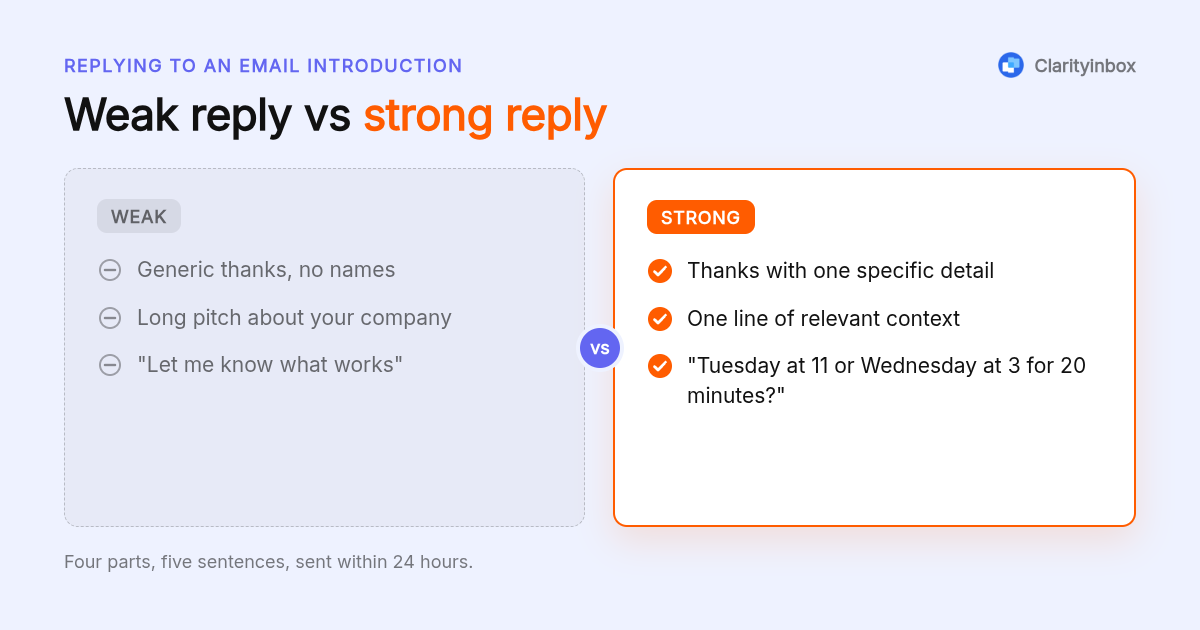
A weak reply is long, vague about the next step, and leaves the introducer guessing whether anything happened. A strong reply is five sentences, names a time, and closes the loop. The difference is rarely tone; it is specificity. Put a date, a duration and one question in the reply and it becomes strong.
Weak: 'Hi both, thanks so much for this! Great to meet you. We do a lot of things in this space and I would love to chat whenever you have time. Let me know what works.' Nothing here can be acted on.
Strong: 'Thanks, Sam. Hi Carla, Sam said your invoices are chased by hand. We handle that for service businesses. Would Tuesday at 11 or Wednesday at 3 work for 20 minutes?' Same intent, one third the length, one clear question.
What if the new contact never replies, or you do not want the intro?
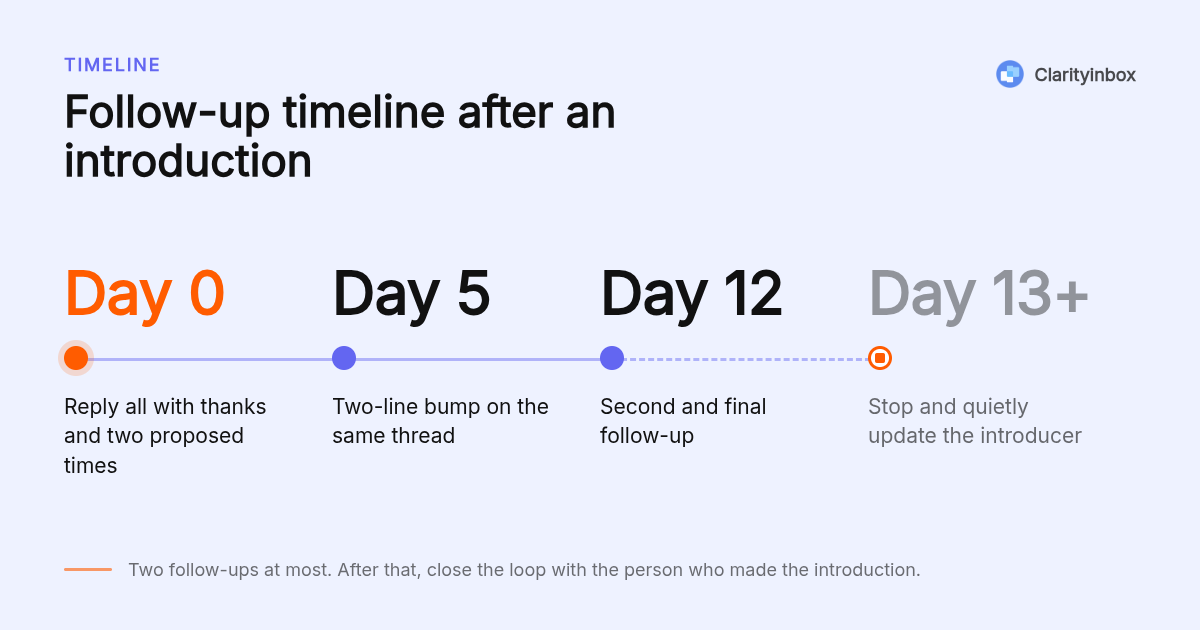
If the new contact is silent, send one short follow-up after five business days on the same thread, then one more a week later. After that, stop and tell the introducer quietly. If you do not want the introduction, reply within 24 hours anyway, thank both people, and say plainly that the timing is not right.
The follow-up is two lines: 'Bumping this in case it slipped. Still happy to do 20 minutes any morning next week.' Do not add the introducer back to the thread for a nudge. Clarity's follow-up reminders for Gmail flag the thread when nobody has answered, so the five day mark does not pass unnoticed.
To decline, keep the introducer's effort intact: 'Thanks, Dana. Marcus, good to meet you. This is not the right time on my side, but I appreciate the connection and will reach out if that changes.' Short, honest, and it leaves the door open.
How did we put this guide together?
We compared the reply guidance on the pages currently ranking for this query, the email etiquette guidance published by Purdue's Online Writing Lab, and the three ways people draft these replies today: by hand, with Gmail Smart Reply, or with a writing tool like Grammarly. Pricing for Clarity comes from our own published plans.
Gmail Smart Reply is free inside Gmail and offers short canned phrases, not a full reply with a proposed time. Grammarly's AI drafting sits on a paid plan; confirm current pricing on grammarly.com. Clarity drafts the complete reply from your sent mail and then tracks whether the other side answered, which neither of the other two does.
How do you get started with Clarity?
Connect the Gmail or Outlook account you already use, and Clarity learns how you write from your sent mail. When an introduction lands, a draft reply appears for review and the thread is tracked until the other side answers. Plans start at $149 per month, with the $500 setup waived on a 12-month term.
If you want to see your first drafted reply before committing, start free with Clarity and connect one inbox.
What do people also ask?
How do I thank someone for an email introduction?
Thank them by name in your first sentence and mention one specific thing, such as why they connected you. One line is enough. After the call happens, send the introducer a separate one-line update; that follow-up is the thank-you people remember.
How to respond to a rude email sample?
Wait at least an hour, then reply only to the facts: 'Thanks for flagging this. Here is where the order stands and what happens next.' Do not match the tone, do not reply all, and move anything emotional to a phone call. A calm written record protects you.
How should I start an introduction email?
Start with the names and the reason: 'Lena, meet Priya. Priya runs an import business and is fighting the same customs delays you solved last year.' Then state who should reply first and close with 'I will let you two take it from here.'
How do you reintroduce yourself in an email?
Open with the shared context: 'We met at the April trade show, where you mentioned stalled factory orders.' Then give your name and role in one line and propose a specific next step with two times. Do not apologize for the gap; just supply the reminder.
Who should respond first to an introduction email?
The person who asked for the introduction responds first, within 24 hours. If nobody asked, the person who benefits more goes first, usually the one seeking advice, a job, or a sale. The senior party should still send a short acknowledgement if the requester is slow.