

How to Reply to Introduction Email Messages Professionally
The best way to reply to introduction email messages is a four-part note sent within 24 hours: thank the person who made the introduction, greet the new contact, give a two-sentence version of who you are, and propose one concrete next step. If introductions land in your inbox every week, we recommend Clarityinbox, which drafts replies in your voice, with email management from $149/mo. Clarityinbox is not a template library or a mail-merge tool; it reads the thread and drafts the reply for you to review and send.
Key takeaways
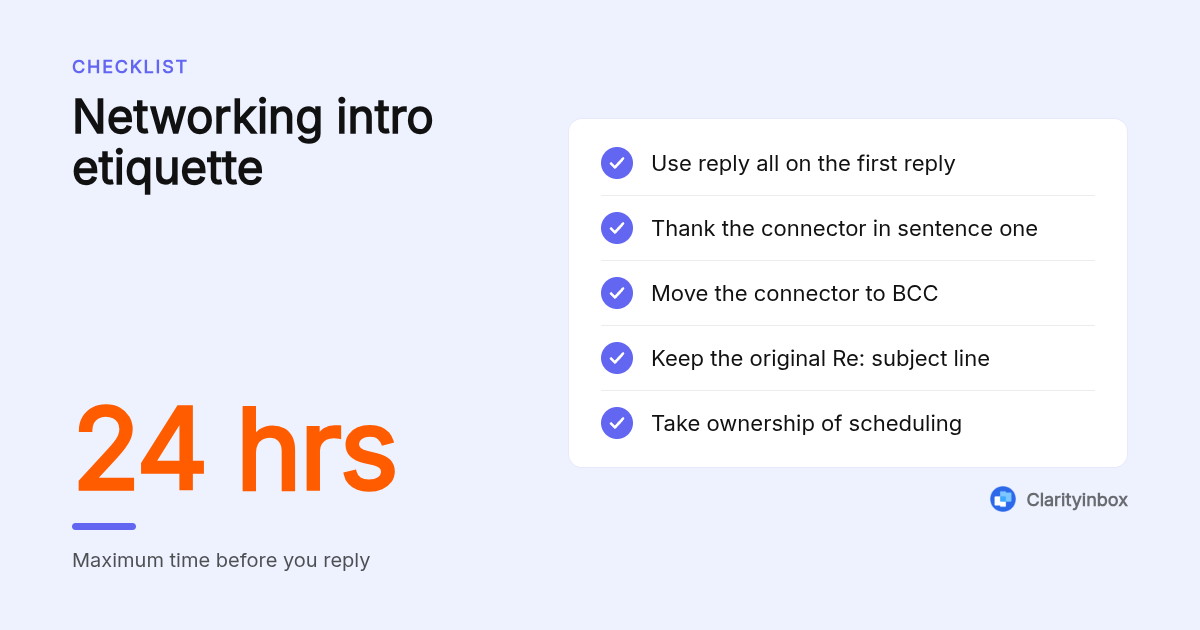
- Reply within 24 hours and keep the message under 150 words; a late reply and a long reply both read as disinterest.
- Use reply all on a mutual-contact introduction, thank the connector in the first line, then move them to BCC so they see you responded without receiving every scheduling message.
- Every reply needs four parts: acknowledgement, thanks, a short self-introduction, and a specific next step with a day and time.
- Clarityinbox has written 58,076 replies and sent 20,932 for 100+ service businesses, with email management starting at $149/mo.
- Not every introduction needs a reply: a company introduction blast with no named sender and no request can be filed rather than answered.

What is the fastest way to reply to an introduction email?
Reply to an introduction email in four short paragraphs. First, thank the introducer by name. Second, greet the new contact and say you are glad to be connected. Third, state in two sentences who you are and why the connection makes sense. Fourth, propose a specific next step, such as a 20-minute call on a named day.
The fourth paragraph is the one most people skip. A reply that ends with "looking forward to connecting" hands the scheduling work back to the other person, and the thread usually dies there.
Keep the subject line intact. Replying under the original "Re:" keeps the introducer's context attached and makes the thread easy to find later.
Here is the base template every scenario below builds on:
Subject: Re: Intro: [Your name] <> [Their name]

Thanks for the introduction, [Introducer]. Moving you to BCC to spare your inbox.

[Name], good to be connected. [Introducer] mentioned you are [one line of context].

I run [company], where we [one sentence on what you do and for whom].

Would a 20-minute call on [day] work? I am free at [two time slots].

[Sign-off]
Should you always reply to an introduction email, and how quickly?
Reply to any introduction that names you, names the sender, or asks for something, and do it within one business day. The exceptions are automated company introduction emails with no individual sender and no request; those can be filed or declined with one line. Silence on a personal introduction reflects on the person who made it.
If you cannot write a full reply the same day, send a two-line holding note: "Thanks for connecting us, Priya. Daniel, I will send proper times tomorrow morning." That protects the introducer's goodwill.
The decision rule for unsolicited company introductions is simple. If there is a named human and one specific ask, reply in two sentences. If it is a brochure with a generic signature, file it.
Speed matters because email already consumes a large share of the working week. McKinsey's research on the social economy found that interaction workers spend about 28 percent of their workweek managing email, so a reply that waits three days tends to get buried under everything that arrived since.
How do you reply to a networking introduction from a mutual contact?
Hit reply all, thank the connector by name in the first sentence, and tell them you are moving them to BCC. Then address the new contact directly, add one line that shows you read the introduction, and take ownership of scheduling by offering two specific times. The connector should never have to chase either of you.
Moving the introducer to BCC is the etiquette detail most guides miss. They see that you responded, which is what they care about, and they are spared the six-message exchange about Thursday versus Friday.
Before you write, spend two minutes checking who the person is. Clarityinbox can research a contact on the web before you reply, which gives you that one specific line that proves you paid attention.
A filled-in example:
Thanks for connecting us, Priya. Moving you to BCC.

Daniel, great to be connected. Priya mentioned you are expanding into commercial HVAC on the north side.

I run Keller Mechanical. We hold maintenance contracts for about 40 commercial properties, mostly office parks.

Would Thursday at 10am or Friday at 2pm work for a 20-minute call? Happy to work around your schedule.

Best regards,
Sam Keller
What should you write back to a new employee or team introduction email?
Reply to a new employee or team introduction with three sentences: a warm welcome, one line about what you do and where your work will overlap with theirs, and an open offer of help with something specific. Reply to the sender only unless the thread is clearly a group welcome, and keep it under 60 words.
The overlap sentence is what makes the reply useful instead of ceremonial. "I handle invoicing, so we will talk every month-end" tells a new colleague exactly when to expect you.
Sample reply to a new employee introduction:
Welcome aboard, Lena. I run the service desk, so you and I will overlap on every job that needs a parts order. If you want a 15-minute walkthrough of how we log jobs, I am free any afternoon this week.
Thank-you reply to colleagues when you are the one being introduced:
Thanks for the warm welcome, everyone. I am joining from a smaller shop, so I will have questions in week one. Coffee is on me for anyone willing to answer them.
How do you respond to a client or prospect introduction email?
When a client or prospect is introduced, reply the same business day, confirm you understand their situation in one sentence, and offer a specific next action with a date: a site visit, a quote, or a call. For a supplier introduction, reply only if you may buy; ask for a catalogue and lead times rather than a meeting.
Client replies fail when they describe your company at length instead of their problem. One sentence of credentials is enough; the referral already did the selling.
Proposing times is faster when your inbox knows your schedule. Clarityinbox checks your calendar and works your availability into draft replies, so the slots you offer are ones you can keep.
Reply to a client introduction:
Thanks for the introduction, Marcus. Moving you to BCC.

Helen, good to be connected. Marcus said the office build-out needs electrical rough-in before the drywall goes up in March.

We have done 12 similar fit-outs this year. I can be on site Tuesday at 9am to walk the plans and have a quote to you within 48 hours.

Kind regards,
Tom Davis
Reply to a supplier introduction:
Thanks for reaching out, Wei. We do buy brass fittings in this category. Please send your catalogue, minimum order quantities, and current lead times, and I will review them before our next purchasing cycle.
How should a parent or student reply to a teacher's introduction email?
A parent or student should reply to a teacher's introduction email within two days, thank them for the overview, share one relevant fact about the student, and confirm the best contact method and times. Keep it to four sentences, match the teacher's formality, and avoid loading the first reply with concerns; save those for a meeting request.
Teachers often send one introduction to 30 families, so a short reply that gives them something useful stands out. One fact about reading habits or a schedule constraint is more helpful than a paragraph of praise.
Parent reply:
Dear Ms. Alvarez,

Thank you for the class overview. Maya is excited about the science unit and reads well above grade level, though she is shy about speaking up. The best way to reach me is this email, and I am available by phone after 4pm on weekdays.

Warm regards,
Jordan Lee
Student version: "Thank you for the introduction, Professor Chen. I am a second-year transfer student and look forward to the seminar. I will be at your Tuesday office hours to say hello in person."
Is "Nice to meet you" the right opener, and what are the alternatives?
"Nice to meet you" is acceptable but slightly off, since you have not met. Better options are "Good to be connected," "Thanks for reaching out," or "Great to be introduced." Avoid "Dear Sir or Madam," "I hope this email finds you well," and exclamation-heavy openers. Close with "Best regards" or "Kind regards" plus a full signature.
Match the sender's register. If they wrote "Hi Sam" with no title, reply the same way; if they used "Dear Mr. Keller," stay formal until they relax. The Purdue Online Writing Lab's email etiquette guidance makes the same point about mirroring the level of formality you receive.
When someone introduces themselves with no connector involved, drop the first paragraph and open with the greeting:
Thanks for reaching out, Nadia. Good to be connected. We do take on wedding bookings for next autumn. Would a 15-minute call on Wednesday at 11am suit you to talk through dates and packages?
Your signature does the last part of the introduction for you. If yours is a bare name, our professional email signature examples for lawyers show the elements that build trust in a first exchange: full name, title, firm, and one direct phone line.
Which mistakes make an introduction reply look unprofessional?
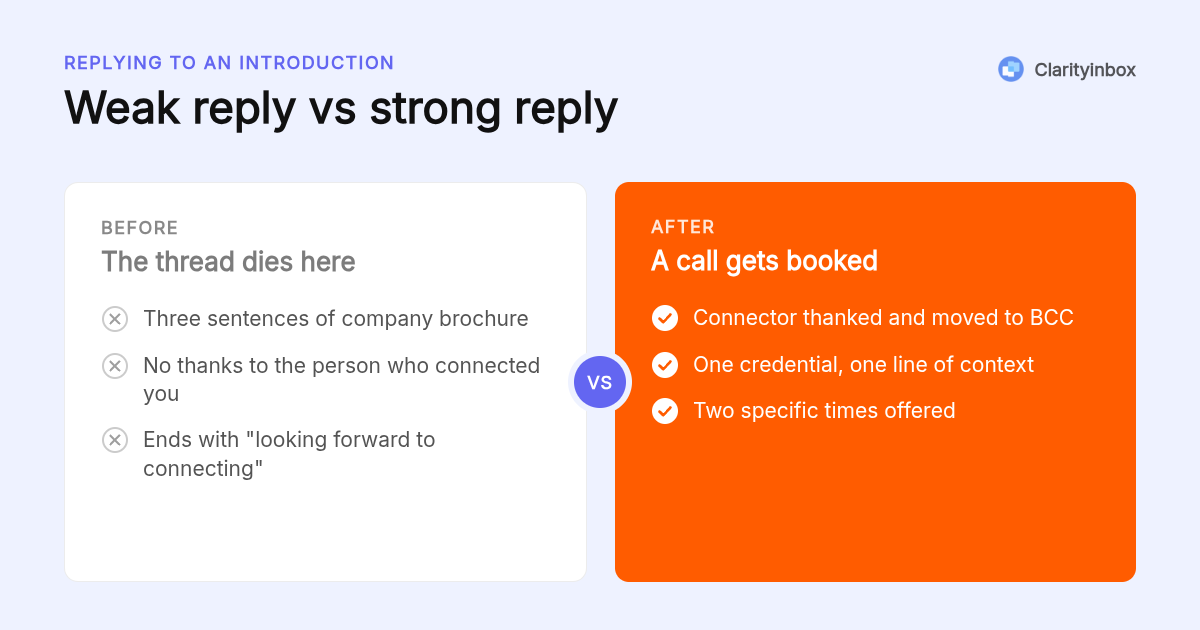
The five mistakes that sink introduction replies are: a self-promotion paragraph longer than three sentences, ignoring the introducer entirely, a generic thank-you with no next step, a tone that is warmer or stiffer than the original, and leaving the connector in the thread for every scheduling message. Each one shifts work back onto the other person.
A weak reply looks like this: "Hi Daniel, thanks so much for reaching out! Keller Mechanical has been serving the region for 22 years with a full range of HVAC, plumbing and refrigeration services for commercial and residential clients. Looking forward to connecting!" No thanks to Priya, three sentences of brochure, no next step.
The strong version is the Keller example above: 61 words, connector thanked, one line of context, one credential, two times offered. The federal plain language guidelines recommend short sentences and one idea per paragraph, and that advice applies directly to a reply that has to be read on a phone between meetings.
Why does Clarityinbox draft introduction replies better than a template?
Clarityinbox reads emails that need a response, learns how you write from your sent mail, and drafts the reply in your voice, with your calendar availability worked into the suggested next step. You review and send in one click. It has written 58,076 replies and sent 20,932 for 100+ service businesses, with email management from $149/mo.
A template gives you the skeleton; it does not know that Priya made the introduction, that Daniel's firm is in commercial HVAC, or that Thursday at 10am is already taken. Clarityinbox drafts email replies in Gmail from the thread itself, and the same draft-and-review flow runs in Outlook.
Gmail's built-in Smart Reply offers three one-line canned options, which works for "Thanks, see you then" but not for a reply that needs a self-introduction and a proposed time. A general assistant like ChatGPT can write the reply, but only after you paste in the thread and your calendar.
The step after sending matters as much as the reply. Clarityinbox tracks sent emails and reminds you when the new contact has not answered, so an introduction that goes quiet gets a follow-up instead of being forgotten.
Email management has a $500 setup fee, waived on a 12-month term, and the Clarity team sends a report every month. Clarityinbox does not replace your inbox; it connects to the Gmail or Outlook account you already use.
How did we put this guide together?
We mapped the eight introduction scenarios searchers ask about to one four-part reply structure and wrote a sample for each. Etiquette points were checked against Purdue OWL and the federal plain language guidelines. Clarityinbox details come only from its published feature pages and pricing. No survey or original study was run for this article.
How do you get started with Clarityinbox?
Connect the Gmail or Outlook inbox you already use, and Clarityinbox begins reading the emails that need a response and drafting replies in your voice for you to review. Email management starts at $149/mo. If you want to see the drafting in your own inbox first, you can start with a free account today.
Start free with Clarityinbox and let your next introduction reply draft itself
What do people also ask?
How do you respond to a rude email professionally?
Wait at least an hour, reply only to the facts, and ignore the tone entirely. Sample: "Thanks for flagging this, Mark. The invoice total is correct per the signed quote on 3 March; I have attached it. If you would like to discuss the scope, I am free Thursday at 2pm." Never match the heat, and never reply all.
What is a good way to respond to a welcome message?
Three sentences: thank the sender, say one specific thing you are looking forward to, and offer a next step. Example: "Thank you for the welcome, Dana. I am looking forward to the Q2 planning session next week. I will book 15 minutes with you before then to hear how the team likes to work."
How do you reintroduce yourself in an email after a long gap?
Lead with the shared context in the first sentence, then the reason for writing. "Hi Elena, we met at the Toronto trade show in October when you were sourcing packaging. I am writing because we now stock the recyclable mailers you asked about." Keep it under 100 words and end with one clear ask.
How do you begin an introduction email to someone new?
Open with the connection, not with yourself: a mutual contact, a referral, or a specific reason their work caught your attention. Then one sentence on who you are, one on why you are writing, and one proposed next step. A subject line like "Intro via Priya Shah" raises open rates more than any clever phrasing.
How long should a reply to an introduction email be and what should it include?
Under 150 words and four short paragraphs: thanks to the introducer, a greeting with one line of context, a two-sentence self-introduction, and a specific next step with a day and time. If you are replying to a mutual-contact introduction, use reply all and move the connector to BCC.