

Best Email System for Import Export Businesses: 9 Picks Compared
The best email system for import export businesses is Clarityinbox Order desk, from $750 per month, which runs on top of the Gmail or Outlook inbox you already use and files every PO and email on the right order. Clarityinbox is not an email host and not a bulk outreach tool, so you still need Google Workspace or Microsoft 365 underneath it. If you only need the cheapest custom-domain mailbox, Zoho Mail is the budget pick on this list.
Key takeaways
- Clarityinbox Order desk costs from $750 per month, works with or without an ERP, and flags stalled orders such as missed deposits, silent factories and unpaid invoices.
- Google Workspace Business Starter is published at $7 per user per month on an annual plan with 30 GB of storage as of November 2026.
- Google's sender guidelines require SPF, DKIM and DMARC for anyone sending 5,000 or more messages a day to Gmail, with a spam rate below 0.3%.
- The FBI's Internet Crime Complaint Center recorded over $2.7 billion in business email compromise losses in 2024, the scam category that hits importers wiring deposits.
- Mainbridge Import runs 261 live orders on Clarity, and across all clients we have tracked 3,878 invoices and matched 1,230 payments.

What is the best email system for import export businesses?
Clarityinbox is the best email system for import export businesses because it files every purchase order and email on the right order inside the Gmail or Outlook inbox you already use, flags stalled orders, and has a person check every unclear line. Order desk starts at $750 per month and works with or without an ERP.
An email system for an import export business is the combination of a hosted mailbox, a filing method for POs and shipping documents, and a way to see who owes the next step on every order.
Most ranking pages only cover one of those three layers. We compared all nine picks on which layer they handle, what they cost as of November 2026, and where each one stops helping.
Which are the 9 best email systems for import export businesses?
The nine best email systems for import export businesses are Clarityinbox, Google Workspace, Microsoft 365, Zoho Mail, Proton Mail, Tuta, Hunter.io, Lemlist and Front. Clarityinbox ranks first because it is the only option that tracks order status, while the other eight each solve one job: hosting, encryption, finding contacts, outreach or shared inboxes.
Clarityinbox Order desk: best when you need every PO filed on the right order. From $750 per month, with or without an ERP, a person checks every unclear line and quality memory builds per product and client. Honest limit: Clarityinbox connects to an inbox rather than hosting one, and it is not built for bulk cold outreach.
Google Workspace: best when you need a hosted mailbox with the widest app support. Business Starter is listed at $7 per user per month on an annual plan with 30 GB per user as of November 2026, per the Google Workspace pricing page. Honest limit: Gmail is unreliable to reach from mainland China, so factories there often reply from QQ or 163 addresses.
Microsoft 365 Business Basic: best when your forwarders, brokers and bank all live in Outlook. Published at $6 per user per month on an annual plan with a 50 GB mailbox as of November 2026, per Microsoft's business plan comparison. Honest limit: Outlook rules fail quietly, with no error when mail lands in the wrong folder.
Zoho Mail: best when you need the cheapest custom-domain mailbox. Mail Lite starts at $1 per user per month billed annually with 5 GB per user as of November 2026, per Zoho Mail pricing; confirm current pricing before buying. Honest limit: fewer third-party integrations than Google or Microsoft.
Proton Mail for Business: best when payment instructions need end-to-end encryption. Mail Essentials is published at $6.99 per user per month on an annual plan as of November 2026, per Proton's business plans. Honest limit: end-to-end encryption only applies between Proton users or password-protected messages; a supplier on Outlook receives ordinary mail.
Tuta: best when you want an encrypted mailbox from a German provider. Pricing is per user on annual business plans, published on tuta.com. Honest limit: Tuta does not support IMAP, so most ERP and CRM email sync tools cannot connect to it.
Hunter.io: best when you need to find and verify a buyer's email address. The free plan allows a limited number of searches per month, with paid tiers published on hunter.io. Honest limit: coverage is thinnest for small trading companies that only publish an info@ address.
Lemlist: best when you run multi-step cold sequences to overseas buyers. Pricing is per user per month, published on lemlist.com. Honest limit: a sequencing tool does nothing for inbound POs, and daily caps still apply to each connected mailbox.
Front: best when a multi-person team needs a shared inbox with assignment and audit trail. Pricing is per seat per month, published on front.com. Honest limit: Front organises conversations but does not understand what an order is, so PO status still ends up in a spreadsheet.
How do the 9 picks compare side by side?
The comparison below shows that only Clarityinbox tracks order status, four options host mail, two encrypt it, two find or contact buyers, and one runs a shared inbox. Most importers end up with one host plus one or two tools, so the table is a build sheet rather than a single winner.
| Option | Best for | Pricing or format | Standout limit |
|---|---|---|---|
| Clarityinbox Order desk | Filing POs and flagging stalled orders | From $750/mo | Not an email host |
| Google Workspace | Hosted mail with broad app support | $7/user/mo annual (Nov 2026) | Hard to reach from mainland China |
| Microsoft 365 Business Basic | Outlook-based teams and brokers | $6/user/mo annual (Nov 2026) | Rules fail silently |
| Zoho Mail | Cheapest custom domain | $1/user/mo annual (Nov 2026) | Fewer integrations |
| Proton Mail Business | Encrypted payment instructions | $6.99/user/mo annual (Nov 2026) | Encryption needs both sides on Proton |
| Tuta | Encrypted mail, EU provider | Per-user annual plans | No IMAP |
| Hunter.io | Finding buyer emails | Free tier plus paid plans | Weak on info@ only companies |
| Lemlist | Cold outreach sequences | Per-user monthly plans | Ignores inbound POs |
| Front | Shared inbox and audit trail | Per-seat monthly plans | No order awareness |
Should an import export LLC use a custom domain email instead of Gmail or Yahoo?
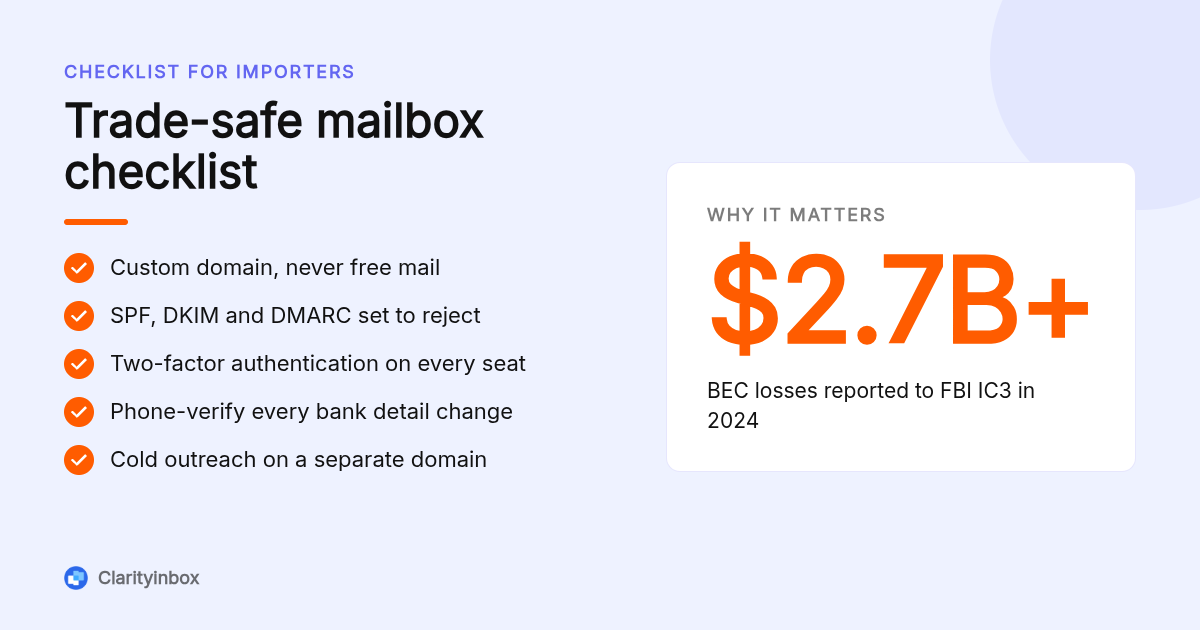
Yes, an import export LLC should use a custom domain email because suppliers, banks and customs brokers treat free-mail senders as fraud risks, and you cannot publish SPF, DKIM or DMARC records for gmail.com. A custom domain on Google Workspace, Microsoft 365 or Zoho Mail costs $1 to $7 per user per month as of November 2026.
The practical test is a bank wire. A supplier's finance team receiving new bank details from a yahoo.com address will, if they are careful, refuse it. From a domain you control, they can at least check the DMARC record.
A custom domain also lets you separate roles. Many trading companies run orders@ and accounts@ as a shared mailbox in Outlook, which is free under 50 GB.
How many cold emails can you send per day to overseas buyers without getting blacklisted?
No provider publishes a safe daily number, but Google's sender guidelines state that anyone sending 5,000 or more messages a day to Gmail must authenticate with SPF, DKIM and DMARC and keep a spam complaint rate below 0.3%. Most outreach practitioners keep new mailboxes to a few dozen cold sends a day for that reason.
The Google email sender guidelines are the primary source here, and the complaint rate is measured in Postmaster Tools. One burst of 300 unsolicited messages to buyers can push a new domain over that threshold.
Our decision rule: never send cold outreach from the domain your POs and invoices run on. Use a secondary domain for sequences, so a blacklisting never stops a factory's shipping confirmation reaching you.
How do you protect your email from invoice fraud when wiring payments to foreign suppliers?
Protect against invoice fraud by verifying every change to bank details through a phone call to a number you already hold, enabling two-factor authentication on every mailbox, and publishing a DMARC policy of reject on your domain. Business email compromise cost victims over $2.7 billion in 2024 according to the FBI's Internet Crime Complaint Center.
The FBI IC3 annual report tracks invoice-redirect scams as business email compromise, and importers are a prime target because a supplier deposit is a normal event. The attacker compromises the factory's mailbox, waits for an invoice, and sends a polite note with new account details.
DMARC is the standard that tells receiving servers to reject mail that fails SPF and DKIM for your domain; the specification lives at dmarc.org. None of the hosts above enable reject by default, so this is a setup task.
Clarityinbox adds a human layer. Our collections and reconciliation service matches each remittance to the invoice it settles, and chasing money never sends without you.
Why do emails to China or India land in spam, and how do you fix deliverability?
Emails to suppliers in China and India land in spam because many factories use QQ, 163 or regional providers with aggressive filters, Gmail services are unreliable from mainland China, and messages sent at 3 a.m. local time look automated. Fix it with plain-text replies, no link shorteners, and sends scheduled for the recipient's morning.
A Shenzhen supplier is on UTC+8, so a Toronto importer sending at 9 p.m. Eastern lands at 9 a.m. in the factory. Scheduling takes two clicks, and we explain the exact steps for scheduling an email in Gmail.
Keep attachments standard: PDF proforma invoices and packing lists, not zipped folders. Regional filters treat archives as malware.
What should a full email stack look like for a solo trader versus a growing team?
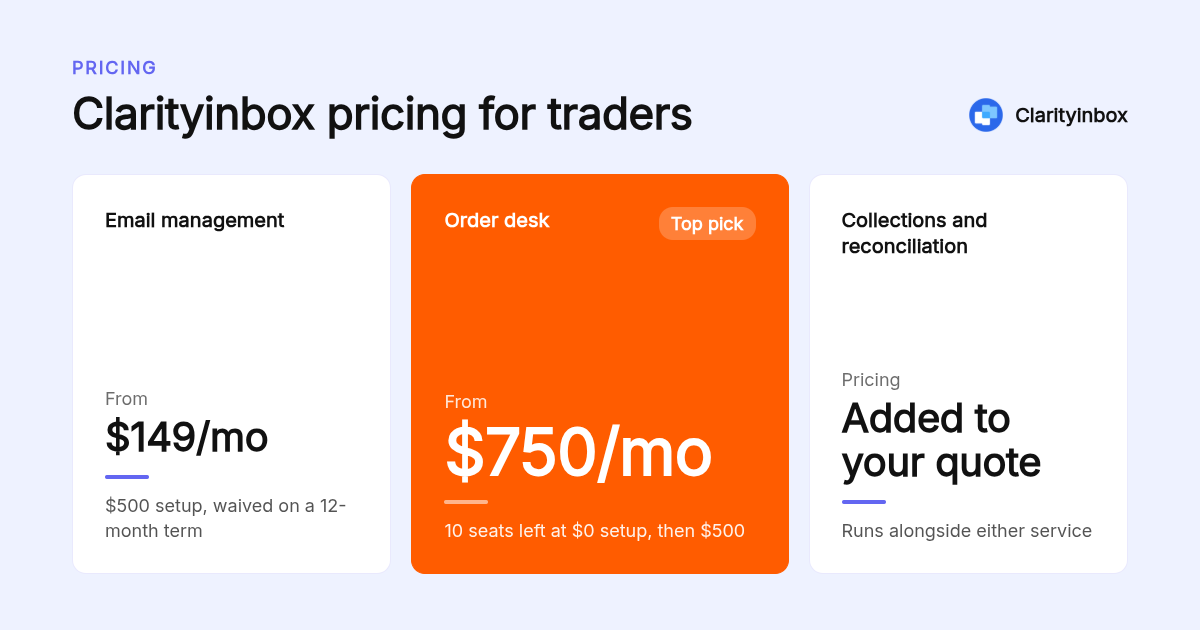
A solo trader needs one hosted mailbox on a custom domain, a free-tier email finder, and Clarityinbox Email management from $149 per month to track follow-ups. A team of five needs Google Workspace or Microsoft 365, a shared orders@ mailbox, and Clarityinbox Order desk at $750 per month on top of the hosting bill.
The worked example: five seats at $7 each is $35 per month for hosting as of November 2026, plus $750 for Order desk, with the setup fee at $0 while the 10 discounted seats last, then $500. Our Order desk price never changes once you are on it.
For the solo setup, Email management carries a $500 setup fee that is waived on a 12-month term. It tracks overdue follow-ups and people gone quiet, the same job as follow-up reminders for Gmail, but kept current by our team with a monthly report.
What has Clarityinbox actually done for importers?
Clarityinbox has opened 3,601 jobs, written 58,076 replies, sent 20,932 of them, logged 154,636 job updates, tracked 3,878 invoices and matched 1,230 payments across more than 100 service businesses. Mainbridge Import runs 261 live orders on Clarity, with every PO and email filed to its order.
Those numbers come from our own system, not a survey. The gap between replies written and replies sent is deliberate: drafts wait for a human, and anything touching money never goes out without you.
Order desk also keeps quality memory per product and client, so a recurring defect on one SKU surfaces the next time that factory quotes. That is the part no mailbox or outreach tool covers.
How did we compare these options?
We compared each option on its published pricing page as of November 2026, the job it is designed for, and the limit its own documentation states, such as Tuta's lack of IMAP or Google's 0.3% spam threshold. Where we were not certain of a current price, we described the pricing model and pointed you to the vendor.
How do you get started with Clarityinbox?
Getting started with Clarityinbox means connecting the Gmail or Outlook inbox you already use, after which our team maps how your orders run and starts filing POs, flagging stalled orders and chasing open invoices. Order desk is from $750 per month, with 10 seats left at a $0 setup fee as of November 2026.
See how Clarityinbox turns your inbox into an order desk and we will walk you through the setup on your own orders.
What do people also ask?
What is the best email address for a small business?
The best email address for a small business is a role-based address on your own domain, such as orders@yourcompany.com, hosted on Google Workspace, Microsoft 365 or Zoho Mail. A custom domain lets you publish SPF, DKIM and DMARC records, which free gmail.com or yahoo.com addresses cannot do.
What are the most profitable export businesses?
Profitability depends more on margin discipline than product category, but exporters of machinery parts, specialty foods, cosmetics and branded consumer goods often report healthy margins. Whatever you export, unpaid invoices and missed deposits erode profit fastest, which is why order and collections tracking matters as much as product choice.
Which website is best for export?
For finding buyers, Alibaba, Global Sources and government trade portals such as trade.gov are the most used starting points. For finding verified contact emails at those buyers, Hunter.io and the company's own Contact Us page are the usual next step before any outreach tool is involved.
Should I create an email for my LLC?
Yes. Create a custom-domain email for your LLC before your first supplier wire, because banks, customs brokers and suppliers treat free-mail senders as higher fraud risk. Zoho Mail Lite starts at $1 per user per month and Google Workspace Business Starter at $7 per user per month as of November 2026.
Are free encrypted email services like Proton or Tuta good enough for a trading business?
Free Proton or Tuta plans are fine for a solo trader's personal correspondence, but a trading business should use a paid business plan on a custom domain. Note that end-to-end encryption only works when both sides use the same provider, and Tuta lacks IMAP, so it will not sync with most ERP or CRM tools.