

Easier to Use Alternative to Dove Email
If you are hunting for an easier to use alternative to Dove email, the shortest route is a mainstream inbox, Gmail or Outlook, with Clarityinbox running on top of it. Clarity labels, drafts, files and follows up on email for you, from $149 per month for email management. Clarity is not an email provider and does not host a mailbox; it connects to the Gmail or Outlook account you already use. If all you need is a new free address with a clean interface, Gmail or Outlook.com alone will do.
Key takeaways
- Clarityinbox pricing: email management starts at $149 per month, and it works inside Gmail or Outlook rather than replacing them.
- Fastest free switch: Gmail and Outlook.com both include 15 GB of free storage and need no setup beyond creating an account.
- Simplest private option: Proton Mail's free plan gives end-to-end encrypted mail with 1 GB of storage; a custom domain requires a paid plan.
- Free custom domain: Zoho Mail's Forever Free plan supports one custom domain for up to five users, but is limited to web and mobile app access.
- Proof of scale: Clarity has written 58,076 replies and logged 154,636 job updates across 100+ service businesses.

What is Dove email, and why do people want an easier alternative?
There is no widely documented mainstream provider called Dove email. In practice the search comes from people on a niche, legacy or internal mail client that feels slow and cluttered. The fix is not a brand-for-brand swap. It is choosing a modern inbox with fast search, clean mobile apps and the least setup possible.
We checked the obvious places and found no mainstream, documented provider trading as Dove email. Most people typing this query are stuck on a client their company, school or hosting provider handed them. It works, but every action takes three clicks more than it should.
That matters for the recommendations below. You are not looking for a Dove clone with a nicer logo. You are looking for the inbox that gets out of your way, and possibly for something that does the email work for you.
Related searches show the same pattern: people pair the query with Gmail, Outlook and ProtonMail. Those three, plus Zoho Mail, are the realistic landing spots, so we focus on them and on what sits on top of them.
Why does your current inbox feel like work?
People leave an email service for five repeatable reasons: a cluttered interface, weak search, ads inside the inbox, storage caps that trigger constant deletion, and privacy concerns. The hidden sixth reason is manual upkeep. Folders, rules and filters all need maintenance, and the moment they are neglected the inbox slides back into chaos.
McKinsey found that the average knowledge worker spends 28 percent of the workweek reading and answering email. A clunky client makes that worse, because every search, label and reply costs extra seconds that add up to hours.
The usual complaints are concrete. Search that misses attachments. Rules that fail silently and route mail to the wrong folder, which is why we wrote a guide to the six reasons Outlook rules stop working. Storage warnings that force a deletion session every few months.
The least discussed complaint is upkeep. Any system built on folders and filters depends on you maintaining it. When a busy week hits, the maintenance stops and the inbox decays back to where it started.
How do you judge whether an email service is easy to use?
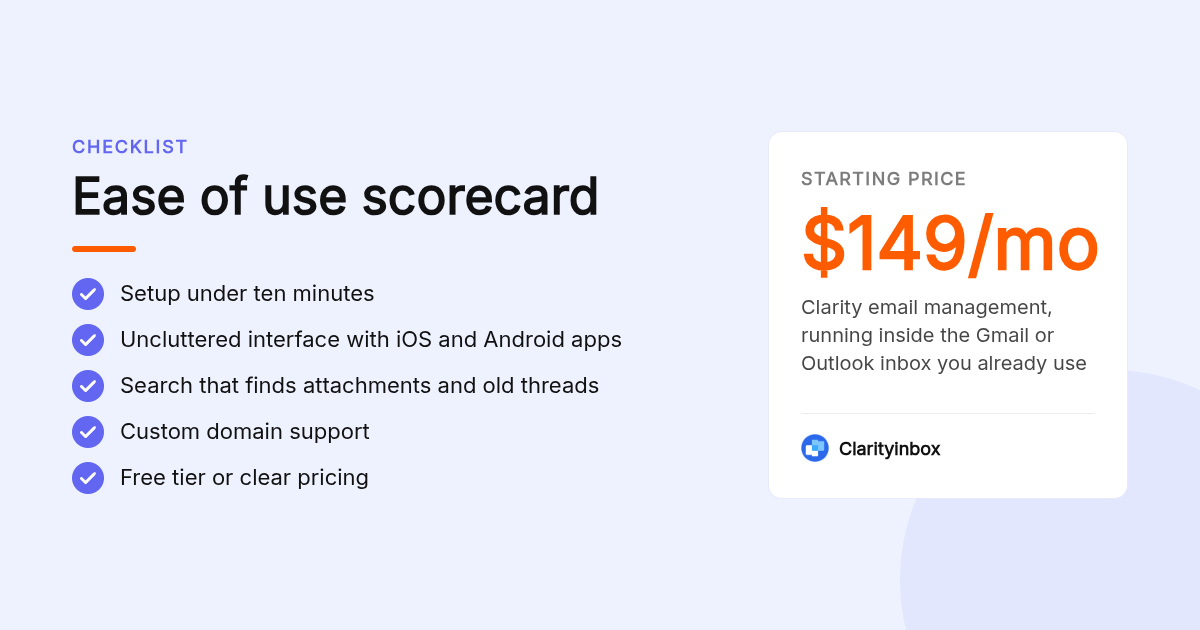
Ease of use comes down to seven checkable criteria: setup time under ten minutes, an uncluttered interface, native mobile apps on iOS and Android, search that finds attachments and old threads instantly, reliable spam filtering, custom domain support, and a free tier or clear pricing. Score each candidate on all seven before you move a single message.
Setup time is the first filter. Gmail and Outlook.com take under five minutes to create. Zoho Mail with a custom domain takes longer because you must verify DNS records, which is the step that trips up non-technical users.
Search quality is the second. Encrypted providers like Proton Mail cannot search message bodies on the server, so full-text search depends on a local index being built first. That is a real trade-off, and privacy-first users should know it going in.
Mobile apps, spam filtering and custom domain support round out the list. Write the seven criteria in a row, score each candidate one to five, and the decision usually makes itself.
What are the top 5 easier to use alternatives to Dove email?
Clarityinbox ranks first because it removes the email work itself, not just the clutter, from $149 per month on top of Gmail or Outlook. Gmail is best for a free, zero-setup switch. Outlook suits anyone already in Microsoft 365. Proton Mail is the simple private option. Zoho Mail is best for a free custom domain.
- Clarityinbox: best when you want the email work done, not just a cleaner inbox
Clarity connects to the Gmail or Outlook inbox you already use. It reads every message, applies labels without rules, drafts replies in your voice, tracks who owes the next step, and files emails and documents into a workstream page for each deal or project. Email management starts at $149 per month. The honest limit: Clarity is not a mailbox. You still need Gmail or Outlook underneath it, and it is built for service businesses rather than casual personal mail.
- Gmail: best when you need a free, zero-setup switch
Gmail is the default answer for a reason. A new account takes minutes, the mobile apps are strong, and search is the best in the category. The free tier includes 15 GB shared across Gmail, Drive and Photos. Google Workspace Business Starter adds a custom domain from $7 per user per month on an annual plan; confirm current pricing on Google's site. The limit: 15 GB fills quickly once Drive and Photos share it, and the free version shows promotions inside the inbox.
- Outlook: best when your business already runs on Microsoft 365
Outlook.com is free with a 15 GB mailbox and a clean web interface. If you already pay for Microsoft 365, mail, calendar and Teams live in one place; Business Basic lists at $6 per user per month on an annual plan, which you should confirm on Microsoft's site. The limit: Microsoft now ships a new Outlook and a classic Outlook side by side, and the same feature sits in a different menu depending on which one you opened.
- Proton Mail: best when privacy matters but you still want simple
Proton Mail is based in Switzerland and encrypts mail end to end between Proton users. The free plan includes 1 GB of storage and caps sending at 150 messages per day. The apps are uncluttered and account setup is as fast as Gmail. The limit: custom domains, more storage and third-party desktop clients via Proton Bridge all require a paid Mail Plus plan or higher.
- Zoho Mail: best when you want a free custom domain for a small team
Zoho Mail's Forever Free plan covers up to five users, 5 GB per user, and one custom domain, which no other provider here offers for free. Paid Mail Lite plans start at $1 per user per month billed annually; confirm on Zoho's pricing page. The limit: the free plan is web and mobile app only, with no IMAP or POP, so you cannot use a desktop client, and the interface is busier than Gmail's.
| Option | Best for | Pricing or format | Standout limit |
|---|---|---|---|
| Clarityinbox | Doing the email work inside Gmail or Outlook | From $149/mo | Not a mailbox; needs Gmail or Outlook underneath |
| Gmail | Free, zero-setup switch with top search | Free with 15 GB shared; Workspace from $7/user/mo annual | Storage shared with Drive and Photos; promotions in inbox |
| Outlook | Teams already on Microsoft 365 | Free Outlook.com with 15 GB; Business Basic $6/user/mo annual | New vs classic Outlook confusion |
| Proton Mail | Simple, private email | Free 1 GB; paid plans needed for a custom domain | 150 messages per day on free tier |
| Zoho Mail | Free custom domain for up to 5 users | Forever Free; Mail Lite from $1/user/mo annual | Free tier is web and mobile only, no IMAP |
Fastmail, iCloud Mail and Tuta deserve a mention. Fastmail has no free tier and is paid only after a trial. iCloud Mail is excellent if everyone is on Apple devices. Tuta is encrypted like Proton, with a smaller ecosystem of apps and integrations.
Should you switch providers or add a simpler app on top of your current account?
Switch providers when the underlying service is the problem: ads, tiny storage, broken search or no mobile app. Add a client or an assistant on top when the account is fine but the daily work is not. Spark and Apple Mail change how mail looks. Clarityinbox changes who does the labelling, drafting and follow-up.
A provider hosts your mailbox. A client, like Spark or Apple Mail, displays mail from any provider in a different interface. Many people who say they hate their email actually hate the client, and swapping the app fixes it without changing the address.
An assistant is a third category. Clarity's follow-up reminders for Gmail watch your sent mail and flag anyone who has not replied. Its auto-drafted replies in Outlook are written from your own sent history, ready to review and send in one click.
The decision rule is simple. If you dread opening the app, change the client. If you dread what is inside it, change who handles it.
Which pick is right for personal use, small business, or privacy first?
For casual personal use, pick Gmail or Outlook.com and stop there. For a small business that lives in its inbox, pick Gmail or Outlook with Clarityinbox on top so replies, follow-ups and filing happen without you. For privacy-first users, pick Proton Mail and accept a smaller free storage allowance in exchange for encryption.
Casual users rarely need a custom domain or a paid plan. Gmail or Outlook.com with default settings covers calendar, contacts and 15 GB of mail, and both have mature apps on iOS and Android.
Small service businesses have a different problem. Quotes, invoices and client questions all land in one inbox, and someone has to track them. That is the work Clarity takes over; across 100+ service businesses it has matched 1,230 payments to the invoices they settle.
Privacy-first users should accept the trade. Proton Mail's encryption means weaker server-side search and a 1 GB free limit. Whichever you pick, turn on two-factor authentication; the FTC's guide to recognizing and avoiding phishing scams is a five-minute read that prevents most account takeovers.
How do you migrate without losing emails, contacts and folders?
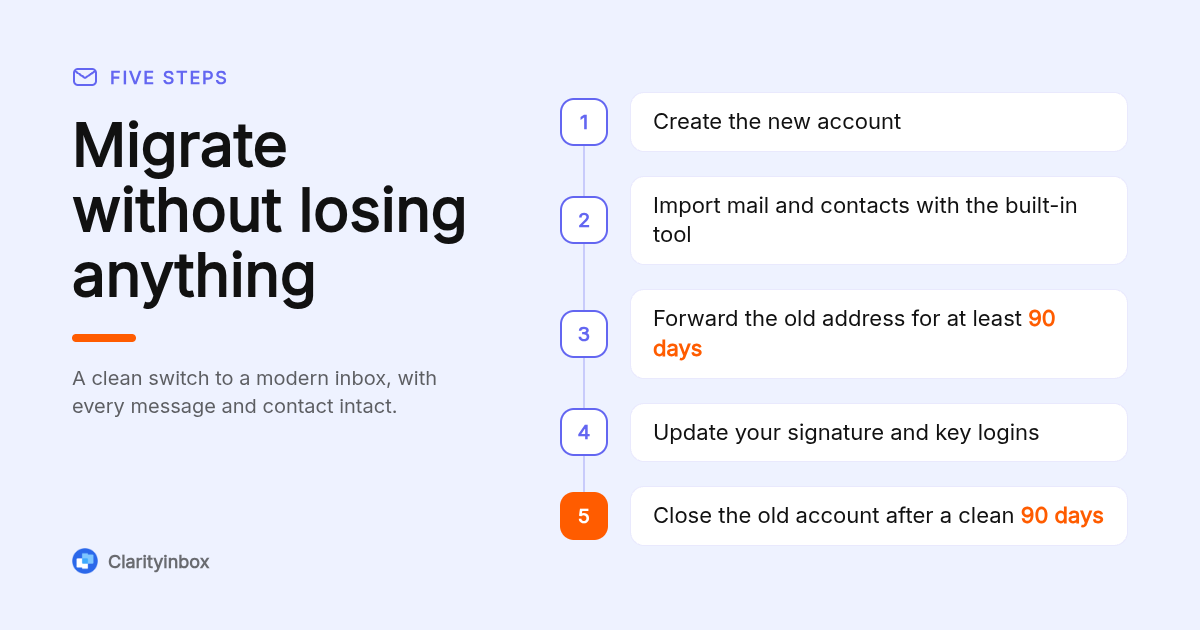
Migrate in four steps: create the new account, import old mail and contacts using the provider's built-in import tool, set up forwarding from the old address for at least 90 days, and update your signature and key logins. Keep the old account open until the forwarding period ends and nothing important has arrived there.
Each provider ships an importer. Gmail pulls mail and contacts from another account under Settings, then Accounts and Import. Proton Mail's Easy Switch pulls Gmail mail, contacts and calendars in one pass. Zoho Mail runs migrations from its admin console, and Outlook can import a PST file from older clients.
Folders are the usual casualty. Gmail uses labels while Outlook and Zoho use folders, so nested structures can flatten on import. Count messages in each folder before and after, and fix gaps before you close the old account.
Forwarding is the safety net. Set it for at least 90 days, then work through bank logins, software accounts and your Google Business Profile, updating the address on each. The last message that arrives at the old address tells you what you missed.
Is Clarityinbox really the easiest option for a service business?
Clarityinbox is easiest because there is nothing to configure. It connects to the Gmail or Outlook inbox you already use, learns how your business runs, and does the work end to end. Across 100+ service businesses it has written 58,076 replies, logged 154,636 job updates and matched 1,230 payments to invoices.
The easy part is what you do not do. There are no filters to write, no rules to debug and no spreadsheet to update. Each deal, project or client gets a workstream page that shows what was said, when, and who owes the next step, with Fathom meeting notes filed alongside.
Each morning you get a daily email summary of what needs attention, prioritized by urgency. The Clarity team keeps everything current, so the system does not decay the way folder-based setups do.
Two honest limits. Clarity is built for businesses that run on email, so it is overkill for a personal account. And importers with purchase orders need the separate order desk service rather than the $149 email management tier.
How did we compare these options?
We compared each option on its published pricing page, free-tier storage limits, custom domain support, and the scope of what the tool actually does: hosting mail, displaying it, or doing the work inside it. Clarity's figures come from its own pricing and usage data. Competitor prices change, so confirm current pricing on each vendor's site.
How do you get started with Clarityinbox?
Getting started takes three steps: connect the Gmail or Outlook inbox you already use, let Clarity learn how your business runs, and review the drafts and workstream it produces. Email management starts at $149 per month. You keep your existing address.
Start free with your Gmail or Outlook inbox and see your first drafts and labels before you commit to a plan.
What do people also ask?
What is the 3 email rule?
The 3 email rule is a common workplace guideline: if a thread has gone back and forth three times without resolution, stop emailing and pick up the phone or book a short call. It keeps simple questions from turning into ten-message chains.
What is the most hacked email service?
There is no verified ranking of the most hacked service. Attackers target the largest user bases, so Gmail, Outlook and Yahoo see the most phishing attempts by volume. Your account's safety depends far more on two-factor authentication and a unique password than on the provider.
How do you use sincerely in an email?
Write Sincerely on its own line after your final sentence, followed by a comma, then your name on the next line. It suits formal or first-contact emails. For ongoing client threads, shorter closers like Thanks or Best regards read more naturally.
What to say instead of I trust this email finds you well?
Open with something specific instead: thank the person for yesterday's call, reference the quote they requested, or state the purpose in one line, such as Quick update on your Tuesday install. Specific openers get read; generic pleasantries get skimmed.
Can I keep my existing email address when I switch to an easier alternative?
Yes, two ways. If you own a custom domain, point it at the new provider, such as Zoho Mail's free plan or Google Workspace. If the old address is on a provider's domain, set forwarding for at least 90 days and update your key logins while mail still arrives.