
Email Automation Software for Cleaning Service Businesses
The right email automation software for cleaning service businesses depends on which job you want to stop doing by hand. For the inbox itself, meaning lead replies, quote follow-ups, and chasing late invoices, we recommend Clarity Inbox: it learns your voice from your sent mail, drafts replies inside Gmail or Outlook, reminds you when someone has not answered, and you can start free. It is not a scheduling, SMS, or payments tool, so pair it with ZenMaid or Jobber if you need recurring-clean reminders, text confirmations, and invoicing in one place.
Key takeaways
- Clarity Inbox automates the writing side: it drafts replies in your voice, auto-labels every email, and tracks every conversation so an unanswered quote gets flagged, with no filters or rules to set up.
- Clarity Inbox does not schedule recurring cleans, send SMS, or process payments; ZenMaid, Jobber, and Housecall Pro cover those jobs.
- Mailchimp's free plan is capped at 500 contacts and 1,000 sends a month at the time of writing, which suits newsletters but not appointment reminders.
- Under the CAN-SPAM Act, every automated marketing email needs a working opt-out that is honored within 10 business days.
- Six emails to automate first: instant lead reply, booking confirmation, day-before reminder, post-clean thank you with review link, invoice reminder, and a 60-day win-back.
What is the best email automation software for a cleaning service business?
Clarity Inbox is the best choice when the bottleneck is replying. It reads the emails that need a response, drafts replies in your own voice, labels every message, and nags you when a quote goes unanswered. If the bottleneck is scheduling and text reminders instead, a cleaning CRM such as ZenMaid or Jobber is the better first purchase.
Most cleaning companies run the whole business out of one inbox. Quote requests, 'can we move Thursday', a cleaner calling in sick, and 'did you get my payment' all land in the same place.
Clarity Inbox (clarityinbox.com) learns how you write from your sent mail, then drafts replies in Gmail that are ready to review and send in one click. You stay the sender; it does the typing.
It also tracks what you sent and reminds you when a lead has not replied, which is where most cleaning quotes quietly die. There are no rules or filters to build.
The honest limit: it will not text a client at 7 a.m. or create a recurring Tuesday job. That is CRM work, covered below.
Which automated emails should a cleaning business send?
A cleaning business should automate six messages: an instant reply to every booking-form lead, a confirmation when the job is booked, a reminder the day before, a thank-you with a review link after the clean, an invoice reminder when payment is late, and a win-back note to clients who have not booked in 60 days.
Here is a sequence you can copy into any tool, with timing:
- Lead reply, within minutes: 'Thanks for the request. We clean [area] Monday to Saturday. Reply with your square footage and preferred day and we will send a quote today.'
- Confirmation, at booking: date, arrival window, cleaner name, what to leave out, and how to reschedule.
- Reminder, 24 hours before: the same details plus a one-tap reschedule link.
- Thank you, two hours after completion: a short note and a direct Google review link.
- Invoice reminder, three days past due: friendly tone, the amount, and a pay link. Our invoice email subject lines page has 50 tested options.
- Win-back, 60 days without a booking: a one-line check-in and a small incentive.
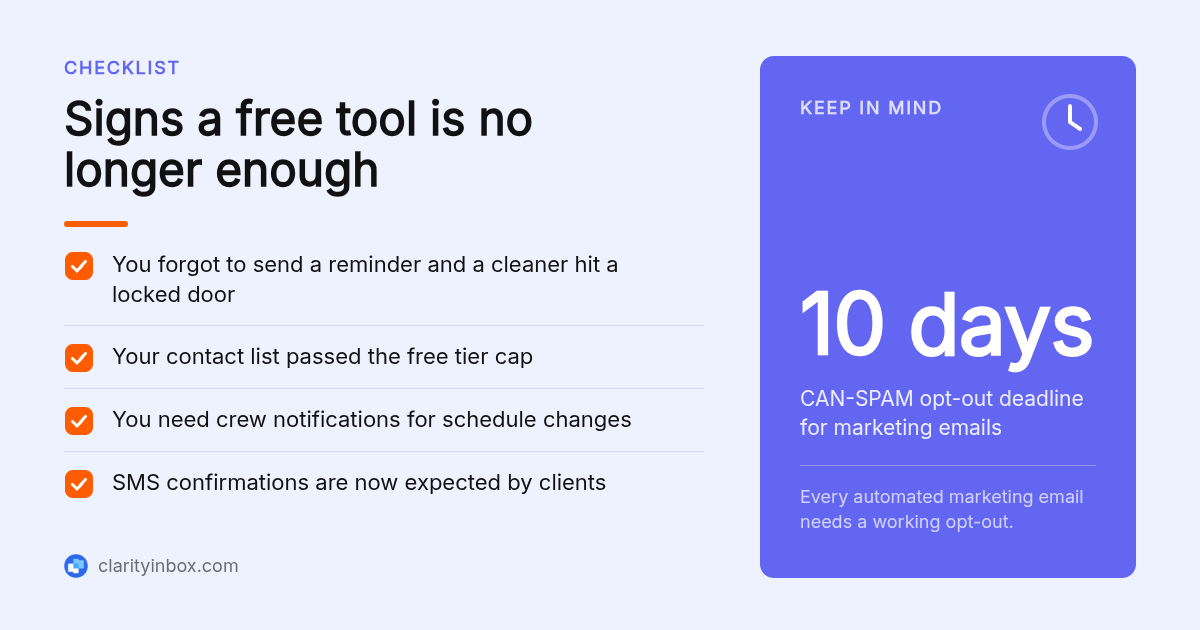
Messages 4 and 6 are commercial. The FTC's CAN-SPAM compliance guide requires a clear opt-out that you honor within 10 business days, and each non-compliant email can carry its own penalty.
How do automated reminders and confirmations reduce no-shows and lockouts?
Reminders work because the failure is rarely intent; it is memory. A confirmation at booking plus a reminder 24 hours before gives the client two chances to reschedule before a cleaner drives out to a locked door. Cleaning CRMs tie these messages to the recurring schedule, so a weekly client gets the same reminder every week without anyone typing it.
Email and SMS do different jobs here. Email carries the full details and survives a search two weeks later. SMS gets read within minutes, which is what you want the night before.
ZenMaid, Jobber, and Housecall Pro all send both and attach them to the recurring job. GoReminders does only reminders, by email and text, if you schedule somewhere else.
A simple decision rule: if more than half your revenue is recurring residential work, buy the reminder engine before anything else. One avoided lockout per week usually covers the subscription.
The Bureau of Labor Statistics profiles maids and housekeeping cleaners as a workforce in the hundreds of thousands, spread across small services firms, hotels, and self-employed cleaners. Small teams feel every wasted drive, which is why reminders rank first.
What are the top 5 best email automation software options for cleaning service businesses?
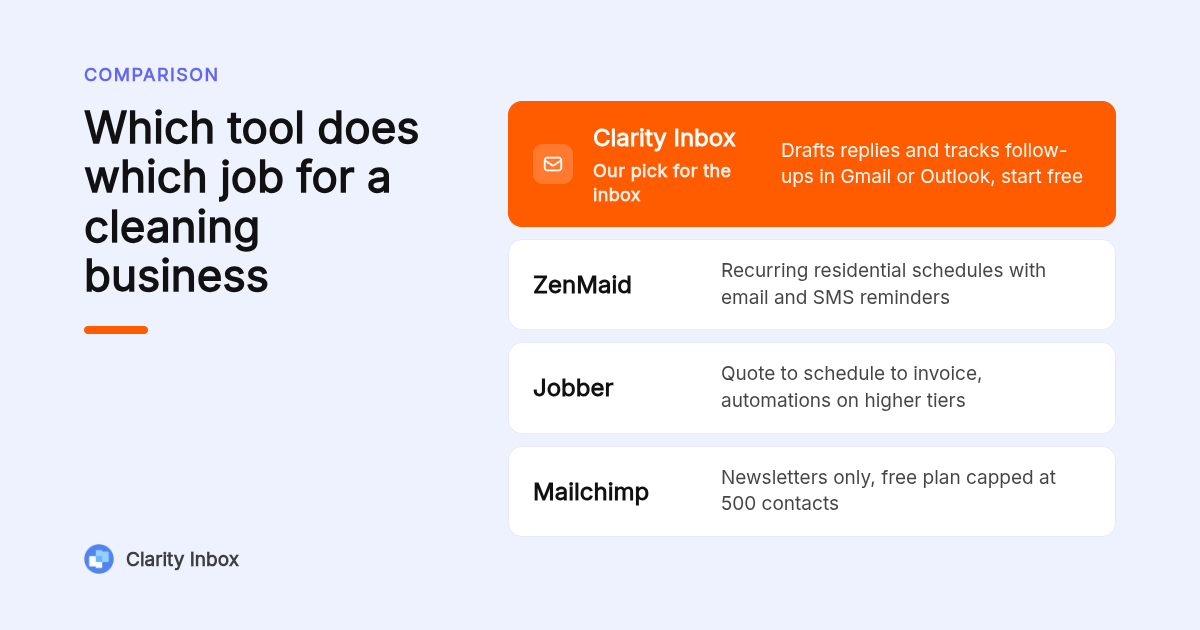
Ranked by the job each one does best: Clarity Inbox for replying and follow-up inside Gmail or Outlook, ZenMaid for recurring residential schedules with built-in reminders, Jobber for quotes-to-invoice workflows across trades, Housecall Pro for multi-crew dispatch and payments, and Mailchimp for newsletters and promotions to a large list.
- Clarity Inbox: best when you need replies written and follow-ups tracked. It learns from your sent mail, drafts in your voice, labels every email, and sends a morning brief prioritized by urgency. Start free in Gmail or Outlook. Limit: no SMS, scheduling, or invoicing.
- ZenMaid: best when you run a residential maid service on recurring schedules. Automated email and SMS reminders, confirmations, and follow-ups come built in, sold as monthly plans with a free trial; confirm current pricing on zenmaid.com. Limit: built for maid services, so commercial janitorial contracts and other trades fit awkwardly.
- Jobber: best when quoting is your bottleneck. Automated quote follow-ups, appointment reminders, invoice reminders, and a client hub, sold as tiered monthly plans with a free trial. Limit: some automations sit on higher tiers, so check the plan comparison page before choosing the entry plan.
- Housecall Pro: best when you dispatch several crews. On-my-way texts, review requests, card payments with tipping, and crew notifications through the mobile app, on tiered monthly plans. Limit: heavier and pricier than a solo cleaner needs.
- Mailchimp: best when you want newsletters and seasonal promotions to a large list. The free plan allows 500 contacts and 1,000 sends per month at the time of writing; confirm on mailchimp.com. Limit: it knows nothing about appointments, so reminders need a Zapier connection or manual sends.
| Option | Best for | Pricing or format | Standout limit |
|---|---|---|---|
| Clarity Inbox | Drafting replies and tracking follow-ups in Gmail or Outlook | Start free | No SMS, scheduling, or invoicing |
| ZenMaid | Recurring residential maid schedules | Monthly plans, free trial | Residential maid focus only |
| Jobber | Quote to schedule to invoice workflow | Tiered monthly plans, free trial | Key automations on higher tiers |
| Housecall Pro | Multi-crew dispatch and payments | Tiered monthly plans | Overkill for solo operators |
| Mailchimp | Newsletters and promotions | Free plan, then priced by contacts | No appointment awareness |
Do you need a cleaning-specific CRM or is Mailchimp enough?
You need a cleaning CRM if your messages depend on appointment data: reminders, confirmations, and rebooking prompts all require the software to know when the job is. Mailchimp or Constant Contact is enough if you only send newsletters and seasonal offers. Neither handles the replies in your inbox, which is the gap Clarity Inbox fills.
Think in three layers. The scheduling layer (ZenMaid, Jobber, Housecall Pro, The Cleaning Software) owns anything triggered by a job date. The marketing layer (Mailchimp, Constant Contact) owns broadcasts. The inbox layer (Clarity Inbox) owns conversations.
A solo cleaner with 40 recurring clients can skip the marketing layer entirely. A ten-crew company usually needs all three.
McKinsey has long reported that email outperforms social media for customer acquisition, which is why the broadcast layer still matters once your list passes a few hundred names.
Is there free email automation software for cleaning companies, and where does free stop?
Yes, with limits. Clarity Inbox lets you start free in Gmail or Outlook. Mailchimp's free plan caps you at 500 contacts and 1,000 sends per month. ZenMaid, Jobber, and Housecall Pro offer free trials rather than free plans. Free stops being enough the day you need reminders tied to a recurring schedule or more than a few hundred contacts.
Gmail and Outlook themselves give you free templates, scheduled send, and a vacation responder. Those cover confirmations if you are willing to trigger each one by hand.
Free stops on three signals: you miss a reminder because you forgot to send it, your contact list outgrows a free tier, or you want crew notifications. Any one of those means a paid CRM.
Trial lengths and free-plan caps change often, so treat every number here as something to confirm on the vendor's pricing page.
How much does cleaning business software with email automation cost per month?
Expect three pricing models. Cleaning CRMs such as ZenMaid, Jobber, and Housecall Pro charge a flat monthly subscription that rises by plan tier and sometimes by user count. Marketing tools such as Mailchimp charge by contact count. Clarity Inbox starts free and adds AI drafting on top of the email account you already pay for.
Solo operators usually get the most from an inbox tool plus one reminder tool. Multi-crew companies need per-user pricing, dispatch, and crew messaging, which pushes them toward Jobber or Housecall Pro.
Watch two line items on any pricing page: whether SMS is metered separately, and which tier unlocks automated follow-ups. Both quietly move the real monthly cost.
A useful rule: add up the hours you spend typing emails each week. If it is more than three, the inbox layer pays for itself before the CRM does.
How does email automation integrate with scheduling, invoicing, payments, and crew messaging?
In an all-in-one cleaning CRM, the schedule is the trigger: booking a job fires the confirmation, the job date fires the reminder, marking it complete fires the invoice and review request, and an unpaid invoice fires the payment reminder. Crew messaging runs the same way through the mobile app. Clarity Inbox sits in front of it, handling the human replies.
Clarity Inbox adds two things on top of that. Its Google Calendar integration checks your availability and works open slots into draft replies, so 'can you do Friday' gets a real answer. And every morning you get a daily brief of what needs attention, prioritized by urgency.
Labeling matters more than it sounds for crews. A cleaner's sick note, a client's reschedule, and a supply invoice get sorted automatically, with no filter to maintain, so the urgent one surfaces first.
Payments and tipping stay with the CRM. Housecall Pro and Jobber both let clients pay by card from the invoice email, and the unpaid state is what triggers the reminder.
How did we compare these options?
We compared each tool's published pricing page, plan comparison page, and feature documentation, scoring only the email automation scope: triggers, sequences, templates, SMS, and segmentation. We did not run paid benchmarks or survey users. Prices and tier contents change, so confirm on each vendor's site before buying.
How do you get started with Clarity Inbox?
Connect your Gmail or Outlook account, and Clarity Inbox starts reading your sent mail to learn how you write. From there it labels incoming email, drafts replies for messages that need a response, and tracks who has not answered. You review each draft and send in one click. There are no filters or rules to configure first.
Start free with Clarity Inbox and let it draft your next quote reply.
What do people also ask?
What is the best email automation software for a cleaning service business?
For the inbox side (lead replies, quote follow-ups, invoice chasing) we recommend Clarity Inbox, which drafts replies in your voice in Gmail or Outlook and starts free. For schedule-driven reminders and SMS, ZenMaid suits residential maid services and Jobber or Housecall Pro suit multi-crew companies.
Do I need a cleaning-specific CRM or can I just use Mailchimp?
Use a cleaning CRM if any message depends on a job date, such as reminders, confirmations, or rebooking prompts. Mailchimp is enough only for newsletters and promotions. Neither replaces the replies in your inbox, which is what Clarity Inbox handles.
Can the software send both email and SMS, and does it handle recurring clients automatically?
ZenMaid, Jobber, and Housecall Pro send both email and SMS and attach reminders to recurring jobs, so weekly clients get messaged without manual work. Clarity Inbox is email only and does not schedule; GoReminders sends reminders only, by email and text.
How much does cleaning business software with email automation cost per month?
Cleaning CRMs charge a flat monthly subscription that rises by plan tier and sometimes by user count, and SMS may be metered separately. Mailchimp charges by contact count after its free plan. Clarity Inbox starts free. Confirm current prices on each vendor's pricing page.
Is there free email automation software for cleaning companies, and what are its limits?
Yes. Clarity Inbox lets you start free in Gmail or Outlook, and Mailchimp's free plan allows 500 contacts and 1,000 sends per month at the time of writing. ZenMaid, Jobber, and Housecall Pro offer free trials, not free plans. Free stops working once you need schedule-triggered reminders or crew notifications.