

How to Manage Supplier Emails for Import Orders
The simplest answer to how to manage supplier emails for import orders is to run one email workflow per purchase order, from deposit to delivery, and file every message and document against that PO number. For importers who want this handled for them, we recommend Clarity's Order desk, built for importers and trading companies, which files every PO and email on the right order and flags stalled ones: missed deposits, silent factories, unpaid invoices. Clarity is not a freight forwarder or a customs broker; it does not move cargo or file entries. It runs the inbox and document side of each order, with or without an ERP.

Key takeaways
- One PO, one thread, one folder: every supplier email, proforma invoice, and shipping document is filed against a PO number, never against a person or a date.
- Confirm within 48 hours: a usable supplier confirmation states quantity, unit price, lead time, and ship date, and you log all four before the deposit goes out.
- Track status in nine stages: PO sent, confirmed, deposit paid, in production, inspected, balance paid, documents received, cleared, received.
- Keep the trail five years: U.S. recordkeeping rules in 19 CFR Part 163 require import records to be retained for five years from the date of entry.
- Clarity's Order desk handles this for you: every PO and email is filed on the right order, and a person checks every unclear line.
What does the full email workflow for an import order look like?
An import order passes through nine stages you can see in the inbox: PO sent, confirmation received, deposit paid, production update, pre-shipment inspection, balance paid, shipping documents received, customs cleared, goods received. Each stage has one email you send, one reply you expect, and one document to file. A stage with no dated email is a stalled order.
Most importers lose orders between stages, not within them. The deposit goes out, the supplier goes quiet for three weeks, and nobody notices until the ship date passes.
So write the stage list into your PO log as a status column, and record the date of the email that moved the order forward. McKinsey's research on the social economy found knowledge workers already spend 28 percent of their week on email, so the goal is fewer, better-filed messages, not more.
How should you email a purchase order to an overseas supplier?
Send the PO as a PDF attachment and repeat the key terms in the email body, because the body is what gets forwarded inside the factory. Include PO number, SKUs, quantities, unit price and currency, Incoterm, payment terms, requested ship date, and packing marks. Use a fixed subject line: PO number, product, target ETA.
A subject line such as PO-2026-118 | Oak dining chairs x 400 | ETA 15 Aug lets a mail rule file the thread and lets anyone search the PO number later. Attach a CSV as well if the order has more than about 20 SKUs; factories retype PDFs and errors creep in.
Name the Incoterm explicitly. The ICC publishes the current Incoterms 2020 rules, and FOB versus EXW changes who books the freight and who pays origin charges.
Subject: PO-2026-118 | Oak dining chairs x 400 | ETA 15 Aug

Hi Lin,
Please find PO-2026-118 attached (PDF and CSV).
Qty: 400 units, SKU OAK-DC-01. Price: USD 42.00/unit, FOB Ningbo.
Payment: 30% deposit on confirmation, 70% against BL copy.
Requested ship date: 15 Aug 2026.
Please confirm qty, price, lead time and ship date within 48 hours.
What must a supplier order confirmation include, and how do you record it?
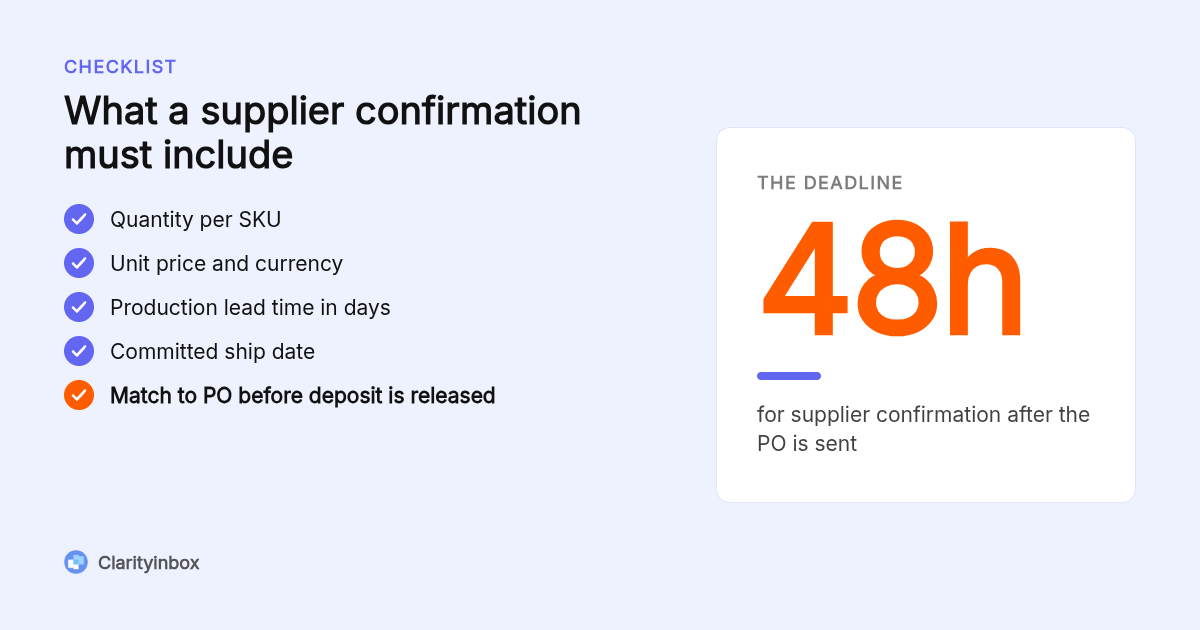
A confirmation is usable only when it restates four values in writing: quantity per SKU, unit price in the agreed currency, production lead time in days, and a committed ship date. Ask for it within 48 hours of sending the PO. Log all four in your order tracker, with the email date, before any deposit leaves your account.
A reply that says 'ok, noted' is not a confirmation. If the supplier's proforma invoice differs from your PO on any of the four values, reply with the discrepancy quoted line by line and do not pay until it is fixed.
When you confirm an order yourself, for example accepting a revised ship date, use the same four fields so the record stays symmetrical on both sides.
Subject: RE: PO-2026-118 | Please confirm by Thursday

Hi Lin, to confirm PO-2026-118 please reply with:
1. Quantity per SKU
2. Unit price and currency
3. Production lead time (days from deposit)
4. Committed ship date
We release the deposit once all four match the PO.
How do you track dozens of open import orders without losing status?
Keep one order log with a row per PO and a status column that only moves forward through the nine stages. Add columns for next action, owner, and date due. A spreadsheet typically holds up to about 30 open orders; past that, status emails arrive faster than anyone retypes them, and you need an ERP or a managed order desk.
Pair the log with one rule per supplier: one communication channel and one document location. If the factory sends inspection photos on WhatsApp, forward them to the PO thread the same day, or the evidence will not exist when a claim arrives.
This is the job Clarity's Order desk does. Every PO and email is filed on the right order, stalled orders are flagged, and a person checks every unclear line rather than guessing. Across all clients we have logged 154,636 job updates to date.
Should you set up Outlook or Gmail folders by supplier or by PO number?
By PO number, nested under the supplier. A supplier-only folder mixes six live orders into one pile; a PO-level folder keeps each order's trail intact for customs and claims. Run purchasing from a shared mailbox so confirmations are never trapped in one buyer's inbox, and key your rules on the PO number in the subject line.
In Outlook, create a parent folder per supplier and a subfolder per PO; our guide to creating folders and subfolders in Outlook covers the clicks. A shared mailbox for purchasing is free under 50 GB in Microsoft 365 and takes about two minutes to set up.
In Gmail, use labels the same way, or let Clarity apply Gmail labels automatically so there are no filters to maintain when a supplier changes their sending address.
Keep a contact record per supplier: sales contact, accounts contact, a backup for holidays, and their time zone. Chinese New Year and Golden Week stop replies for a week or more, so note them beside the ship date.
When should you follow up with a silent supplier, and how do you escalate?
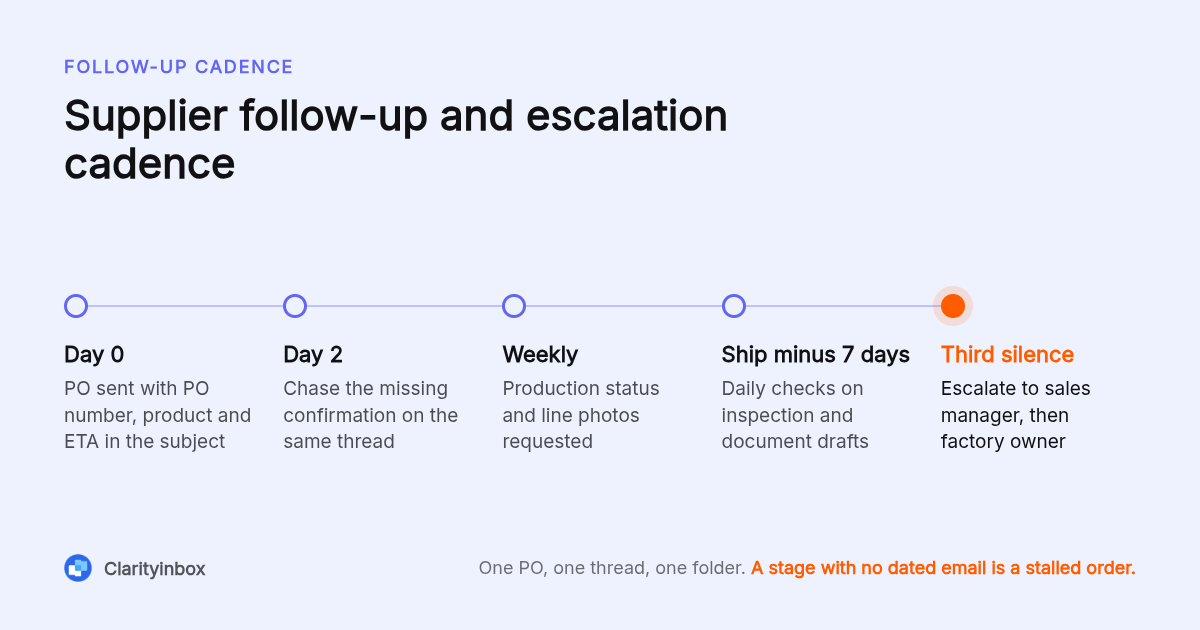
Follow up at 48 hours for a missing confirmation, weekly during production, and daily in the seven days before the ship date. Escalate on the third unanswered message: copy the sales manager, then the factory owner, and state the cost of the delay plainly. Send during the supplier's morning so a reply can come the same working day.
Write for a non-native reader: short sentences, numbered questions, one request per email, and dates written as 15 Aug 2026 rather than 8/15. Reply on the existing thread so the PO number stays in the subject.
Clarity's follow-up reminders for Gmail track sent mail and flag when nobody has replied, which removes the calendar bookkeeping from the buyer.
Chaser: Hi Lin, following up on PO-2026-118. We have not received the production update due 2 Jun. Please send current status and line photos by Friday.

Escalation: Hi Mr Chen, copying you on PO-2026-118. Three updates are now overdue and the 15 Aug ship date is at risk. A one-week delay costs us a missed retail launch. Please confirm the revised ship date today.
Which shipping documents should you request by email, and how long should you keep them?
Request the proforma invoice before the deposit, then the commercial invoice, packing list, bill of lading or air waybill, and certificate of origin before releasing the balance. File each on the PO thread, not in a personal download folder. U.S. importers must keep entry records for five years from the date of entry.
Ask for draft copies of the commercial invoice and packing list before the goods ship, and check them against the PO. A quantity mismatch found before departure costs one email; found after arrival it costs demurrage. The International Trade Administration lists the standard document set for cross-border shipments.
The recordkeeping rule sits in 19 CFR Part 163, and the email trail is part of that file. Archive the thread, never delete it, and keep it searchable by PO number.
Can supplier confirmation and status emails be automated from Sage, SAP, or GoComet?
Partly. Sage and SAP can email a purchase order as a PDF directly from the purchasing module, and GoComet markets supplier confirmation automation for logistics teams. Out of the box, none of them read the supplier's reply, update the order, or notice when a factory goes silent.
Exporting emails on all purchase orders from an ERP usually produces a log of sent PO emails, not the supplier replies, so check each vendor's documentation and current pricing before assuming coverage.
Clarity's Order desk works with or without an ERP.
How did we put this workflow together?
We compared the PO emailing features documented by Sage and SAP, the supplier confirmation automation GoComet publishes, the built-in folder, rule and shared mailbox tools in Outlook and Gmail, and the published scope of Clarity's Order desk. We did not run a paid benchmark; the workflow reflects published pages plus what we see running inside client inboxes.
How do you get started with Clarity's Order desk?
Connect the inbox your purchasing team already uses, and we map how your orders run: suppliers, PO format, payment terms, and the stages above. From then on every PO and supplier email is filed on the right order, stalled orders are flagged, and a person checks every unclear line. Clarity is trusted by 100+ service businesses.
See how Clarity runs an import order from PO to payment.
What do people also ask?
Do I send a PO to the supplier?
Yes. Email a formal PO as a PDF for every import order, even to a long-standing factory. It fixes quantity, price, Incoterm, payment terms, and ship date in writing, and it is the document your confirmation, proforma invoice, and customs file all reference.
What does importing email do?
In Outlook or Gmail, importing email means loading messages from a file or another account into your mailbox. It does not file messages against orders. For import orders, the useful action is filing each supplier email on its PO thread or folder so the trail is complete.
How do I confirm an order on email?
Reply on the PO thread and restate the four values: quantity per SKU, unit price and currency, lead time in days, and committed ship date. Ask the supplier for the same four within 48 hours, and do not release the deposit until both sides match.
What is the proper email format for a purchase order?
Subject line with PO number, product, and target ETA; a short body repeating quantity, price, Incoterm, payment terms, and ship date; the PO attached as a PDF, plus a CSV for orders with many SKUs. One PO per email, never several in one thread.
Can I export supplier emails for all purchase orders from Sage or SAP?
You can usually export a log of PO emails sent from the ERP, but not the supplier replies, which live in the mailbox. To keep both together, file replies on the PO in your mailbox or use a managed order desk such as Clarity's, which works with or without an ERP.