

How to Stop Missing Supplier Emails
How to stop missing supplier emails comes down to fixing three layers in order: delivery (whitelist supplier domains and get suppliers to authenticate their mail), sorting (one rule or label per supplier and order, never a hidden folder), and follow-up (a timed chase ladder with a backup contact). For importers and trading companies, we recommend Clarity's Order desk, which files every PO and supplier email on the right order and flags silent factories, missed deposits and unpaid invoices. Clarity is not a mail server, a spam filter or an ERP; it works inside the Gmail or Outlook inbox you already use.
Key takeaways
- Three failure points: supplier emails go missing at delivery (spam or failed authentication), sorting (buried in an overloaded or shared inbox) or follow-up (nobody owns the next step), and each needs a different fix.
- Authentication causes most spam filtering: Google's sender guidelines require SPF or DKIM from every sender, and DMARC from anyone sending 5,000 or more messages a day.
- Shared mailboxes are cheap: a Microsoft 365 shared mailbox is free under 50 GB and takes about two minutes to set up, but it needs a named daily owner.
- Follow up on a fixed ladder: email on day two, phone on day three, alternate contact on day five, written down so it runs the same way for every order.
- Clarity's Order desk is built for importers and trading companies: every PO and email is filed on the right order, and stalled orders are flagged.

Why do supplier emails get missed in the first place?
Supplier emails get missed for four reasons: spam or junk filtering, an overloaded inbox where the message is read and forgotten, a wrong or outdated contact on file, and genuine delivery failure between mail servers. Most businesses only check one of these. Working through all four in order finds the cause in under an hour.
The scale of the problem explains why. McKinsey's research on the social economy found that workers spend 28 percent of the workweek reading and answering email. A supplier's quote competing with hundreds of other threads is easy to lose even when it lands correctly.
Our decision rule: if the supplier says they sent it and you cannot find it in spam, treat it as a delivery problem. If you can find it, treat it as a sorting or follow-up problem.
How do you keep supplier emails out of spam?
Add each supplier's domain, not just one address, to your safe senders list in Outlook or your filter in Gmail, then ask suppliers whose mail still lands in junk to publish SPF, DKIM and DMARC records. Mail from an unauthenticated domain is the most common reason quotes, invoices and purchase orders get filtered.
Whitelisting is the quick fix. In Outlook, add the domain under Junk email options, then Safe senders. In Gmail, create a filter for from:@supplierdomain.com with Never send it to Spam ticked. A whole domain covers new staff at the supplier.
Authentication is the durable fix. Google's email sender guidelines require every sender to pass SPF or DKIM, and senders of 5,000 or more messages a day to add DMARC. A factory sending from a misconfigured domain will keep failing until its IT team publishes those records. The US government has required DMARC on federal domains since CISA's Binding Operational Directive 18-01, a useful reference for a supplier who thinks it is optional.
One habit: scan the junk folder daily for the first 30 days after onboarding a new supplier, because the first messages from a new domain are the most likely to be filtered.
What rules, folders or labels should sort supplier mail automatically?
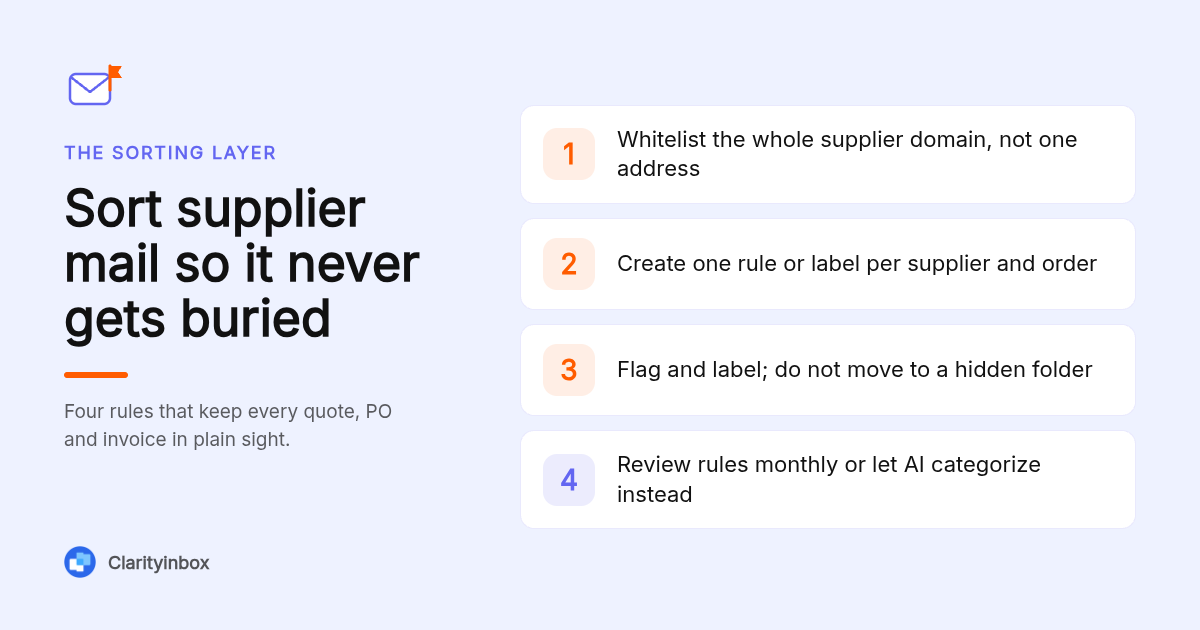
Create one rule per supplier domain that applies a category or label and flags the message, rather than moving it to a folder where it disappears from view. Name labels by supplier and order number where possible. Rules fail silently, so review them monthly and whenever a supplier changes domains or adds a new contact.
Moving mail out of the inbox is where most supplier threads die. A rule that files a PO confirmation into a Supplier folder works until the week nobody opens that folder. Flag and label; do not hide.
Manual rules also break quietly. Client-only rules in Outlook stop when the desktop app is closed, and a keyword rule misses the email that uses a different word. We documented the six real causes of Outlook rules not working if yours have gone silent.
The alternative is to let AI read the message and pick the category. Clarity categorizes Outlook emails automatically with no keyword rules to maintain, and does the same with Gmail labels, so a new supplier contact is sorted correctly on the first message.
Should you use a shared procurement mailbox instead of personal inboxes?
Yes, for anything a supplier might send to more than one person: quotes, order confirmations, invoices and shipping documents. A shared suppliers@ or ap@ mailbox removes the single-person bottleneck when a buyer is on leave. It only works if one named person owns triage each day and every thread shows who is handling it.
In Microsoft 365 a shared mailbox is free under 50 GB and takes about two minutes to create. Our guide to setting up a shared mailbox in Outlook covers licensing and where it stops helping.
Where it stops helping is ownership. Three people can read the same supplier email and each assume someone else replied. Fix that with a daily triage rota and one rule: nobody archives a supplier thread until the next step is written where everyone can see it.
How can you tell whether an email was lost between servers or never sent?
Ask the supplier for the exact send time, recipient address and subject line, then run a message trace in the Microsoft 365 or Google Workspace admin console for that window. If the trace shows nothing, the message never reached your server, which usually means a typo in the address or a bounce the supplier ignored.
The standard Microsoft 365 message trace reaches back 10 days and Google Workspace email log search 30 days, so ask quickly. A trace showing delivery to Junk or quarantine is a filtering problem, covered above. A 5xx rejection in the trace is a block on your side, often a security gateway or a blocked-sender list.
Ask the supplier to check their sent folder and bounce messages too. The plain cause is often an old address: a buyer who left two years ago and whose mailbox was deleted.
Why isn't your supplier receiving PO or payment notifications from your system?
In most ERP and procurement systems, notifications fail for one of three reasons: the supplier record has no email address or an outdated one, the notification toggle for that event is switched off, or the system sends from a domain that the supplier's filter rejects. Check the record, the toggle and a test send, in that order.
The same authentication rules apply in reverse. If your ERP sends PO emails from a no-reply address your own SPF record does not authorize, suppliers' filters will drop them. Ask IT to add the ERP's sending service to your SPF record and sign with DKIM.
Then set a saved search or alert for POs with no supplier acknowledgement after 48 hours. A notification going out is not the same as a supplier reading it.
When should you follow up with a quiet supplier, and through which channels?
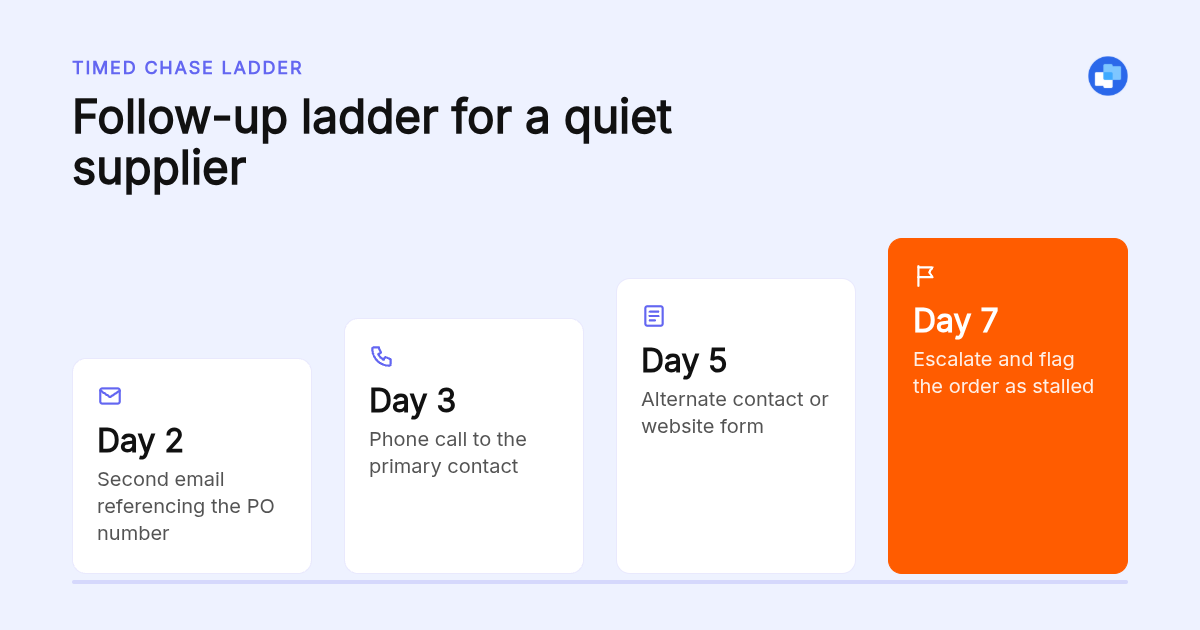
Follow up by email after two business days, by phone on day three, and through an alternate contact or the supplier's website form on day five. Time zones with overseas factories stretch this by a day. Write the ladder down so it runs the same way for every order, regardless of who is chasing.
Reminders are the weak point. A buyer with 40 open orders cannot remember which supplier owes a reply from last Tuesday. Clarity's follow-up reminders for Gmail watch your sent mail and flag who has not replied, so the ladder starts on time without a spreadsheet.
The phone step matters more than people expect. A supplier whose own inbox is overloaded will often answer a call in a minute after ignoring three emails. Keep a second contact for every active supplier so one person on holiday cannot stall a shipment.
Is a supplier portal a better answer than email?
A portal such as SAP Ariba or Coupa removes ad-hoc email for large procurement teams, but most suppliers to small and mid-sized businesses will not log in to it. The practical choice for a business running on email is a system that tracks threads and documents inside the inbox, rather than asking suppliers to change how they work.
Portals carry onboarding effort and a long rollout, and the quote from a new factory still arrives by email first. Shared help desk tools solve ownership but tend to strip the order context out of the thread.
This is the gap Clarity's Order desk is built for. Every PO and email is filed on the right order, with or without an ERP. Stalled orders are flagged: missed deposits, silent factories, unpaid invoices. A person checks every unclear line, and quality notes are kept per product and client.
What process keeps supplier threads from slipping when the buyer is out?
Four things: a written response-time standard for supplier mail, a single view of every open supplier thread and who owes the next step, a named backup for each buyer, and a weekly review of anything with no activity for seven days. When an employee keeps missing supplier emails, fix the view before fixing the person.
A standard of one business day to acknowledge and three to decide is realistic for most trading companies. The point is visibility rather than speed: a thread outside the standard should surface without anyone searching for it.
Clarity's Email management plan, from $149/mo, gives each deal, project or client a workstream page showing what was said, when, and who owes the next step, and flags overdue follow-ups and people gone quiet. Across our clients we have logged 154,636 job updates, which is the record a manager needs when a supplier claims nobody replied.
For the team member who keeps missing supplier mail, pair that shared view with a morning brief listing what needs a reply. Someone who starts the day with that list rarely misses the same supplier twice.
How did we choose these fixes?
We ordered the fixes by where supplier emails are lost: delivery first, sorting second, follow-up last, because a sorting rule cannot catch a message that never arrived. For the tools named, we compared published documentation for Outlook and Gmail rules, shared mailboxes and message trace, the public positioning of SAP Ariba and Coupa, and Clarity's own published plan pages.
We have not tested portal fees ourselves; confirm current pricing on each vendor's site.
How do you get started with Clarity?
Connect the Gmail or Outlook inbox you already use, tell us how your orders run, and we set up the workstreams or order desk around it. Email management starts from $149/mo. Order desk works with or without an ERP; ask us for current Order desk pricing and setup terms.
See how Clarity runs your inbox from lead to revenue
What do people also ask?
Why should you never delete spam emails without checking them?
Spam filters make mistakes, and the first messages from a newly onboarded supplier domain are the most likely to be misfiled. Scan the junk folder before it auto-purges (Gmail deletes spam after 30 days) and mark legitimate messages as Not spam, which also trains the filter for that sender.
What is the 3 email rule?
It is a rule of thumb that after three unanswered emails you change channel rather than send a fourth. For suppliers, that means three emails over about a week, then a phone call and an alternate contact, since a fourth email to an overloaded inbox rarely gets a different result.
Why does Shop have access to my emails?
The Shop app asks to connect a Gmail account so it can read order confirmations and show package tracking. You can revoke it under your Google account security settings for third-party access. It is unrelated to lost supplier mail, but it is a reminder to audit which apps can read your business inbox.
How can I find out whether a supplier email was lost between mail servers or never sent?
Get the exact send time, recipient address and subject from the supplier, then run a message trace in the Microsoft 365 admin center or Google Workspace email log search. No record means it never reached your server, usually a wrong address or an ignored bounce. A record showing Junk or quarantine means it arrived and was filtered.
How do I handle an employee who keeps missing important supplier emails?
Fix the system first: a written response-time standard, a shared view of every open supplier thread with who owes the next step, a morning brief of what needs a reply, and a named backup. If the same person still misses supplier mail after that, the problem is performance, not tooling.