

How to Track Purchase Orders in Email
If you want to know how to track purchase orders in email, the quickest way is a three-part system: a PO number at the start of every subject line, one label or category per order status, and a spreadsheet that logs each email event. If you run more than a handful of live orders, we recommend Clarity's Order desk, which files every PO and email on the right order and flags the ones that stall. Clarity is not an ERP and not a procurement approval platform; it works with or without an ERP and does the filing and chasing for you.

Key takeaways
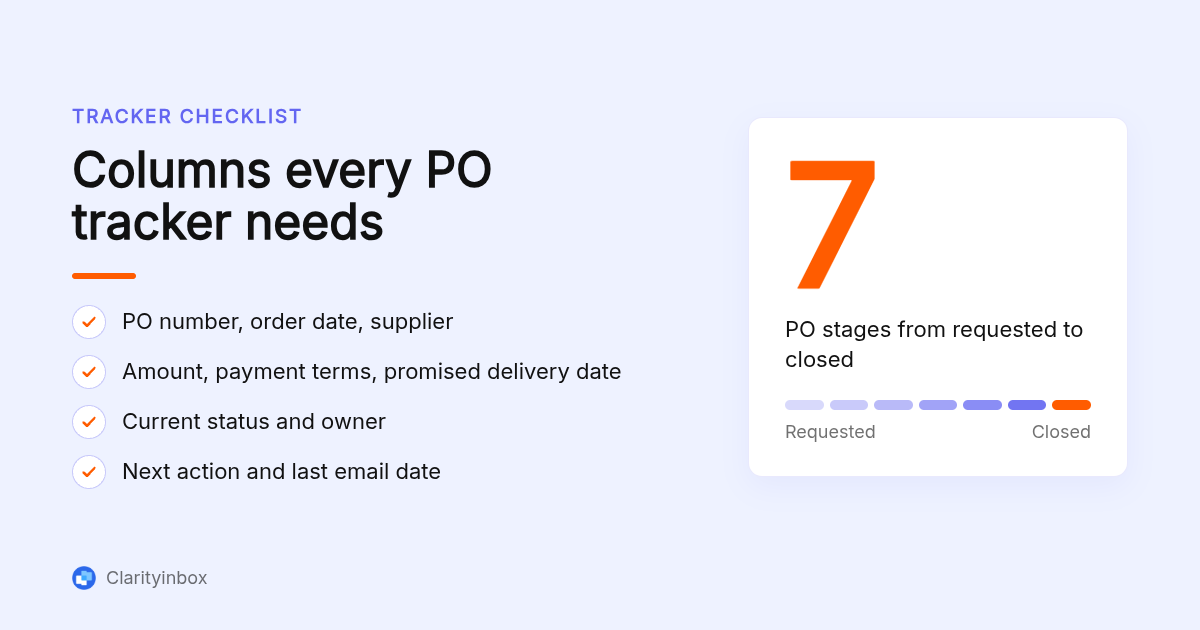
- Seven stages: a PO moves from requested to approved, sent, supplier-confirmed, shipped, received and invoiced or closed, and each stage arrives as a recognisable email type you can label.
- Subject-line rule: start every subject with the PO number, for example PO-2041 | Supplier | Deposit, so Gmail filters, Outlook rules and search can all key on it.
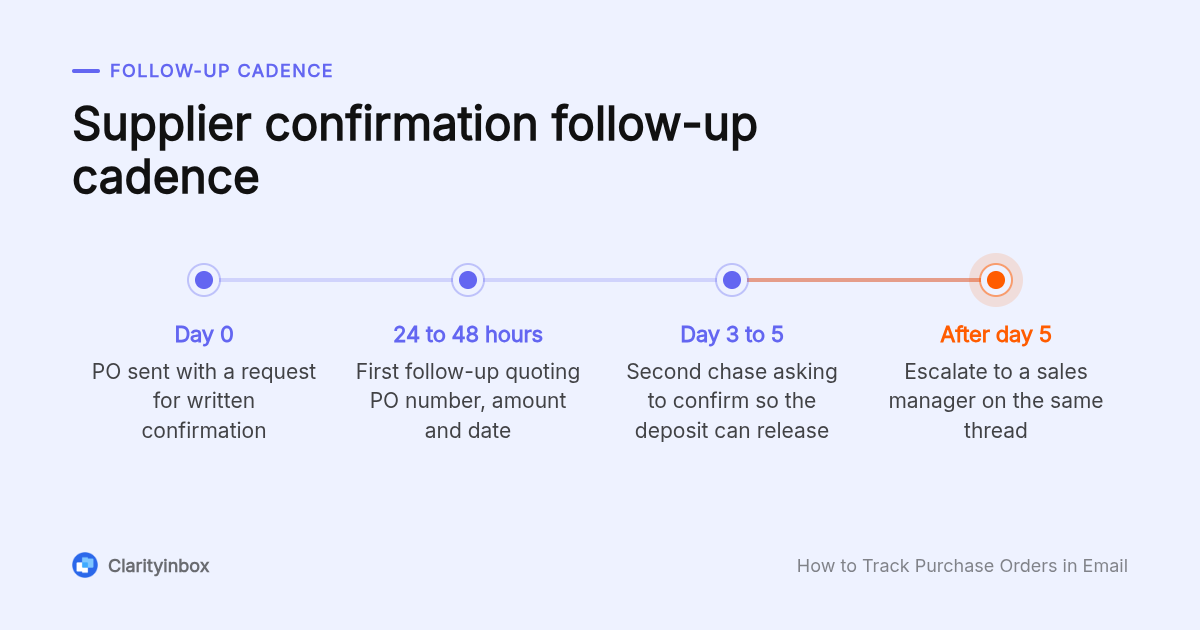
- Follow-up cadence: ask for written confirmation in the PO email, chase at 24 to 48 hours, chase again at 3 to 5 business days, then escalate to a second contact.
- Clarity Order desk: files every PO and email on the right order, flags missed deposits, silent factories and unpaid invoices, and a person checks every unclear line.
- Breaking point: when nobody can list today's overdue POs without opening threads, the email-plus-spreadsheet method has already failed.
What does it mean to track purchase orders in email?
Tracking purchase orders in email means knowing the current stage of every open PO, who owes the next step, and when it is due, using only the messages already in your inbox. The PO moves through seven stages, from requested to closed, and each stage arrives as a different kind of email you can recognise and file.
Most importers and trading companies already have every fact they need sitting in the inbox. The problem is that those facts are spread across threads, attachments and three people's mailboxes.
Here is what each stage usually looks like in email:
- Requested: an internal message asking for the order, usually with a quantity and a target date.
- Approved: a reply from whoever signs off, sometimes just go ahead.
- Sent: your outbound email with the PO PDF attached.
- Supplier-confirmed: a proforma invoice or order acknowledgement from the supplier.
- Shipped: a tracking number, packing list or bill of lading.
- Received: your warehouse or team confirms the goods arrived and match.
- Invoiced or closed: the supplier invoice lands, gets matched and gets paid.
Stages four and seven are where orders go wrong most often, because both depend on the supplier replying. McKinsey's analysis of the social economy found that knowledge workers spend about 28 percent of the working week on email, which is why a system that surfaces the stalled stage beats one that merely stores everything.
Which fields does a purchase order tracking spreadsheet need?
A working PO tracker needs nine columns: PO number, order date, supplier, line items or amount, payment terms, promised delivery date, current status, owner and next action. Add a tenth column for the date of the last email event so you can sort by age and see which orders have gone quiet without opening a single thread.
Set the sheet up in Excel or Google Sheets with one row per PO and the columns in that order. Keep the status column as a dropdown using the same seven stage names as your inbox labels, so the sheet and the mailbox never disagree on vocabulary.
Two conditional formatting rules do most of the work. Turn the row amber when the last email date is more than five days old and the status is Sent, and turn it red when today is past the promised delivery date and the status is not Received.
Log each email event by updating the status, the next action and the last email date on the row. A second tab with one line per event, PO number first, gives you an audit trail without cluttering the main view.
That trail doubles as your records. The IRS advises keeping records that support income and expenses for at least three years, and a PO, confirmation and invoice stored together are exactly those records.
Should your business set up a dedicated PO email address?
Yes, if more than one person sends or receives purchase orders. A dedicated address such as orders@ or po@ gives every PO thread one home, keeps supplier replies visible when someone is away, and lets filters run on a single mailbox instead of four. Solo buyers can skip it and use labels in a personal inbox.
In Microsoft 365, a shared mailbox is free under 50 GB and takes about two minutes to create. Our guide to setting up a shared mailbox in Outlook covers the setup, the licensing and the point where it stops helping. In Google Workspace, a Google Group set to collaborative inbox does the same job for orders@.
Two rules make the address work. Every PO goes out from it or copies it, and every supplier is told to reply to it, including for invoices. Put the address on the PO template itself so it travels with the document.
The named limitation is ownership. A shared mailbox has no owner field, so the owner column in the spreadsheet becomes the only record of who is chasing what.
How do you track purchase orders in Gmail without buying software?
In Gmail, create one label per PO status, a filter for each supplier that applies the supplier label, and a subject-line convention that starts with the PO number. Search by PO number returns the whole order history. Use stars or Tasks for follow-up dates, and review the Sent label weekly for replies that never came.
Build the label taxonomy first. Use a parent label called PO with nested status labels: PO/1-Sent, PO/2-Confirmed, PO/3-Shipped, PO/4-Received and PO/5-Invoiced. Add a second parent called Supplier with one nested label per vendor.
Then fix the subject-line convention and stick to it. PO-2041 | Harbor Fasteners | Deposit paid tells anyone the order, the counterparty and the stage without opening the thread, and it keeps supplier replies grouped in one conversation.
Filters have a real limit here. A Gmail filter matches literal text, so you can key one filter on subject:(PO-) to apply the PO label and one per supplier domain to apply the Supplier label, but no single filter can read the status out of the subject. Status labels move by hand, or by a tool that reads the email itself, which is what Clarity's automatic Gmail labelling without filter rules does.
Searching the PO number returns the full history across every label. Star each sent PO and check the Sent label every Friday for threads with no reply.
How is tracking purchase orders in Outlook different?
Outlook replaces labels with categories and filters with rules, and adds Flags with a due date, which Gmail lacks. Create a colour category per PO status, a rule that moves anything with PO- in the subject into a PO folder, and flag each sent PO for the day you expect confirmation. The flagged items appear in your To Do list.
Set up one folder called PO Open and archive orders once they are invoiced. Categories, not folders, carry the status, so a thread stays in one place and still shows 2-Confirmed in colour.
Classic Outlook can run rules on messages you send as well as messages you receive, so your outbound PO can be categorised the moment it leaves. Rules do fail silently when conditions overlap or a rule only runs client-side; if a PO lands in the wrong folder, our list of the six causes behind Outlook rules not working is the fastest check.
Flags are the real advantage. Flag each sent PO with a due date two business days out and it appears in To Do alongside everything else you owe.
How do you keep PO confirmations, shipping updates and invoices tied to one PO number?
Insist on the PO number in every supplier document and subject line, then match three emails per order: your PO, the supplier's confirmation, and the invoice. Compare quantity, unit price and total across all three before paying. If any field differs, the order stays open with a next action, which is a basic three-way match without an ERP.
Suppliers break this constantly by replying from a different person on a new thread with a subject like Re: order. When that happens, forward the message into the original thread or edit the subject to the PO-first convention before filing it.
Write the requirement into your PO terms: invoices without the PO number in the subject and on the document will be returned. It sounds strict, and it works.
For the match itself, keep the three attachments per order in one folder named by PO number and compare quantity, unit price, currency and total. Any difference becomes the next action on the tracker row. Across our clients, Clarity has tracked 3,878 invoices, matched 1,230 payments and logged 154,636 job updates this way, with each document filed on the order it belongs to.
What should you write when a supplier has not confirmed your purchase order?
Ask for written confirmation inside the PO email itself, with a deadline of two business days. If nothing arrives, send a short follow-up at 24 to 48 hours, a second at 3 to 5 business days, then escalate to a sales manager or your account contact. Each message should quote the PO number, amount and promised date.
Confirmation request, inside the PO email:
Subject: PO-2041 | Harbor Fasteners | Please confirm by Thursday Please confirm receipt of PO-2041 for 4,000 units at the attached unit price, total 18,400 USD, delivery promised for 14 March. A one-line reply confirming quantity, price and date is enough.
First follow-up, 24 to 48 hours later:
Subject: PO-2041 | Harbor Fasteners | Confirmation outstanding We have not received confirmation of PO-2041 sent on Monday. Could you confirm quantity, price and the 14 March delivery date today so we can release the deposit?
Escalation, after 3 to 5 business days:
Subject: PO-2041 | Harbor Fasteners | Escalation, unconfirmed order Copying [sales manager]. PO-2041 has been unconfirmed for five business days. If we cannot get written confirmation by end of day, we will hold the deposit and review the order.
The cadence only works if someone remembers to send it. Clarity's follow-up reminders for Gmail watch sent mail and prompt you when a reply has not arrived, so the 48-hour chase does not depend on memory.
Can you automate PO status updates from supplier emails without an ERP?
Partly. Zapier, Make and Parabola can parse a confirmation email and append a row to Google Sheets, which works when suppliers use consistent subject lines and formats. It breaks on free-text replies, PDF attachments and changed subjects. Clarity's Order desk reads the actual email, files it on the right order and has a person check unclear lines.
The common small-team setup is Email Parser by Zapier or Make's email module feeding a Google Sheets row, with Parabola for teams that prefer a visual flow. Zapier publishes a free tier with a monthly task cap and paid plans above it; confirm the current limits on zapier.com before you build on it.
Parsing works for one supplier that sends the same template every time. It fails on a factory that writes 'deposit received, start production next week' in plain text, attaches a scanned proforma, or replies on a fresh thread.
Clarity's Order desk is built for that gap. It reads every PO and email, files each on the right order, flags missed deposits, silent factories and unpaid invoices, and a person checks every unclear line. It also keeps a quality memory per product and client so the next order starts from the last one's issues.
When does email plus spreadsheet tracking stop working?
Email plus a spreadsheet breaks when updating the sheet takes longer than the buying it describes, or when two people buy from the same suppliers and neither sees the other's threads. The signals are duplicate POs, invoices paid against unconfirmed orders, and nobody able to list today's overdue orders without opening every thread.
Here is how the main options line up for a small importer or trading company:
| Option | Best for | Pricing or format | Standout limit |
|---|---|---|---|
| Clarity Order desk | Importers and traders who want POs filed and chased for them | Monthly service, works with or without an ERP | A managed service, not a self-serve approval workflow |
| Gmail or Outlook plus a spreadsheet | One buyer with a few dozen open POs | Free with your existing mailbox | Status updates are manual and stop when that person is away |
| Zapier, Make or Parabola | Consistent supplier emails that can be parsed into a sheet | Free tiers with task caps, paid plans above; confirm on each vendor's site | Breaks on free text, PDFs and new threads |
| ProcureDesk or Zip | Teams that need approval workflows and spend control | Subscription or quoted pricing; confirm on each vendor's site | Built around approvals, so suppliers still get chased by email outside the tool |
Smartsheet also publishes a free purchase order tracking template that works as a starting sheet, with paid plans for shared editing and alerts.
The decision rule is simple. If a supplier going silent for a week would cost you a deposit or a shipment slot, and nobody would notice until the vessel sailed, you have outgrown the spreadsheet.
How did we compare these options?
We compared the published plan and pricing pages for Zapier, Smartsheet, ProcureDesk and Zip, the filter, rule, label, category and flag features documented by Google and Microsoft, and the scope of work each option takes off a buyer's desk. Clarity figures come from our own usage counts.
How do you get started with Clarity's Order desk?
Connect the inbox you already use, and we learn how your orders run before anything is filed. Order desk works with or without an ERP. Every PO and email is filed on the right order, stalled orders are flagged, and a person checks every unclear line.
See how Clarity runs your orders end to end
What do people also ask?
How do you track orders that come in and go out by email?
Give every order a PO number, put it first in the subject line, and apply one label or category per stage: sent, confirmed, shipped, received, invoiced. Keep one spreadsheet row per PO with status, owner, next action and last email date, and review sent mail weekly for threads with no reply. If that takes more time than the buying itself, Clarity's Order desk files and chases orders for you.
What is a PO email address and should my business set one up?
A PO email address is a dedicated mailbox such as orders@ or po@ that every purchase order is sent from and every supplier replies to. Set one up if more than one person buys or if someone else needs to cover when you are away. In Microsoft 365 a shared mailbox is free under 50 GB; in Google Workspace a collaborative inbox Google Group does the same job.
Can you provide an Excel template for purchase order tracking?
You can build one in minutes with these columns in order: PO number, order date, supplier, line items or amount, payment terms, promised delivery date, current status, owner, next action and last email date. Add two conditional formatting rules: amber when the last email is more than five days old and status is Sent, red when today is past the promised date and status is not Received. Smartsheet also publishes a free PO tracking template.
How do I write an email to follow up on a purchase order?
Quote the PO number, quantity, total and promised delivery date, then ask for one specific thing: written confirmation of quantity, price and date by a stated deadline. Send the first follow-up 24 to 48 hours after the PO, a second at 3 to 5 business days, and escalate to a sales manager after that, copying them on the same thread.
At what point should I move from email and spreadsheets to purchase order software?
Move when you see duplicate POs, invoices paid against unconfirmed orders, or nobody can list today's overdue orders without opening threads. Those signals mean the manual update step is being skipped. A parsing tool like Zapier helps only if suppliers send consistent emails; otherwise look at a service like Clarity's Order desk, which reads real supplier emails and flags stalled orders.