

Lindy AI
Lindy AI is a no-code platform for building AI agents from a plain-English prompt, with a Free plan and paid tiers listed at $49.99 and $199.99 per month. It is the right pick if you want to build and maintain your own email, scheduling or CRM agents. If you run a service business on email and want the work done for you, Clarityinbox from $149 per month is the better fit. Clarityinbox is not an agent builder; it is a managed service that connects your existing inbox and keeps every deal, project and client current.
Key takeaways
- What Lindy is: a no-code AI agent builder founded by Flo Crivello, based in San Francisco, where you describe an agent in natural language and connect it to Gmail, Slack, HubSpot or Calendar.
- What it costs: a Free plan plus Pro and Business tiers listed at $49.99 and $199.99 per month, billed on a credit model where every agent step consumes credits.
- Where it struggles: unpredictable credit burn, agents that drift after prompt edits, and a maintenance load that lands on you.
- The alternative for service businesses: Clarityinbox email management starts at $149 per month, with a $500 setup fee waived on a 12-month term, and the Clarity team keeps it current.

What is Lindy AI and what does it actually automate?
Lindy AI is a no-code platform where you describe an agent in plain English and it builds one that can read email, draft replies, book meetings, update a CRM, answer support tickets or run outreach. You pick a trigger, give it instructions and connect apps. It is a builder, so you own the setup and the upkeep.
Lindy calls these agents "Lindies" and markets them as AI employees. Each one has a trigger, a set of instructions, a list of connected tools and an optional human-approval step before anything goes out.
The most common use cases are email triage and drafting, meeting scheduling, lead outreach, customer support and CRM updates. Templates cover each of these, so a first agent usually starts from a template rather than a blank page.
Two features stand out. Agent templates get you running in minutes, and the "Lindy Society" feature lets one agent hand a task to another, so a triage agent can pass a quote request to a drafting agent.
Who owns Lindy AI and what kind of company is it?
Lindy is a venture-backed startup based in San Francisco, founded in 2022 by Flo Crivello, who previously founded the virtual office company Teamflow. It is a private software company, not a consultancy, and it sells subscriptions to its agent platform. Investor names and funding totals change, so check Crunchbase or Lindy's press page.
Crivello is a frequent public voice on AI agents and has argued that most knowledge work will route through agents within a few years. That ambition shapes the product: Lindy is built to be general, not specialised for any one industry.
For a buyer, the practical point is that Lindy is a horizontal platform. It does not know how an importer tracks a purchase order or how a contractor chases a deposit unless you teach it.
How much does Lindy cost and how do credits work?
Lindy sells a Free plan with a small monthly credit allowance, a Pro plan listed at $49.99 per month and a Business plan listed at $199.99 per month, with credits consumed every time an agent runs a step. More steps per email means more credits. Confirm current tiers and allowances on lindy.ai before budgeting.
The credit model is the part most reviews skip. An email agent that reads a message, classifies it, drafts a reply and logs the outcome runs several steps per email, and each step draws down credits. A quiet inbox fits a low tier. A busy service inbox can exhaust an allowance mid-month.
A simple decision rule: count the steps in your agent, multiply by the emails you expect per month, and compare that against the plan allowance. If the number is close, budget for the next tier up.
This matters because email already eats a large share of the week. McKinsey's research on the social economy found knowledge workers spend about 28 percent of their time reading and answering email, which is why automating it is worth getting the cost model right. You can read the McKinsey analysis here.
Which apps and tools does Lindy integrate with?
Lindy connects to Gmail, Google Calendar, Slack, HubSpot, Outlook, Notion and many more apps through native connectors plus a bridge to thousands of additional tools, and it can run phone and voice agents. Integration depth varies: Gmail and Calendar are mature, while some CRM actions need a custom HTTP step or a workaround.
The Gmail and Google Calendar connectors are the strongest, which is why email agents are the default demo. Slack is solid for notifications. HubSpot and other CRMs work for reads and simple writes, but anything unusual often means building a custom API call.
Phone and voice agents are a genuine differentiator. Lindy can answer or place calls, which Zapier and Make do not do natively. For a service business this is useful for after-hours intake, though it still needs a human review of what was promised.
Does Lindy require coding, and how long does a first agent take?
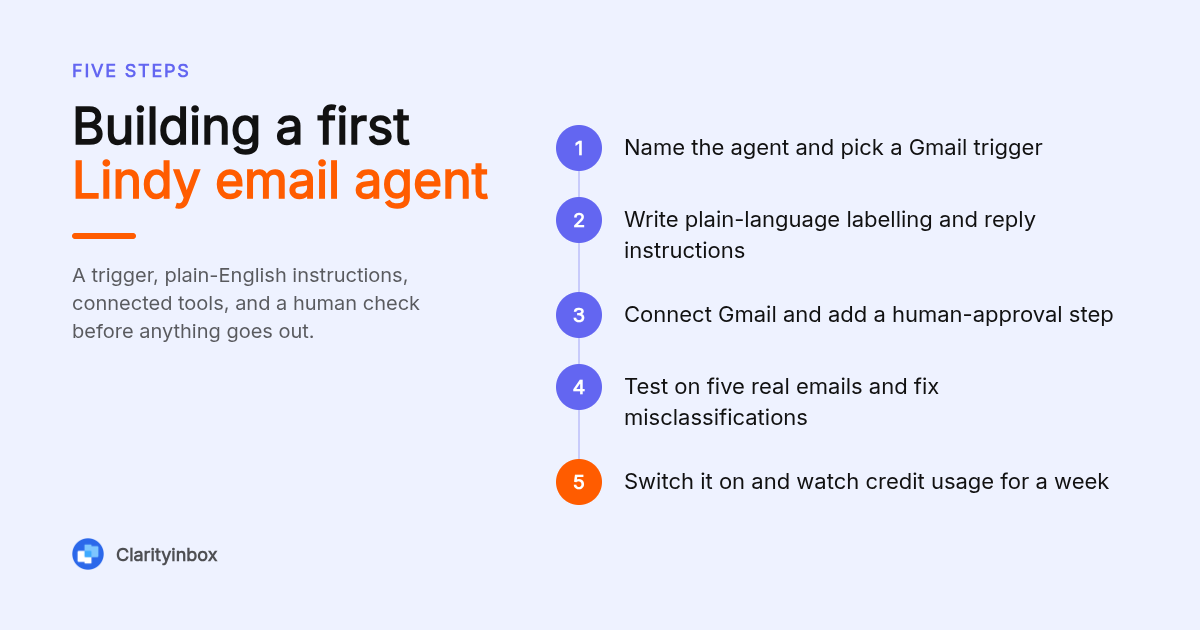
No, Lindy does not require code. A first agent takes 10 to 30 minutes: name it, choose a trigger such as a new Gmail message, write instructions in plain language, connect the app, test with a real email and switch it on. Getting it reliable takes longer, usually several rounds of prompt edits over the first week.
Here is a concrete walkthrough for an email triage agent. Trigger: new email in Gmail. Instructions: "Label each email as Quote, Invoice, Support or Other. For Quote, draft a reply asking for the job address and preferred date. For Invoice, forward to accounts. Never send without approval."
Then connect Gmail, run the test on five real messages and read the output. In our experience with prompt-built agents, the failure modes show up here: a supplier invoice labelled Support, or a draft that promises a date you have not confirmed.
That approval step is the safety net. Clarityinbox takes a similar stance; our auto-drafted replies in Gmail are written in your voice and wait for your one-click review before anything sends.
Is Lindy secure enough for business data?
Lindy publishes a trust page stating SOC 2 Type II and HIPAA compliance, and data is processed through third-party model providers under its terms. For business inboxes, the practical questions are who can read the agent's logs, how long email content is retained and whether a human reviews outbound mail. Verify each on Lindy's security page.
Compliance badges answer the audit question, not the operational one. The operational risk with any email agent is a confident wrong answer sent to a client, which no certification prevents.
The US National Institute of Standards and Technology frames this as managing AI risk through human oversight and monitoring across the system's life, not just at setup. Its AI Risk Management Framework is a useful checklist before you let any agent send mail unattended.
What are the main limitations users report with Lindy?
The complaints that come up most are credit burn that is hard to predict, agents that drift or misclassify after a prompt edit, a learning curve once a workflow has more than a few branches, and support response times on lower tiers. They are manageable for a technical founder and real costs for an owner who wants the inbox handled.
Drift is the subtle one. An agent that worked in week one can start mislabelling in week four because a supplier changed their email format or because you tweaked the prompt for a different case. Someone has to notice, diagnose and fix it.
That someone is you. Lindy has no team watching your agents. If a follow-up reminder silently stops firing, nobody tells you until a client goes quiet.
Why do service businesses pick Clarityinbox instead of building Lindy agents?
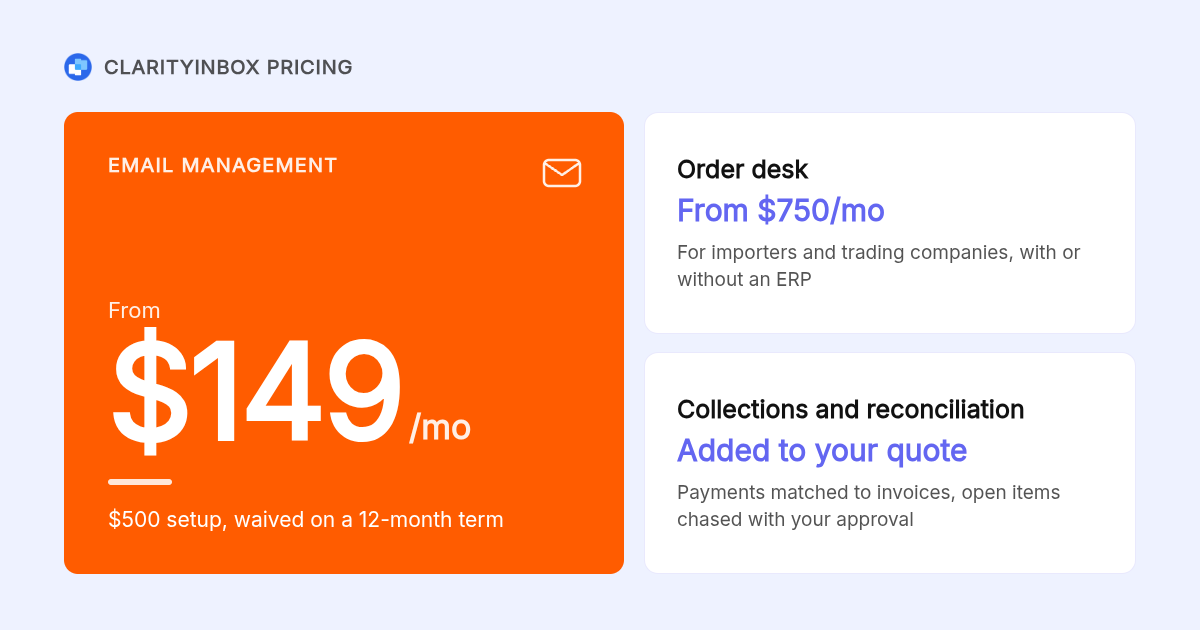
Clarityinbox is the better fit when you want the email work done rather than a tool to build. From $149 per month, we connect the inbox you already use, file every email and document to the right workstream, draft replies in your voice, flag overdue follow-ups and send a monthly report. Nothing to prompt, nothing to maintain.
A workstream is a single page per deal, project or client showing what was said, when, and who owes the next step. It catches what is slipping: overdue follow-ups, people gone quiet, deals with no next step. Your Fathom meeting notes land in the same place.
The scale is real. Across 100+ service businesses, Clarity has opened 3,601 jobs, written 58,076 replies, sent 20,932 of them, logged 154,636 job updates, tracked 3,878 invoices and matched 1,230 payments.
For importers and trading companies, the Order desk starts at $750 per month, files every PO on the right order and flags missed deposits, silent factories and unpaid invoices. For anyone who sends invoices and then wonders, collections and reconciliation is added to your quote, and chasing money never sends without you.
If you are earlier in the journey and just want the inbox under control, start with our AI email assistant for Gmail, which labels every email and tracks replies without filters or rules.
Should you choose Lindy, Zapier, Make, n8n or Clarityinbox?
Pick Lindy for prompt-built agents across many apps, Zapier or Make for deterministic multi-app workflows, n8n if you can self-host and want full control, and Clarityinbox if you run a service business on email and want a done-for-you workstream kept current by the Clarity team. The deciding question is who maintains it.
| Option | Best for | Pricing or format | Standout limit |
|---|---|---|---|
| Clarityinbox | Service businesses that want inbox and document work done end to end | Email management from $149/mo; Order desk from $750/mo; $500 setup waived on 12-month term | Not a self-serve agent builder; scope is email, orders and collections |
| Lindy | Builders who want natural-language agents with voice and multi-agent handoffs | Free plan; Pro listed at $49.99/mo; Business listed at $199.99/mo; credit-based | Credit burn and agent drift are yours to manage |
| Zapier | Deterministic app-to-app automations with the widest connector library | Free tier plus paid plans priced per task volume; confirm on zapier.com | Rules-based, so judgement calls on email content are weak |
| Make | Visual branching workflows with many operations per month | Free tier plus paid plans priced per operation; confirm on make.com | Steeper learning curve than Zapier |
| n8n | Technical teams that want open-source, self-hosted control | Self-hosted community edition plus paid cloud plans; confirm on n8n.io | You run the server, updates and security |
Relevance AI and Relay.app sit near Lindy: Relevance leans toward teams building custom agent workforces, and Relay.app pairs human-in-the-loop steps with LLM actions. Both are credible if you want to build rather than buy.
If your real pain is unpaid invoices rather than inbox volume, pair whichever tool you choose with a disciplined chase cadence. Our list of invoice email subject lines that get paid faster is a practical starting point.
How did we compare these options?
We compared published pricing pages, plan descriptions and the stated scope of each tool as of writing, then weighed who carries the maintenance work once an automation is live. We did not run a benchmark study. Competitor prices change often, so treat the figures above as a starting point and confirm them on each vendor's site.
How do you get started with Clarityinbox?
Connect the inbox you already use, tell us how your business runs, and we take the email and document work from there. Email management starts at $149 per month, with the $500 setup fee waived on a 12-month term. You get a workstream per deal, replies drafted in your voice, slipping follow-ups flagged and a monthly report.
There is no agent to prompt and no workflow to debug. If a follow-up stalls, our email follow-up reminders catch it before the client goes quiet.
Try Clarityinbox free and see your first workstream filled from the inbox you already have.
What do people also ask?
What is the best AI assistant for email?
It depends on who maintains it. Lindy is strong if you want to build your own agents from a prompt. Clarityinbox is the better pick for service businesses that want email, order and invoice work done for them, starting at $149 per month with the Clarity team keeping it current.
Who owns Lindy AI?
Lindy is a private, venture-backed company founded by Flo Crivello, who earlier founded Teamflow. It is headquartered in San Francisco. Check Crunchbase or Lindy's press page for current investors and funding totals, as they change.
How much does an AI agent cost?
On Lindy, a Free plan exists and paid tiers are listed at $49.99 and $199.99 per month, with credits consumed per agent step, so a busy inbox can push you up a tier. A managed alternative like Clarityinbox email management starts at $149 per month with no credits to track.
What kind of company is Lindy?
Lindy is a horizontal AI software startup that sells a no-code platform for building AI agents, sometimes marketed as AI employees. It is not a consultancy or a managed service; you build, test and maintain the agents yourself.
Is Lindy worth it compared to Zapier, Make or n8n?
Lindy wins when the work needs judgement on free-text content, such as reading an email and deciding what to do. Zapier and Make win for deterministic app-to-app steps, and n8n wins when you want self-hosted control. If you do not want to maintain any of them, a done-for-you service like Clarityinbox removes the upkeep entirely.