

Purchase Order Tracking for Small Importers
Purchase order tracking for small importers means knowing, for every open order, where the goods are, what has been paid, and who owes the next step. We recommend the order desk from Clarity (clarityinbox.com) because it files every PO and supplier email on the right order, flags stalled orders such as missed deposits and silent factories, and has a person check every unclear line. It is not an ERP, a customs broker or a freight forwarder. It works with or without an ERP, on the Gmail or Outlook inbox you already run the business from.
Key takeaways
- An import PO passes through at least seven stages: issued, confirmed, deposit paid, in production, shipped, cleared and received. Each stage needs its own date field.
- A spreadsheet holds up to roughly 10 open POs a month. Partial shipments and container consolidation are what break the one-row-per-order model.
- Clarity's order desk works with or without an ERP and has a person check every unclear line.
- Clarity has logged 154,636 job updates and tracked 3,878 invoices across its clients.
- Landed cost needs five inputs: supplier price, freight, insurance, duty and destination charges, plus the FX rate on the day each payment left your account.

What is an importer actually tracking between PO issue and warehouse receipt?
For an importer, purchase order tracking means recording where each order sits between the moment you issue a PO and the day goods land in your warehouse. It covers supplier confirmation, deposit and balance payments, production, freight booking, customs clearance and receipt, plus every email and document tied to that order along the way.
Most purchase order software for small business is designed for domestic buying, where an order is placed and received in two steps. An import order has far more hand-offs. A factory lead time of 30 to 90 days, a deposit with the balance due before shipment, a freight forwarder, a customs broker and a receiving warehouse all sit between you and the goods.
Each hand-off is a place where an order stalls quietly. The factory misses the promised ship date and says nothing. The balance invoice lands in a thread someone archived. The broker needs a packing list nobody attached.
The documents matter as much as the dates. U.S. Customs and Border Protection explains in its guidance on importing into the United States that an entry depends on paperwork such as the commercial invoice and packing list. If your tracker cannot find those files per order, it is not really tracking the order.
Which statuses and dates should an import PO move through from order to warehouse receipt?
A practical import PO status list is: Issued, Confirmed (signed proforma invoice returned), Deposit paid, In production, Ready to ship, Shipped (actual ETD), In transit, Customs cleared, Received and Closed. Record a planned and actual date for the ship, arrival and receipt stages, and note who owns the next step at each status.
| Status | Date to record | Who owns the next step |
|---|---|---|
| Issued | PO date | Supplier (confirm) |
| Confirmed | Signed proforma invoice returned | You (pay deposit) |
| Deposit paid | Payment date and FX rate | Supplier (start production) |
| In production | Promised ship date | Supplier (photos, inspection booking) |
| Ready to ship | Balance invoice date | You (pay balance, book freight) |
| Shipped | Actual ETD, bill of lading number | Forwarder (send documents) |
| In transit | ETA at port | Broker (file entry) |
| Customs cleared | Release date | Trucker (deliver) |
| Received | Receipt date, quantity counted | You (close or query) |
ETD and ETA are the two dates that cause the most confusion. ETD is when the vessel leaves, ETA is when it reaches the port, and neither is the day stock reaches your warehouse. Clearance and inland delivery add days that the ETA never shows, so keep a separate received date.
Can you track import POs in Excel or Google Sheets, and when does that break down?
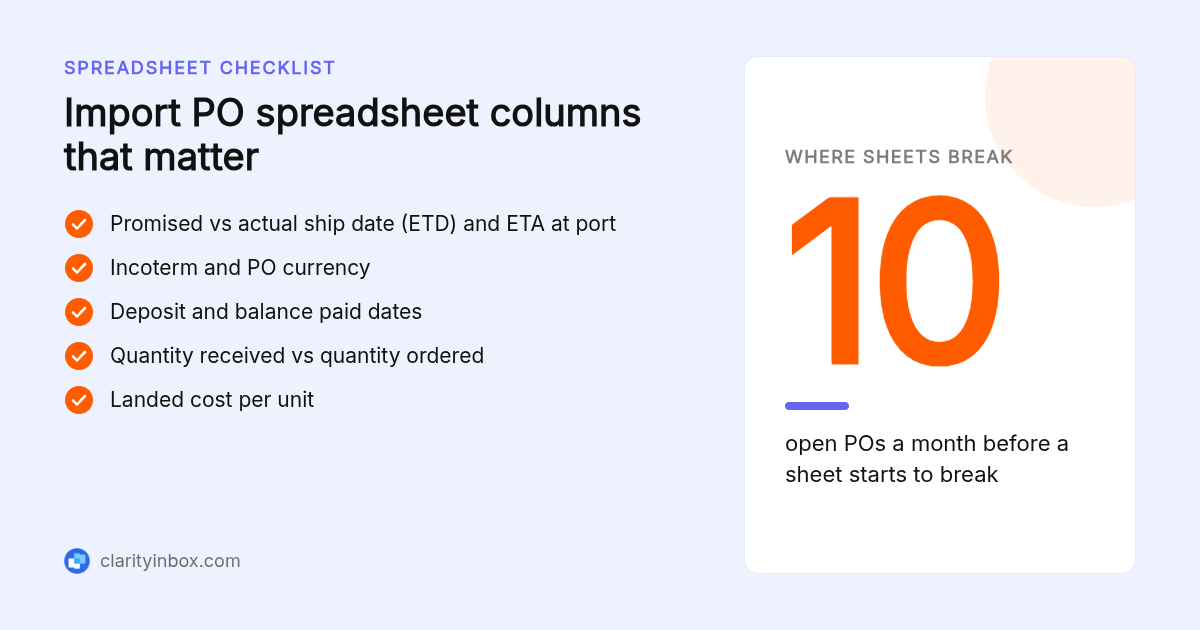
Yes. A spreadsheet works for an importer with fewer than about 10 open purchase orders a month, one shipment per PO, and one person updating it. It breaks down when a PO ships in partial lots, when two or more people need the same row, or when supplier emails pile up faster than anyone copies dates across.
The reason purchase order system Excel is such a common search is that the free option genuinely works at low volume. If you want a copyable template, these are the columns we would start with:
PO number, supplier, SKU and description, quantity ordered, unit price, PO currency, PO total, incoterm, deposit due date, deposit paid date, balance due date, balance paid date, promised ship date, actual ship date (ETD), ETA at port, customs cleared date, received date, quantity received, freight cost, duty and fees, landed cost per unit, document folder link, next step, owner.
That is 24 columns. It is wide, but every one answers a question you would otherwise ask a supplier or forwarder by email.
The breakdown is rarely the formulas. It is that every status change arrives as an email, and a person has to re-key it into the row. At 10 open POs with three or four emails each per week, that is dozens of manual updates, and the first missed one is the first late container.
Should each partial shipment get its own record in the tracker?
Track shipments as child records under the PO, not as edits to the PO row. Each shipment gets its own quantity, ETD, ETA, bill of lading and commercial invoice. The PO shows ordered, shipped and received totals as sums. For consolidation, one container record links to several POs, so freight cost can be allocated across them.
Take a PO for 5,000 units. The factory ships 3,000 in March and 2,000 in April. That is two commercial invoices, two bills of lading, two ETAs and usually two balance payments. A single row cannot hold that without overwriting March with April.
Consolidation runs the other way: three small POs share one container. Record the container once, link it to all three POs, and split freight by cubic metres or units so each PO's landed cost is honest.
Supplier invoices also need reconciling against the PO. If the PO is in USD and you pay from a CAD or AUD account, record the rate on the payment date and book the difference as an FX gain or loss, not as a price variance. Flag any invoice whose quantity exceeds the PO's remaining open quantity.
Clarity's order desk keeps a quality memory per product and client, so the note that lot two arrived short last time is attached to the next order of the same product.
How do you get overseas suppliers to confirm POs and update dates without chasing them by email?
Make confirmation a condition of the order: a PO is not live until the supplier returns a signed proforma invoice with a ship date. Then run a fixed follow-up ladder at day 3, day 7 and day 10 after any unanswered request, sent at the start of the factory's working day, and ask for a date rather than a status.
The chase problem is a process problem first. When the PO is not live until the signed proforma invoice comes back with a date, the supplier confirms because the deposit depends on it.
After that, the discipline is reminders. Set a reminder on every sent request so a silent factory is visible on day three, not week three. Our follow-up reminders for Gmail do this for every sent email, and these follow-up email subject lines help the nudge get opened.
Route supplier mail through a shared orders@ address so a reply nobody saw is still visible to the team. A shared mailbox in Outlook is free under 50 GB and takes about two minutes to set up.
Clarity's order desk flags silent factories and missed deposits as stalled orders, so the chase starts from the order list rather than from memory.
Where does PO tracking meet landed cost, customs documents and accounting?
Each PO should carry a chain of documents: proforma invoice, PO, commercial invoice, packing list, bill of lading and the customs entry. Landed cost per unit is supplier price plus freight, insurance, duty and destination charges, divided by units received. Posting that figure to your accounting or inventory system is what makes margin reports true.
Which costs are yours depends on the incoterm on the PO. Under FOB you pay freight, insurance and duty; under DDP the supplier does. The International Chamber of Commerce publishes the Incoterms rules that define each term, and the three-letter code belongs on the PO itself.
The accounting side is a three-way match: the PO quantity and price, the supplier's commercial invoice, and the quantity counted at receipt. Any gap is an over-shipment, a short delivery or a pricing dispute, and each needs a different email.
Clarity's collections and reconciliation service reads remittances, e-transfer notices and bank statements as they land and matches each payment to the invoice it settles. Across its clients it has tracked 3,878 invoices and matched 1,230 payments. If you also bill customers, these invoice email subject lines are a useful companion.
Which purchase order tracking tools fit a 1 to 10 person importer, and what do they cost?
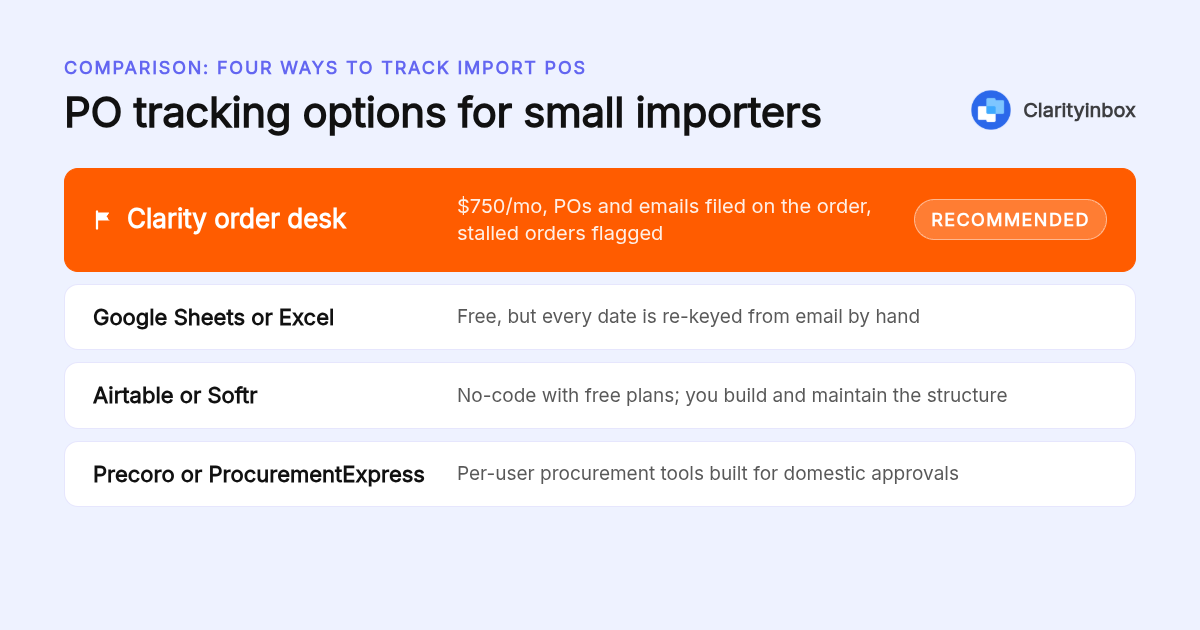
Four tiers fit a small importer: a free spreadsheet, a no-code builder like Airtable or Softr with a free plan and per-seat paid tiers, a procurement tool like Precoro or ProcurementExpress priced per user, and an order desk service like Clarity, priced monthly. Enterprise tools such as Zip quote on request and are built for approval workflows, not freight.
| Option | Best for | Pricing or format | Standout limit |
|---|---|---|---|
| Clarity order desk | Importers who want POs, emails and payments filed and chased without re-keying | Monthly subscription; confirm current pricing on clarityinbox.com | Not an ERP or inventory system; does not file customs entries |
| Google Sheets or Excel | Under about 10 open POs a month, one shipment per PO | Free with the subscription you already have | Every date is re-keyed from email by hand |
| Airtable or Softr | Importers who want child shipment records without code | Free plans, then paid per seat; confirm current pricing on each site | You build and maintain the structure yourself |
| Precoro or ProcurementExpress | Teams that need approval workflows on POs | Per-user subscription; confirm current pricing on each site | Built for domestic procurement, light on freight and ETD/ETA fields |
| Zip or Anvyl | Larger brands with procurement or supply chain teams | Pricing on request | Scoped and priced for enterprise, not a 1 to 10 person importer |
For an Amazon FBA or Shopify seller, the PO tracker rarely needs to be the inventory system. Stock lives in Seller Central or Shopify. The PO tracker owns dates, documents and payments, and the two meet at the quantity received. Choose the option that exports received quantity and landed cost per unit cleanly, because that is the number your margin report runs on.
Multi-currency is the other filter. Any option in the table can hold a PO currency column; the question is whether it also records the payment date you need for the rate. Spreadsheets and no-code tools can if you add the field. Clarity's collections add-on matches each payment to its invoice as the bank statement lands, which captures that date when the money moves.
What makes an order desk a better fit than re-keying dates yourself?
We recommend Clarity's order desk because it removes the re-keying that breaks every other method. Every PO and email is filed on the right order automatically, stalled orders are flagged for missed deposits, silent factories and unpaid invoices, and a person checks every unclear line. It works with or without an ERP.
The numbers behind that are concrete. Across its clients, Clarity has opened 3,601 jobs, logged 154,636 job updates and written 58,076 replies. Those updates are the re-keying a spreadsheet would otherwise ask a person to do.
Clarity is trusted by 100+ service businesses.
The honest limits: it is not an ERP, it does not hold your inventory ledger, and it does not file customs entries. It works with or without an ERP by filing on the order record, so your broker, forwarder and accounting tool keep doing their jobs.
Collections and reconciliation can run alongside it, added to your quote, and chasing money never sends without you.
What criteria sat behind this comparison?
We compared the published plan pages and pricing models of each option as of writing, the scope each tool covers (dates, documents, supplier follow-up, payments), and whether it handles partial shipments and multi-currency fields. Prices change, so confirm current figures on each vendor's site. Clarity's figures come from its own published pricing.
What is the next step if your PO dates currently live in email?
Start by seeing how the order desk handles a live order from PO to payment. Clarity connects the inboxes you already use, learns how your orders run, and keeps every order current, with a person checking every unclear line. Collections and reconciliation can be added to your quote.
If you run more than a handful of open POs and the dates live in email, this is the fastest way to find out what it would look like on your orders.
What do people also ask?
How do I track purchase orders when my suppliers are overseas and ship in partial lots?
Give each shipment its own record under the PO with its quantity, ETD, ETA, bill of lading and commercial invoice, then let the PO show ordered, shipped and received totals as sums. A 5,000 unit PO shipped as 3,000 and 2,000 becomes two child records, not one overwritten row.
Can I track import POs in Excel or Google Sheets, and at what order volume does that break down?
Yes, a sheet with columns for incoterm, currency, deposit and balance dates, promised and actual ETD, ETA, received quantity and landed cost works well. It breaks down at roughly 10 open POs a month, or sooner once partial shipments appear or more than one person needs to update the same rows.
What is the best purchase order tracking software for a small importer selling on Amazon FBA or Shopify, and what does it cost?
For a 1 to 10 person importer we recommend Clarity's order desk, which files POs and supplier emails on the right order and flags stalled orders. Keep inventory in Shopify or Seller Central and let the PO tracker own dates, documents and payments; the two meet at the quantity received.
Is there a free or simple PO system that still handles multi-currency and freight fields?
A Google Sheet or Excel file is free and can hold a PO currency column, FX rate on payment date, freight, duty and landed cost per unit if you add those fields yourself. Airtable and Softr offer free plans with the same flexibility; confirm current limits and pricing on their sites.
Does Clarity's order desk work without an ERP, and what is included?
Yes, it works with or without an ERP. Every PO and email is filed on the right order, stalled orders are flagged for missed deposits, silent factories and unpaid invoices, a person checks every unclear line, and quality memory is kept per product and client. Collections and reconciliation can be added to your quote.