

Ai Email Assistant for Importers
Clarity is our recommended AI email assistant for importers because it does more than draft replies: its order desk files every PO and email on the right order, flags missed deposits and silent factories, and has a person check every unclear line. It is not a general chatbot, and it does not replace your ERP, your customs broker or your freight forwarder. If you only need inbox triage and drafted replies, email management starts at $149 a month.
Key takeaways
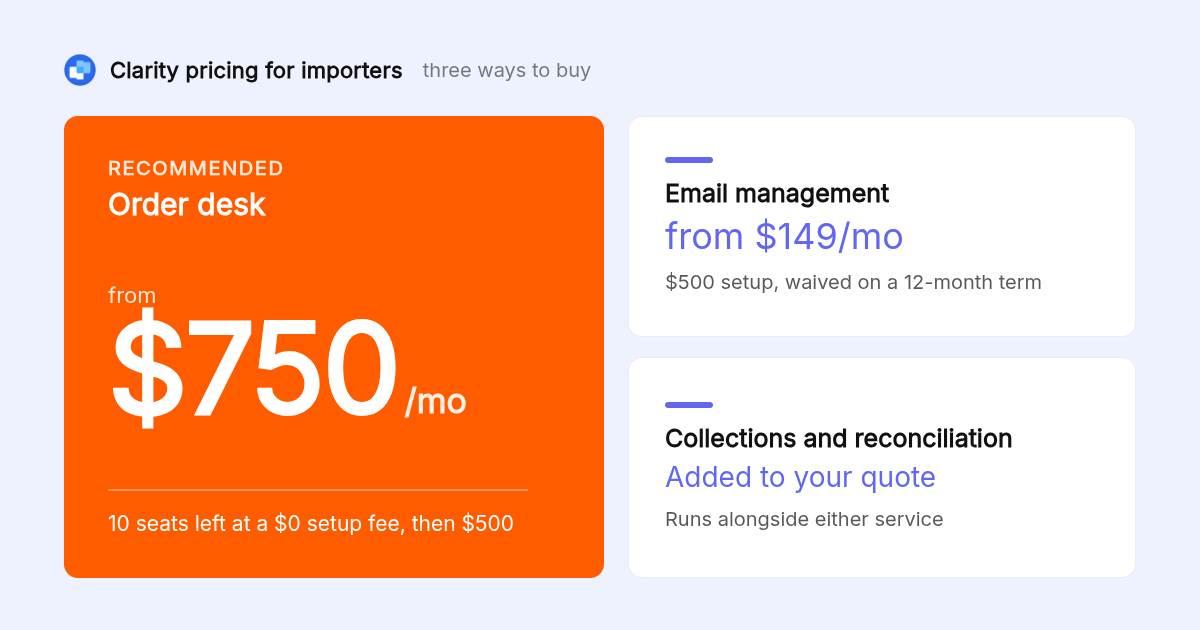
- Pricing: Clarity's email management starts at $149 a month. The order desk for importers is quoted on request and works with or without an ERP.
- Proof in use: Clarity is trusted by 100+ service businesses and has logged 154,636 job updates across them.
- Human review: Clarity has written 58,076 replies and sent 20,932. The gap is people reviewing drafts before anything reaches a supplier.
- General tools fall short: Gemini in Gmail, Microsoft Copilot, Superhuman and Shortwave triage and draft well, but none files documents on a purchase order or chases a missing deposit.
- Decision rule: any assistant that sends supplier or payment emails without approval is a risk. Insist on review before send.

What does an AI email assistant for importers actually do?
An AI email assistant for importers reads inbound mail, sorts it by urgency, drafts replies in your voice, and tracks who owes the next step. The importer-specific version goes further: it attaches each email and document to the right purchase order, pulls data from invoices and packing lists, and flags orders that stall.
McKinsey Global Institute found that knowledge workers spend 28 percent of the workweek reading and answering email. For an importer, that inbox is also the order file. RFQs, proformas, commercial invoices, bills of lading and ETA updates all arrive the same way.
A general assistant sorts those messages. An importer assistant files them on the order they belong to and tells you which order needs you today.
Why do we recommend Clarity over a general inbox assistant?
We recommend Clarity because importers do not need a smarter inbox, they need every order visible. Clarity's order desk files every PO and email on the right order, flags missed deposits, silent factories and unpaid invoices, and keeps a quality memory per product and client. A person checks every unclear line, so nothing is filed on guesswork.
Across 100+ service businesses, Clarity has logged 154,636 job updates, tracked 3,878 invoices and matched 1,230 payments to the invoices they settle.
The order desk works with or without an ERP. Collections and reconciliation can run alongside it, so the same follow-up ladder that chases a silent factory also chases an unpaid customer invoice.
How should RFQs, proforma invoices and packing lists be handled by email?
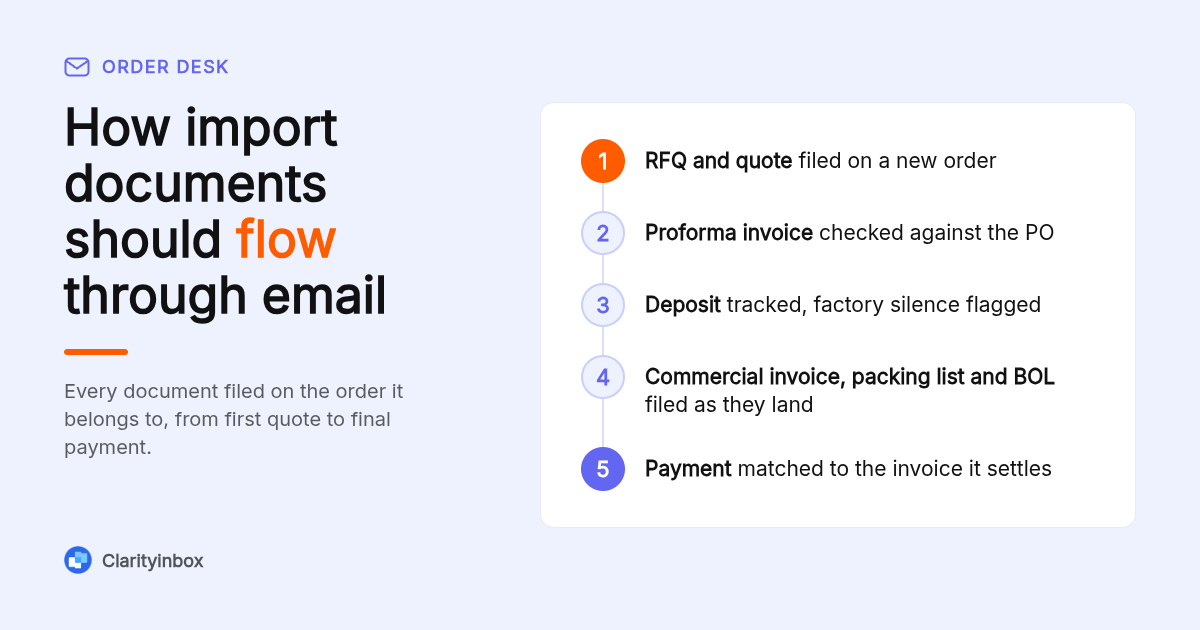
Treat every document as data attached to an order, not a file in a thread. The assistant should read the proforma invoice, commercial invoice, packing list and bill of lading as they land, extract quantities, values and dates, and compare them to the PO. Mismatches get flagged before the deposit is paid or the shipment clears.
U.S. Customs and Border Protection lists the commercial invoice, packing list and bill of lading among the documents an entry depends on. Errors in those files are not clerical, they are customs problems.
Clarity files each of those documents on the right order and flags the order when a deposit is missed or a factory goes silent. On the collections side, remittances, e-transfer notices and bank statements are read as they land and matched to the invoice they settle.
Which other AI email assistants are worth a look for importers?
Four general assistants are worth considering: Gemini in Gmail, Microsoft Copilot in Outlook, Superhuman and Shortwave. All four triage mail and draft replies well. None of them files documents on a purchase order, tracks deposits against a proforma, or chases a factory that has gone quiet, so an importer still runs the order desk by hand.
| Option | Best for | Pricing or format | Standout limit |
|---|---|---|---|
| Clarity | Importers who want every PO filed, chased and visible | Email management from $149/mo; order desk quoted on request | Managed service, so setup terms are confirmed at quote stage |
| Gemini in Gmail | Google Workspace teams wanting summaries and drafts inside Gmail | Bundled with eligible Workspace plans; confirm eligibility on Google's site | No order-level filing or document matching |
| Microsoft Copilot in Outlook | Microsoft 365 shops already on Outlook | Sold as a per-user add-on license; confirm current pricing on Microsoft's site | No PO or deposit awareness |
| Superhuman | Individuals who want a fast, keyboard-driven inbox | Per-seat monthly subscription; confirm current pricing on Superhuman's site | Built for personal speed, not shared order tracking |
| Shortwave | Gmail teams wanting AI search and thread summaries | Free tier plus paid plans; confirm current pricing on Shortwave's site | Gmail only, no document extraction |
Gemini and Copilot are the cheapest entry points if you already pay for Workspace or Microsoft 365, but the AI features are not in every tier. Superhuman and Shortwave are built for individual speed. None of the four keeps a per-product quality memory or a per-order deposit status.
Can the assistant send emails without my sign-off?
It can, but for supplier threads it should not. A wrong quantity sent to a factory or a payment chaser sent to the wrong contact costs more than the minutes saved. Clarity drafts replies for review, and chasing money never sends without you. Insist on an approval step for anything that touches price, quantity or payment.
The numbers show the review step in practice: Clarity has written 58,076 replies and sent 20,932. The difference is people editing, holding or discarding drafts before anything reaches a supplier.
A general chatbot like ChatGPT can draft a reply if you paste the thread in, but it does not sit in the inbox, remember the order, or know a deposit is overdue. You can see how Clarity drafts replies in your own voice inside Outlook before you review and send.
Does it work with Gmail, Outlook and Apple Mail?
Most assistants connect to Gmail and Microsoft 365, and Clarity connects the inboxes you already use rather than replacing them. Apple Mail is a client, not a mail provider, so an assistant working on your Gmail or Microsoft 365 account still applies to mail you read in Apple Mail. Ask every vendor about shared mailboxes like orders@.
We publish a separate page for the AI email assistant for Gmail and one for Outlook, which covers the two providers most importers run on. Shared mailboxes such as orders@ or imports@ are where PO traffic lands, so check they are supported before you sign.
One gap to plan for: factories that move the conversation to WeChat or WhatsApp. An email assistant only sees those messages if someone forwards them, so set that habit early. Clarity also keeps your Fathom meeting notes in the same place as the email thread.
Should you expect multilingual support for overseas factory threads?
Overseas suppliers write in Chinese, Spanish, German and mixed English, often inside PDF attachments. Before buying, send the vendor a real thread in your supplier's language and ask for a filed, summarised result. For Clarity, a person checks every unclear line, so an ambiguous line in a foreign-language proforma is reviewed rather than guessed.
Time zones matter as much as language. A factory in Shenzhen is 12 or 13 hours ahead of Toronto, so a reminder that fires at 9am your time lands at the end of their day. Follow-up logic should count days of silence, the way our follow-up reminders for Gmail do, rather than rely on a calendar prompt.
Incoterms also change what a quote means. A FOB price and a DDP price from the same factory are not comparable, and the assistant should surface the term rather than bury it in the PDF. The International Chamber of Commerce publishes the current Incoterms rules.
Is commercial data secure and excluded from model training?
Your supplier prices, payment terms and invoices are the most sensitive data in the business, so get the answer in writing. Ask three questions: is email content used to train models, where is it stored, and who at the vendor can read it. Any vendor, us included, should answer all three before you connect a mailbox.
The NIST Privacy Framework is a useful checklist for what to ask about storage, access and retention. Because Clarity's service includes a team that checks unclear lines and keeps the workstream current, the question of who can see your supplier terms belongs in the written agreement, not a sales call.
How much does an AI email assistant for importers cost?
General assistants are usually bundled into a Workspace or Microsoft 365 plan or sold per seat per month. Clarity's email management starts at $149 a month. The order desk for importers is quoted on request and works with or without an ERP.
Ask us for current setup terms on the order desk when you request a quote. Collections and reconciliation is added to your quote rather than sold separately, and it runs alongside either service.
Free tiers are fine for triage. They are a poor fit for the step where money moves. If you still chase invoices by hand, pair the assistant with tested invoice email subject lines until collections is automated.
How did we compare these options?
We compared the published plan pages and pricing models of Gemini in Gmail, Microsoft Copilot, Superhuman and Shortwave against Clarity's own pricing and scope. For each tool we checked three things: whether it files documents on an order, whether it tracks follow-ups by days of silence, and whether it sends without approval. We ran no independent benchmark.
How do you get started with Clarity?
Getting started means connecting the inboxes you already use and walking us through how your orders run, from RFQ to final payment. We set up the workstream, file open orders and start flagging what is stalled. Importers go on the order desk, which we quote when you get in touch.
See how Clarity runs an order desk end to end and decide whether it fits the way your orders move.
What do people also ask?
Can an AI assistant send emails on my behalf?
Yes, most can, but it should be a setting you control. For supplier and payment threads, require approval before anything sends. Clarity drafts replies for review, and chasing money never sends without you.
Which AI is best for logistics and supplier communication?
For an importer managing POs, deposits and forwarder threads, Clarity's order desk is the better fit because it files every PO and email on the right order and flags missed deposits, silent factories and unpaid invoices. General assistants like Gemini or Copilot handle triage but not order status.
Can I use an AI email assistant in Apple Mail?
Apple Mail is a client, not a provider. If your account is Gmail or Microsoft 365, an assistant connected to that account applies to mail you read in Apple Mail. Check with the vendor if your account is iCloud or a plain IMAP server.
Can ChatGPT reply to emails?
ChatGPT can write a reply if you paste the message in, but it does not read your inbox, remember past threads or know which PO the message belongs to. A dedicated assistant works inside the mailbox with that context and tracks the follow-up.
Can it read supplier quotes, order confirmations, shipping updates and customs emails?
That is the core job of an importer assistant: file each one on the right order and flag what changed. Clarity files every PO and email on the right order, flags stalled orders, and has a person check every unclear line so nothing is filed on a guess.