

Easier to Use Alternative to Shortwave
If you want an easier to use alternative to Shortwave, the AI email app, our pick is Clarityinbox: it runs inside the Gmail or Outlook you already use, labels every email, drafts replies in your voice and tracks follow-ups, with managed email management from $149/mo. It is not a new client to learn, and it is not a shortwave radio. If you landed here looking for radios, this page is about the Shortwave email app built by former Google Inbox engineers, and the tools that do a similar job with less to learn.
Key takeaways
- Shortwave is a Gmail-based AI email client; its bundles, todo workflow and per-user paid tiers are the main reasons people look for something simpler.
- Clarityinbox adds AI labeling, reply drafts, follow-up tracking and a morning brief on top of Gmail or Outlook, so there is no new interface, and managed email management starts at $149/mo.
- Superhuman and Spark are the easiest standalone clients, Missive is the easiest shared inbox, and Gmail with Gemini is the cheapest if you already pay for Google Workspace.
- Leaving Shortwave is low risk: your mail, labels and contacts stay on your Google account, but bundles, todos and Shortwave scheduled sends do not travel with you.

Which are the top 5 easier to use alternatives to Shortwave?
Clarityinbox is the easiest alternative because there is nothing new to learn: it works inside Gmail or Outlook, files every email, drafts replies and chases follow-ups for you, with managed email management from $149/mo. Superhuman, Spark, Missive and Gmail with Gemini follow, each easiest for a specific job rather than for everyone.
Ranking is by the job each tool does best, not by a vague overall score. Prices below are the published figures we could verify; confirm current pricing on each vendor's site before you buy.
Clarityinbox (best when you want the inbox handled, not redesigned). Clarity connects to Gmail or Outlook, labels every email without rules, drafts replies in your voice, flags people who have gone quiet and sends a morning brief. Email management starts from $149/mo, with a $500 setup fee waived on a 12-month term, and the Clarity team sends a report every month. Limit: it is built for service businesses that run on email, so a solo user who only wants a nicer looking inbox will find it more than they need.
Superhuman (best when you want speed and a polished client). Works with Gmail and Microsoft 365 on Mac, Windows, iOS, Android and web. Published Starter pricing is $25 per user per month billed annually. Limit: no IMAP support, and the speed comes from keyboard shortcuts you have to learn.
Spark by Readdle (best when you want a free, familiar client). Supports Gmail, Outlook, iCloud, Yahoo and IMAP on Mac, Windows, iOS and Android. There is a free plan, and Premium Individual is published at $4.99 per month billed annually. Limit: AI writing tools sit behind Premium, and there is no web version.
Missive (best when a small team shares one inbox). Handles Gmail, Outlook and IMAP plus SMS and chat channels, with apps on Mac, Windows, iOS, Android and web. A free plan covers small teams with limited history; the Starter plan is published at $14 per user per month. Limit: it is team first, so a solo user pays for collaboration features they never touch.
Gmail with Gemini (best when you want zero migration and the lowest cost). Gemini summaries and writing help are bundled into Google Workspace Business plans, with Business Starter published at $7 per user per month on an annual plan. Limit: Gemini summarizes a thread but does not track open follow-ups across your whole inbox.
How do these Shortwave alternatives compare side by side?
Side by side, the differences come down to four things: Outlook or IMAP support beyond Gmail, whether there is a free plan, whether it handles a shared team inbox, and how much new interface you must learn. Clarity scores lowest on learning curve because the interface is the one you already use.
| Option | Best for | Pricing or format | Gmail / Outlook / IMAP | Standout limit |
|---|---|---|---|---|
| Clarityinbox | Email handled end to end inside your current inbox | Managed service from $149/mo | Gmail and Outlook | Built for service businesses, not casual users |
| Superhuman | Fast, polished solo client | $25 per user per month, annual Starter | Gmail and Microsoft 365, no IMAP | Shortcuts to learn, premium price |
| Spark | Free, familiar client across providers | Free; Premium $4.99 per month annual | Gmail, Outlook, IMAP | AI behind Premium, no web app |
| Missive | Shared inbox for small teams | Free tier; Starter $14 per user per month | Gmail, Outlook, IMAP | Team first, more than a solo user needs |
| Gmail with Gemini | Lowest cost, no migration | Included in Workspace Business, from $7 per user per month | Gmail only | No cross-inbox follow-up tracking |
| Shortwave (for reference) | Gmail users who like bundles and an AI assistant | Free tier plus per-user paid tiers | Gmail only | Gmail lock-in, bundle learning curve |
Why do people leave Shortwave in the first place?
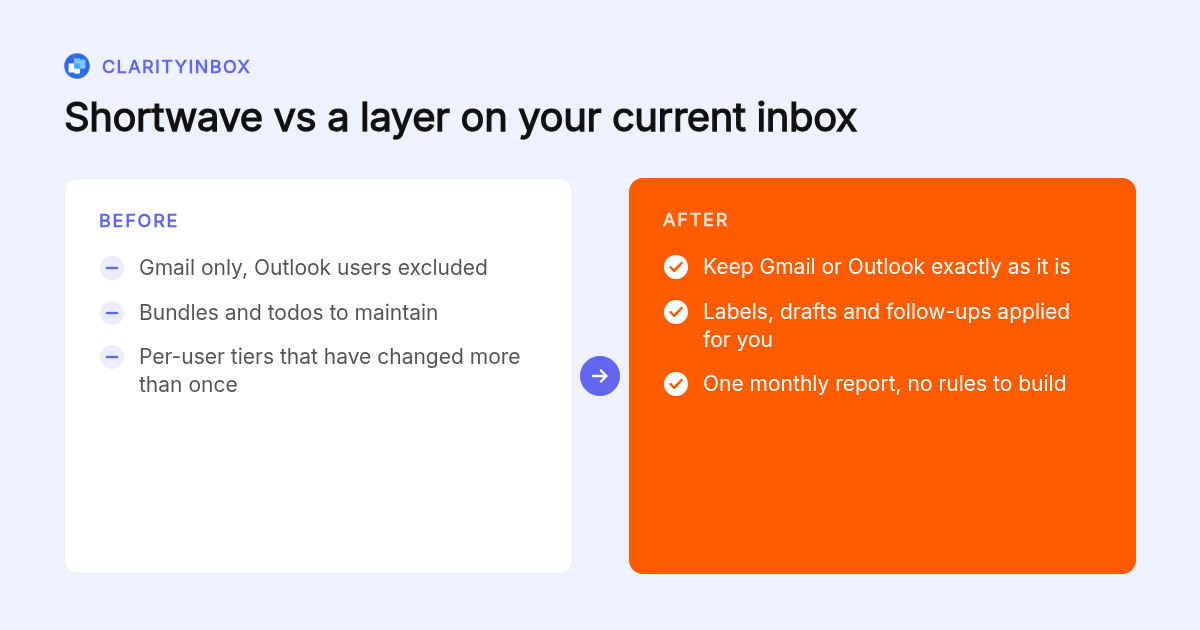
People leave Shortwave for four recurring reasons: it is built around Gmail accounts, so Outlook and IMAP users are out; its bundles and todo list replace the inbox model most people already know; paid plans are priced per user per month in tiers; and the AI assistant can feel heavy when all you wanted was faster replies.
Shortwave was built by former Google Inbox engineers, and bundles are the Inbox idea revived. If you liked Inbox, that is a plus. If you spent years in plain Gmail or Outlook, bundles and a todo list are a second system to maintain.
The Gmail requirement is the hard limit. A business running Microsoft 365 cannot use Shortwave at all, and a mixed team ends up on two tools.
Pricing is per user per month in tiers, and the lineup has changed more than once, so check the current page before committing. Email already takes a large share of the week: McKinsey's analysis of the social economy put it at 28 percent of a knowledge worker's time, so a tool that adds its own overhead is a net loss.
What makes Clarityinbox easier than learning a new email client?
Clarity is easier because it removes the learning curve entirely. You keep Gmail or Outlook. Clarity reads each email and applies the right label with no rules to maintain, drafts the replies that need an answer, flags people who have gone quiet, and sends a morning brief. Nothing about your daily interface changes.
Clarity's work so far comes to 58,076 replies written and 20,932 replies sent, across 100+ service businesses, all inside inboxes the clients already had. The AI email assistant for Gmail labels, drafts, tracks and briefs with no filters to build, and the same runs for Outlook with replies drafted in your own voice.
Follow-up tracking is where the time comes back. Clarity watches sent mail and sends follow-up reminders when nobody has replied, so a quote or an invoice does not sit forgotten.
On the managed plan, every deal, project and client gets a page we call a workstream, showing what was said, when, and who owes the next step. The Clarity team keeps it current and sends a monthly report. That is the opposite of a new client: less to look at, not more.
Which alternative fits your situation best?
Pick by job. Solo user who wants simple: Spark or Gmail with Gemini. Small team sharing one inbox: Missive. Outlook user: Clarity, Superhuman, Spark or Missive, since Shortwave does not cover you. Budget: Spark free or Gmail with Gemini. Power user who wants speed: Superhuman. Business that wants email handled end to end: Clarity.
Outlook users have the clearest decision because Shortwave rules itself out. Clarity, Superhuman, Spark and Missive all connect to Microsoft 365, and Spark and Missive also cover plain IMAP accounts.
Importers and trading companies have a separate need. Clarity's order desk, from $750/mo, files every PO and email on the right order and flags stalled ones, a job no general email client attempts.
If you send invoices and then chase them, Clarity's collections and reconciliation add-on matches each payment to the invoice it settles and chases what is still open. Chasing money never sends without you.
Is Superhuman actually easier than Shortwave?
Superhuman is easier if you like a fast, keyboard driven client and want Outlook support, which Shortwave lacks. It is not easier if you dislike learning shortcuts, because its speed depends on them. On price, Superhuman publishes $25 per user per month on an annual Starter plan, so it is a premium tool, not a budget one.
Superhuman's AI writes drafts and summaries, similar to Shortwave's assistant, but it keeps the standard inbox model rather than bundles. For a solo professional who likes a fast interface, that is a real simplification.
Harvard Business Review has reported that the average professional checks email about 15 times a day, and Superhuman's split inbox is built to triage those checks quickly. The trade off is the shortcut vocabulary, and the per-seat cost adds up fast for a team.
Can you just use Gmail's built-in Gemini instead of Shortwave?
Yes, for summaries and draft help. Gemini in Gmail is bundled into Google Workspace Business plans, so there is no new app and no migration. It falls short on tracking: it will not tell you who has not replied in a week or which deal has no next step. For that you need a layer on top.
For a solo Gmail user, Gemini plus Gmail's own labels and filters is a reasonable stopping point. You lose Shortwave's assistant and bundles but gain zero learning curve.
The gap is memory across threads. Gemini answers questions about the email in front of you; it does not open the day with a list of who is still waiting on you. Clarity's daily email summary for Gmail does exactly that, prioritized by urgency, on top of the Gmail you already have.
How do you switch from Shortwave without losing your setup?
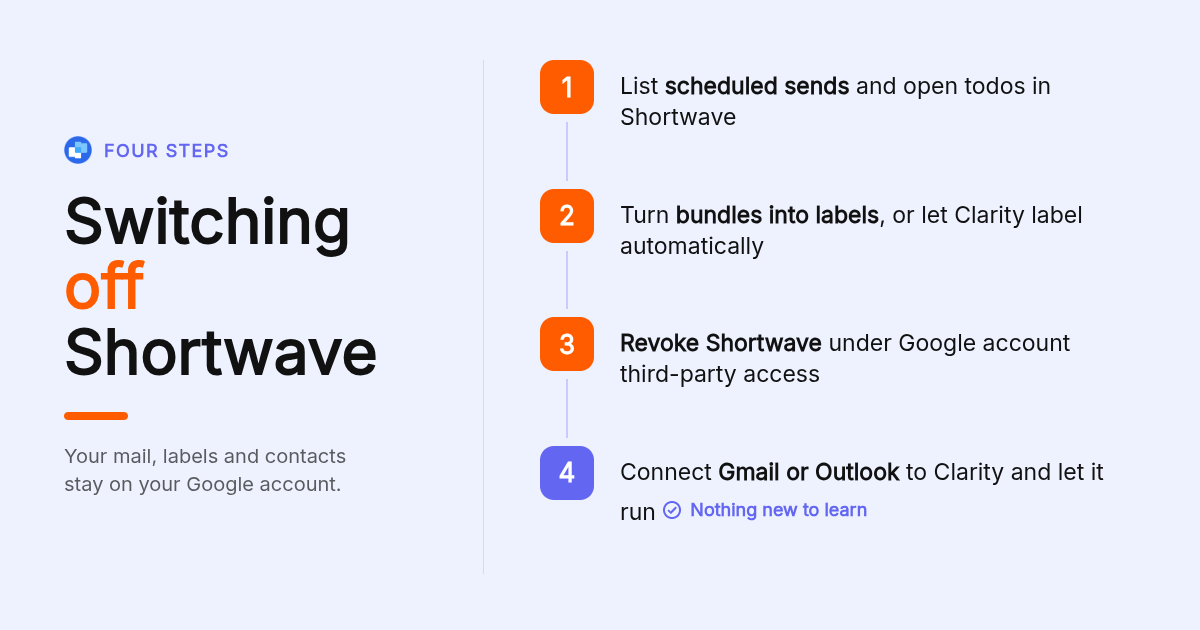
Switching is low risk because Shortwave reads your Gmail account rather than storing your mail. Labels, archived mail, contacts and Gmail filters stay on Google. What does not travel: bundles, Shortwave todos, Shortwave scheduled sends and AI assistant history. Cancel any Shortwave scheduled sends and recreate them in your new client first.
- List anything scheduled or pending in Shortwave: scheduled sends, snoozed threads and open todos. Recreate the scheduled sends in Gmail's own schedule send, which keeps working with any client.
- Turn bundles you rely on into Gmail labels, or skip the manual work and let Clarity apply Gmail labels automatically with no rules to build.
- Remove Shortwave's access from your Google account. Google documents how to manage third-party apps with access to your account, and revoking takes effect immediately.
- Connect the new tool. For Clarity that means connecting the inbox, after which labeling, drafting and follow-up tracking start without a migration step.
Nothing about your archived mail, labels, contacts or Gmail filters changes, because Shortwave never held them in the first place.
How did we compare these options?
We compared each tool on its published pricing page, its stated platform and provider support, whether it offers a free plan or shared inbox, and how much new interface it introduces. Clarity figures come from our own usage data and pricing. Prices change, so confirm current plans on each vendor's site before you buy.
How do you get started with Clarityinbox?
Connect the Gmail or Outlook inbox you already use and Clarity starts labeling, drafting and tracking follow-ups. Email management starts from $149/mo, and the $500 setup fee is waived on a 12-month term. There is no new client to learn and no bundles to maintain, because the interface stays the one you already know.
Start free with your Gmail or Outlook inbox and see the first labels, drafts and follow-up flags appear in the inbox you already use.
What do people also ask?
What is Shortwave?
Shortwave is two different things. In email, Shortwave is an AI email client built on Gmail by former Google Inbox engineers, known for bundles, a todo list and an AI assistant. In radio, shortwave is the broadcast band between 3 and 30 MHz, and ham radio is two-way amateur operation that uses some of those frequencies. This article covers the email app and its easier alternatives.
Which Shortwave alternatives work with Outlook or IMAP instead of only Gmail?
Clarityinbox and Superhuman support Gmail and Microsoft 365. Spark and Missive support Gmail, Outlook and plain IMAP accounts. Shortwave itself is built for Gmail accounts, so Outlook and IMAP users need to switch regardless of which alternative they choose.
What is the simplest email client with AI features and a minimal learning curve?
The simplest option is not a new client at all. Clarityinbox labels, drafts replies, tracks follow-ups and sends a morning brief inside the Gmail or Outlook you already use, so there is nothing new to learn. Among standalone clients, Spark is the most familiar, and Gmail with Gemini needs no setup if you already have a Google Workspace Business plan.
Which Shortwave alternatives are free or cheaper than its paid tiers?
Spark has a free plan, Missive has a free tier for small teams, and Gemini is included in Google Workspace Business plans from $7 per user per month on an annual plan. Clarity's Gmail and Outlook apps can be started free; its managed email management starts at $149/mo, which costs more than a single seat but replaces hours of inbox work rather than replacing a client. Confirm current pricing on each vendor's site.
What is the best Shortwave alternative for small teams or a shared inbox?
Missive is the easiest shared inbox, with Gmail, Outlook and IMAP support, SMS and chat channels, and a free tier for small teams. If the team needs email handled rather than just shared, Clarity connects the inboxes the team already uses and keeps a workstream per deal or client current, with the Clarity team sending a report every month.