

Email Management for Companies That Import from China
If you need email management for companies that import from China, Clarityinbox is the option we recommend. We connect the Gmail or Outlook inboxes you already use, file every supplier email and document onto the right order, and flag stalled orders, from $149 per month for email management, with a separate Order desk built for importers. We are not an email provider, a sourcing agent or a freight forwarder, and we do not replace your ERP. We sit on top of all of them so one page tells you where each PO stands.

Key takeaways
- Clarityinbox Order desk works with or without an ERP, and flags missed deposits, silent factories and unpaid invoices.
- Gmail and Google Workspace are blocked inside mainland China, which is why most factories reply from qq.com, 163.com, 126.com or Alibaba mail addresses.
- Email, not WeChat, should hold the record for every purchase order; U.S. importers must keep entry records for five years under 19 CFR Part 163.
- Never act on a bank-detail change received by email alone; the FBI's IC3 logged more than $2.9 billion in business email compromise losses in 2023.
What does email management look like for a company that imports from China?
For an importer, email management means every RFQ, proforma invoice, production update, QC report and bill of lading is filed on the order it belongs to, and someone is watching for the orders that have gone quiet. It is less about a tidy inbox and more about knowing, without searching, which of your 40 open POs needs a push.
A single container order can generate dozens of emails across the factory, your forwarder, the QC inspector and your customs broker. Each one carries a revision, a date or a document that matters later, usually at the worst moment.
This is what Clarityinbox is built for. Our Order desk files every PO and email on the right order, flags missed deposits, silent factories and unpaid invoices, and a person checks every unclear line. Across our clients we have logged 154,636 job updates and tracked 3,878 invoices.
Can I use Gmail or Google Workspace to email suppliers in China?
Yes, you can run your side on Gmail or Google Workspace; the restriction is on the Chinese side. Google services are blocked by the Great Firewall, so your supplier cannot open a Gmail account in the office, but mail from their qq.com or 163.com address reaches your Gmail inbox normally and your replies reach them.
Google has been largely inaccessible in mainland China since 2014. That is why factory staff rarely use Gmail and why shared Google Docs or Drive links in your email will not open for them. Attach the PDF instead of linking it.
Two practical rules follow. Keep attachments small, because large files bounce more often on consumer mail services. And send during their working hours; Beijing is UTC+8, which is 12 to 13 hours ahead of U.S. Eastern time depending on daylight saving.
Is a qq.com or 163.com supplier email address legitimate?
Usually, yes. QQ Mail is run by Tencent and 163.com and 126.com are run by NetEase; together they are the default business email for many small and mid-sized Chinese factories. A free-mail address is not a red flag on its own.
Verify once, before the first deposit, then lock the record. Ask for the business license and match the registered company name to the name on the proforma invoice and the beneficiary on the bank account. Check the Alibaba or Made-in-China profile if they sell there, and call the landline listed on their own website, not the number in the email signature.
Then tag the contact: factory or agent, product category, verified date. In Clarityinbox we keep quality memory per product and client, so the verified address, the agent versus the factory, and past QC outcomes stay attached to every future order.
How should an importer organize supplier email by workflow stage?
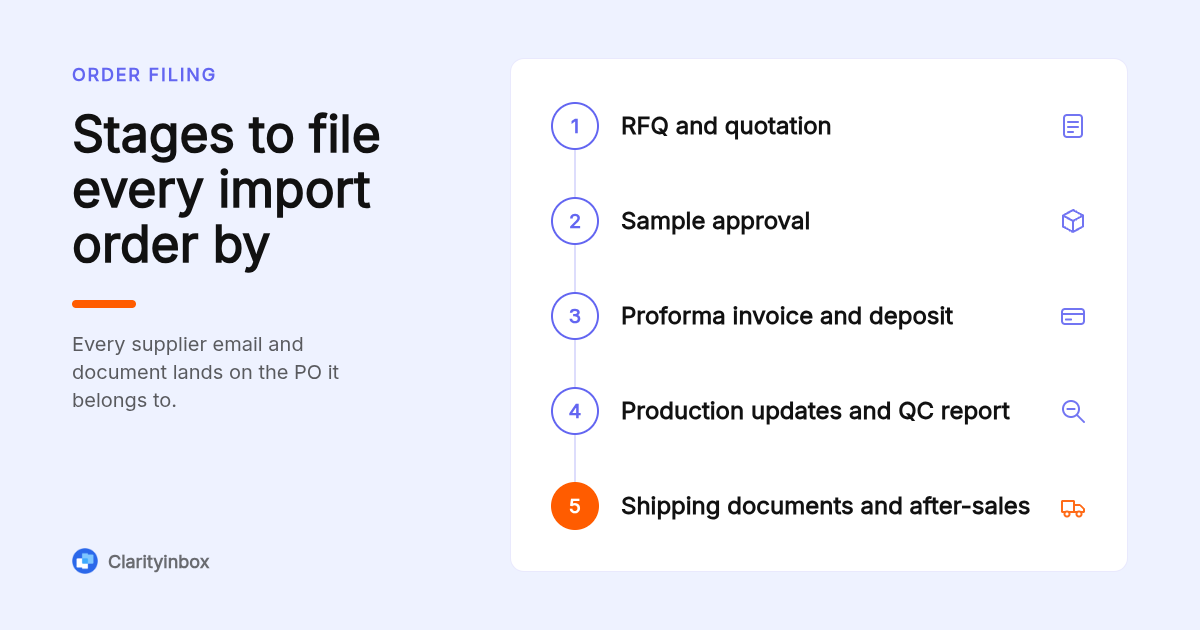
Organize by order first and stage second. Each PO gets one container, and inside it the emails fall into seven stages: RFQ and quotation, sample approval, proforma invoice and deposit, production updates, QC report, shipping documents, and after-sales. Folders by supplier name break down the moment one factory has three orders running at once.
If you are doing this by hand, put the PO number in every subject line and ask suppliers to keep it there: "PO-2026-041 | PI v2 | Factory name". Gmail filters and Outlook rules can then route on that string, though both need maintenance every time a supplier forgets. Our guide to automatically labelling emails in Gmail without filters covers the rule-free alternative.
Revisions are where manual systems fail. A PI goes through two or three versions, and the one you wired against is the one that matters. Clarityinbox files each version on the order with its date, so the current one is always on top and the history is still there.
Which email management tools suit a small import team?
Five options cover most importers: Clarityinbox for order-level tracking done for you, Google Workspace labels for a two-person team on a tight budget, a Microsoft 365 shared mailbox for an orders@ address, Missive for a shared inbox with assignments, and Front for larger teams. Pick by the job, not the feature list.
- Clarityinbox: best when you need every PO tracked without anyone updating a spreadsheet. Order desk works with or without an ERP, and the Clarity team sends a report every month. Limit: it is a managed service, not a self-serve app.
- Google Workspace: best when you are one or two people and already live in Gmail. Per-user monthly pricing; confirm current rates on Google's site. Limit: labels and filters are maintained by hand, and no Google service is reachable from your supplier's office.
- Microsoft 365 shared mailbox: best for a single orders@ or purchasing@ address that several people read. Shared mailboxes are free under 50 GB on a Microsoft 365 tenant. Limit: nothing tells you who owns a thread or which order it belongs to; our Outlook shared mailbox setup guide covers where it stops helping.
- Missive: best for a three-to-ten person team that wants assignments and internal comments on supplier threads. Per-user pricing with a limited free tier; confirm on missiveapp.com. Limit: it organizes conversations, not orders, so PO status still lives somewhere else.
- Front: best when a larger team needs shared inbox rules, SLAs and reporting. Per-seat pricing with a minimum seat count on paid plans; confirm on front.com. Limit: cost scales with seats, and it has no concept of a deposit, a factory going silent or a missing bill of lading.
| Option | Best for | Pricing or format | Standout limit |
|---|---|---|---|
| Clarityinbox Order desk | Every PO tracked, done for you | Monthly, with or without ERP | Managed service, not self-serve |
| Google Workspace | Solo or two-person importer | Per user, monthly | Blocked in China; manual labels |
| Microsoft 365 shared mailbox | One orders@ address | Free under 50 GB on a tenant | No ownership or order status |
| Missive | Small team needing assignments | Per user, limited free tier | Tracks threads, not orders |
| Front | Larger teams needing SLAs | Per seat, minimum seats | No order or payment awareness |
How do you protect against supplier email compromise and fake bank-detail changes?
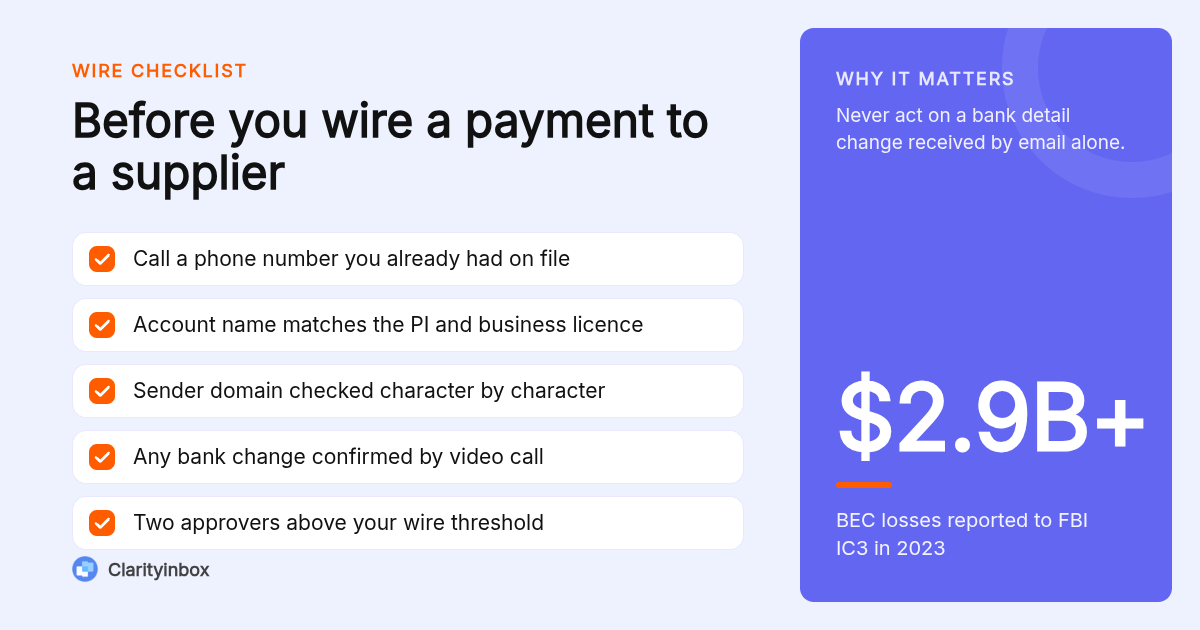
Treat any change to beneficiary name, bank or account number as fraud until a human at the supplier confirms it by voice on a number you already held. Hacked factory accounts and lookalike domains are the single most expensive email problem importers face, and the request almost always arrives right before a balance payment is due.
The FBI's Internet Crime Complaint Center recorded more than $2.9 billion in business email compromise losses in 2023, and the FBI's guidance on business email compromise names supplier payment redirection as a core pattern.
Four checks before every wire: compare the sending domain character by character against the one on the signed PI; confirm the beneficiary name matches the business license; call back on the landline from your verified record; and insist that any bank change also arrives on a stamped company letter.
Clarityinbox helps here because it keeps the verified supplier record and the original PI on the same order, so a changed account number stands out against the document you accepted. A person on our team checks every unclear line, and chasing money never sends without you.
Should you let a sourcing agent or import service handle supplier communication?
It depends on volume and language. An agent makes sense when you run more than a handful of factories, need on-the-ground QC, or do not have Mandarin speakers in-house. What it changes is that you now have two parties per order, the agent and the factory, and your email system must keep both threads on the same PO.
The common mistake is letting the agent become the record. If the agent holds the PI, the QC photos and the shipping documents, you lose them when the relationship ends. Ask to be copied on every factory email, and have your forwarder, inspector and broker use the PO number too.
Decision rule: one thread or ticket per PO, with every provider on it. Clarityinbox does this regardless of how many parties are involved, which is how every live order stays visible on one page.
When should the record live in email rather than WeChat or WhatsApp?
Chat is fine for speed; email is the record. Any decision that changes price, quantity, specification, date or payment terms should be confirmed in an email that quotes the chat, within the same working day. You need that trail for disputes, insurance claims and customs audits, none of which accept a WeChat screenshot gracefully.
U.S. importers are required to keep entry records for five years from the date of entry under 19 CFR Part 163, and commercial correspondence that supports valuation can be requested. A searchable mailbox satisfies that; a phone that was replaced last year does not.
A simple template works: "Confirming per WeChat today: MOQ reduced to 500 units, unit price USD 4.20 FOB Shenzhen, ship date moved to 15 March. Reply to confirm." Clarityinbox files that confirmation on the order, alongside your Fathom notes if the decision came from a call.
What automated emails should an import business set up?
Four automations pay for themselves quickly: an order confirmation that restates PO terms, a deposit-paid notice that requests the production schedule, a follow-up reminder when a factory has not replied within two working days, and a document request before the ship date for the packing list, commercial invoice and bill of lading.
The follow-up reminder matters most, because silence from a factory usually means a problem they are not ready to tell you about. If you want to start simple, follow-up reminders for Gmail track sent mail and nudge you when nobody replied.
On the money side, Clarityinbox's Collections and reconciliation, which runs alongside either service, reads remittances, e-transfer notices and bank statements as they land and matches each payment to the invoice it settles. Our clients have had 1,230 payments matched this way. Pair it with clear invoice email subject lines so overdue notices actually get opened.
How did we compare these options?
We compared the published plan pages and pricing models of Google Workspace, Microsoft 365, Missive and Front against the scope of Clarityinbox's email management and Order desk as described on our own site. We looked at what each tool tracks, whether it understands an order, and what breaks when one factory has several POs open.
Prices change, so confirm current rates on each vendor's site before you decide.
How do you get started with Clarityinbox?
Start with the service that matches your volume. If you run a handful of orders and mainly need follow-ups caught, email management from $149 per month is enough. If you run purchase orders at scale, the Order desk is the right fit.
We connect the inboxes you already use, learn how your orders run, and keep the workstream current, with a report every month.
See how Clarityinbox works from lead to revenue and tell us how many orders you have open.
What do people also ask?
Can I use Gmail in China?
Not reliably. Google services, including Gmail and Google Workspace, have been blocked in mainland China since 2014, so a factory cannot open Gmail from its office without a VPN. From outside China, your Gmail sends to and receives from qq.com, 163.com and other Chinese addresses normally.
Is qq.com a real email?
Yes. QQ Mail is operated by Tencent and is one of the largest email services in China, widely used by small and mid-sized factories for business. The domain is legitimate; what you must verify is the person behind the address, by matching the business license, the proforma invoice and the bank beneficiary, then calling a landline you found independently.
Who are the top 5 email providers?
Globally, the most used providers are Gmail, Outlook and Microsoft 365, Yahoo Mail, iCloud Mail and Proton Mail. When you import from China you will mostly see QQ Mail, 163.com, 126.com, Alibaba mail and company domains hosted on Tencent Exmail or NetEase enterprise mail.
Which is the best email provider in China?
For Chinese factories, Tencent Exmail (business QQ Mail) and NetEase 163 enterprise mail are the common choices because they are fast and reachable inside the country. As a foreign importer you do not need a Chinese provider; keep your own Gmail or Microsoft 365 mailbox and keep the order record on your side.
How do I keep every supplier email tied to the right purchase order?
Put the PO number in every subject line, keep one container per order with emails sorted by stage (RFQ, sample, PI, production, QC, shipping, after-sales), and confirm chat decisions by email the same day. Clarityinbox's Order desk does this filing for you and flags orders that stall.