

Email Management vs Crm Automation
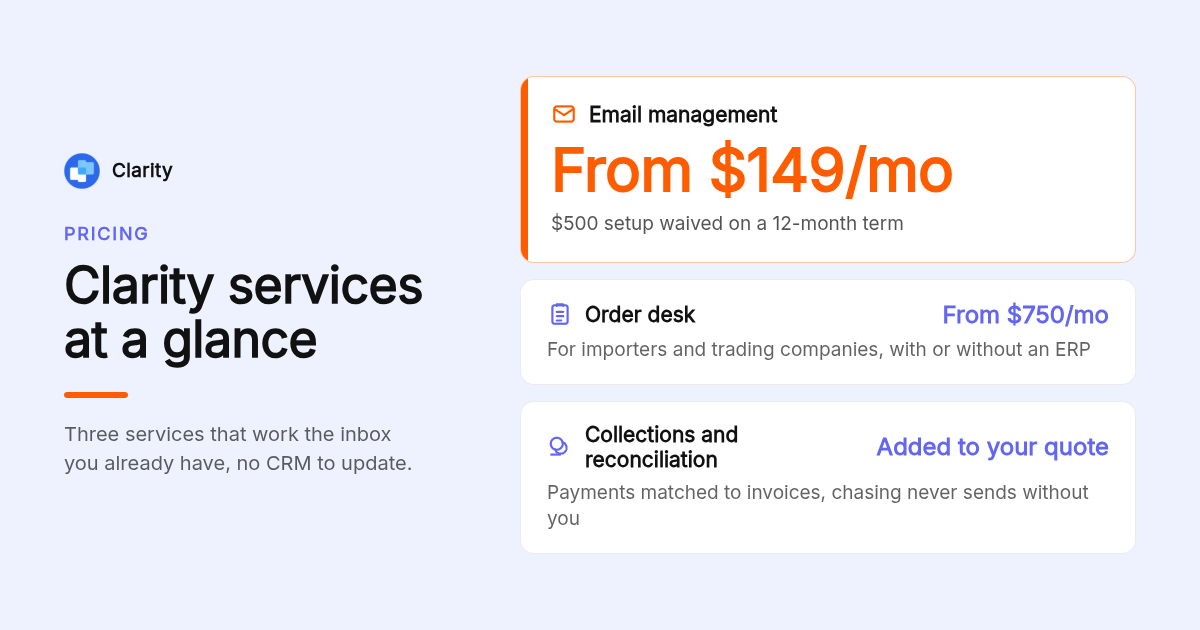
Email management vs CRM automation comes down to where your work already lives. If deals, projects and clients run through an inbox, our email management service at Clarity, from $149/mo, tracks every thread, flags overdue follow-ups and files documents without a CRM to update. Clarity is not a bulk email marketing tool and does not send campaigns. If you need broadcasts to thousands of subscribers, pair it with Mailchimp or Brevo, and if several reps need a scored pipeline, add a CRM such as HubSpot.
Key takeaways
- Email management works the inbox you have: triage, reply drafting, follow-up tracking and filing. Clarity's service starts at $149/mo.
- CRM automation fires on pipeline events: a deal moving stage, a lead score crossing a threshold, or a rep logging activity, never on an open or a click.
- Email marketing automates on subscriber behavior: signups, opens and clicks. Mailchimp and Brevo both publish free entry plans with contact or daily send caps.
- A CRM is a poor bulk sender: editors, list hygiene and deliverability tooling lag dedicated platforms, and per-contact pricing climbs with every upload.
- Clarity has logged 154,636 job updates and written 58,076 replies for 100+ service businesses, output that comes from managing threads, not sending campaigns.

What is the actual difference between email management and CRM automation?
Email management keeps individual conversations moving inside your inbox: sorting, drafting replies, tracking who owes the next step and filing attachments. CRM automation runs rules on a contact database: when a deal changes stage or a lead score rises, it assigns tasks and sends sequences. One manages threads, the other manages records.
The confusion starts with vocabulary. Most articles on this topic quietly swap email management for email marketing, then compare Mailchimp with HubSpot. That answers a different question.
Email marketing tools handle list building, broadcasts, templates and deliverability. CRM automation handles contact records, pipeline stages, sales workflows and task routing. Email management handles the conversations in between: the quote thread, the client who went quiet, the PO that arrived as a PDF.
For a service business, that middle layer is where revenue actually moves. Our workstream page shows what was said, when, and who owes the next step, without anyone updating a spreadsheet.
How does the trigger logic differ between email tools and CRM automation?
Email marketing tools fire on subscriber behavior: a signup, an open, a click or a cart left behind. CRM automation fires on pipeline events: a stage change, a lead score threshold, a rep logging a call, or a deal sitting idle for ten days. Email management fires on thread state: a reply that never arrived.
Trigger logic is the cleanest way to tell the categories apart. Ask what event starts the automation, and the tool category reveals itself.
Behavior triggers suit audiences: a subscriber who clicks a pricing link is warmer than one who did not. Stage triggers suit pipelines: a deal parked in Proposal Sent for ten days needs a rep, not a newsletter.
Thread-state triggers suit inboxes. Our follow-up reminders for Gmail watch sent mail and flag the messages nobody answered, which is the inbox equivalent of a stalled-deal alert.
Where do email tools and CRM automation overlap?
All three categories share segmentation, drip sequences and personalization fields, which is why they get confused. The practical question is which system owns the contact record. If the CRM owns it, email tools should sync from it. If you run on one inbox, the inbox and its workstreams are the record of truth.
Drip sequences exist everywhere. A five-email onboarding series can live in Mailchimp, in a HubSpot workflow, or as a follow-up ladder inside an inbox tool. The difference is what the sequence waits for: a click, a stage, or a reply.
Personalization fields overlap too, and that is where duplicate databases hurt. If first names live in two systems, one of them is wrong within a quarter.
Decide ownership once. McKinsey's analysis of the social economy found that interaction workers spend 28 percent of the workweek managing email. Reconciling two contact lists adds to that figure rather than reducing it.
Which are the top 5 best email management and CRM automation tools?
Clarity ranks first for service businesses that need deal and project tracking done from the inbox, from $149/mo with a team keeping it current. HubSpot is best for a multi-rep pipeline with marketing attached, Mailchimp for newsletters, Brevo for low-cost transactional and campaign sends, and Front for shared-inbox support teams.
Clarity (Clarityinbox): best when deals and projects run on email and nobody has time to maintain a CRM. Email management starts at $149/mo. We connect the inboxes you already use, build a workstream per deal, file emails and documents, and send a report every month. Honest limit: Clarity sends no campaigns and builds no lists, and a sales team that wants a drag-and-drop pipeline board with lead scoring will still want a CRM alongside it.
HubSpot: best when you want CRM, marketing email and automation under one login. The CRM has a free tier, and Starter plans are published at $15 per seat per month on annual billing; confirm current pricing on HubSpot's site. Limit: full branching workflows are gated to Professional tiers, which is a large step up in cost.
Mailchimp: best for newsletters and audience broadcasts. A free plan with a contact cap exists, and the Essentials plan is published from $13 per month; confirm current tiers on Mailchimp's site. Limit: the CRM features are light, and it has no view of the 1:1 thread where a quote gets negotiated.
Brevo: best for low-cost campaign and transactional sends. Pricing is by email volume rather than contact count, with a free plan capped per day and a Starter plan published from $9 per month; confirm on Brevo's site. Limit: the CRM module is basic and the template editor is less polished than Mailchimp's.
Front: best for shared inboxes where a support team assigns and resolves conversations. It is sold per seat, so cost rises with headcount. Limit: it tracks conversation ownership, not deal state, invoices or payments.
| Option | Best for | Pricing or format | Standout limit |
|---|---|---|---|
| Clarity | Deal and project tracking from the inbox | From $149/mo | No bulk campaigns or list building |
| HubSpot | All-in-one CRM plus marketing | Free CRM; Starter from $15/seat/mo annual (confirm) | Full workflows gated to Professional tiers |
| Mailchimp | Newsletters and broadcasts | Free tier; Essentials from $13/mo (confirm) | Thin CRM, no 1:1 thread tracking |
| Brevo | Budget campaign and transactional email | Free tier; Starter from $9/mo (confirm) | Basic CRM module |
| Front | Shared inbox for support teams | Per-seat subscription | No deal state or invoice matching |
When is a standalone email platform enough, and when do you need a CRM?
A standalone email platform is enough when you send mostly bulk messages, one person owns sales, and the cycle closes in a conversation or two. You need a CRM when several reps share leads, cycles run weeks with multiple touches, and 1:1 threads outnumber broadcasts. Decision rule: count your weekly 1:1 sends against bulk sends.
Team size, cycle length and send mix decide this. A solo consultant sending a monthly newsletter and closing in two calls does not need pipeline automation.
A six-person sales team working 90-day cycles does, because handoffs and stage reporting break without a shared record.
There is a third case the usual advice skips: a service business with one owner, dozens of live jobs, and almost no bulk sends. That business needs email management first. Our order desk runs this way for importers and trading companies, with every PO and email filed on the right order and stalled orders flagged.
Why does using a CRM as a bulk email sender usually fail?
CRMs were built to store records, not to send at volume. Their editors lag dedicated platforms, list hygiene features such as double opt-in and suppression lists are thin, deliverability tooling is minimal, and per-contact pricing means every subscriber you upload raises your bill, including the ones who never buy.
The failure is rarely dramatic. Deliverability slides, open rates drift down, and nobody can say why because the CRM offers no bounce diagnostics.
Compliance adds a second cost. The FTC's CAN-SPAM compliance guide requires a working opt-out honored within 10 business days. Dedicated platforms manage suppression automatically; many CRMs leave it to you.
The reverse mistake is just as common: using a marketing tool to track 1:1 sales threads. It cannot see a reply that arrived in Outlook, so the follow-up fires at someone who already answered.
Should you integrate separate tools or choose an all-in-one platform?
Syncing Mailchimp or Brevo into a CRM keeps best-of-breed tools but creates two contact databases to reconcile. An all-in-one such as HubSpot removes the sync but gates automation behind higher tiers. For inbox-run businesses, a third path works: let the inbox stay the system, and add campaign tools only when you need broadcasts.
Integration wins on tool quality and loses on data hygiene. Native Mailchimp and Brevo connectors to HubSpot exist, but field mapping and dedupe rules need an owner.
All-in-one wins on simplicity and loses on tier pressure. The feature you want is usually one plan up.
For inbox-run businesses we recommend keeping the inbox as the record and adding tools outward. Your Fathom notes land on the same workstream and emails file themselves, so the integration work is already done inside the inbox.
What do CRM email automation workflows actually look like?
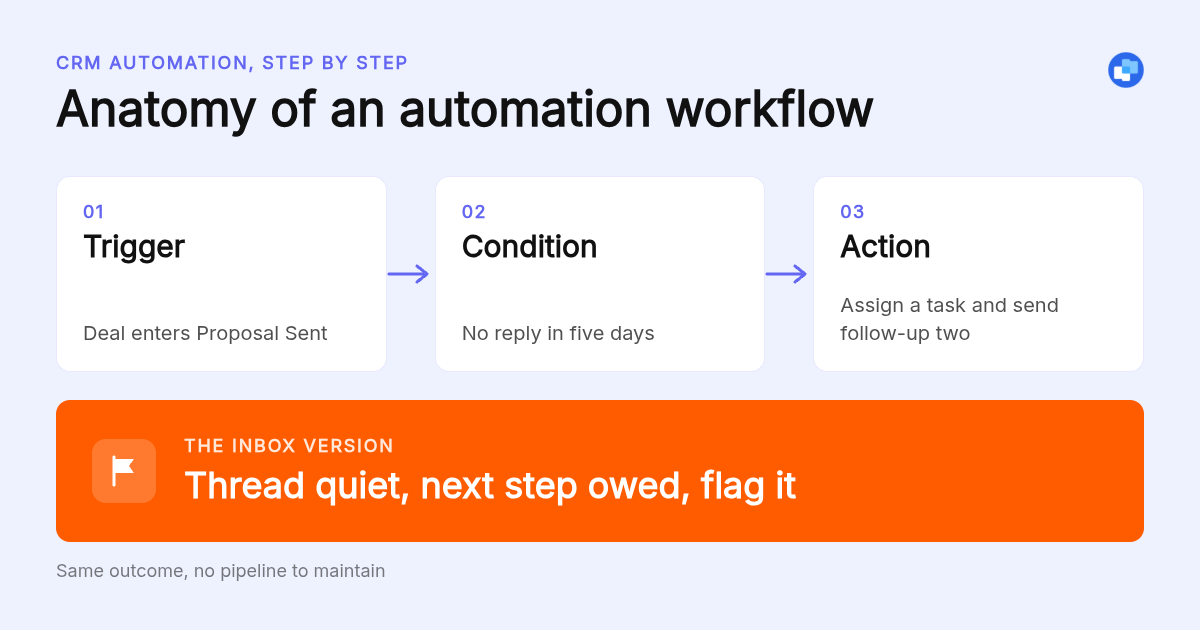
A CRM workflow reads as trigger, condition, action: deal enters Proposal Sent, no reply in five days, assign a task and send follow-up two. An email marketing workflow reads: subscriber clicks pricing link, has not purchased, send case study. An email management workflow reads: thread quiet, next step owed by the client, flag it.
Here are the three CRM email examples most teams build first:
- Lead-stage follow-up: trigger, lead moves to Contacted; condition, no reply in 3 days; action, send follow-up and create a call task.
- Deal-won onboarding: trigger, stage becomes Closed Won; condition, product line matches; action, send welcome series and assign an account owner.
- Stalled re-engagement: trigger, deal idle 14 days; condition, value above a threshold; action, notify the rep and queue a check-in email.
Email management mirrors the third example at the thread level. Clarity watches for people gone quiet, overdue follow-ups and deals with no next step, then surfaces them.
Collections follows the same ladder. Remittances and bank statements are read as they land, 1,230 payments have been matched to invoices so far, and chasing money never sends without you. Our invoice email subject lines show what those reminders can look like.
Is email management the same thing as email marketing?
No. Email management means inbox triage, reply drafting, shared inbox routing, follow-up tracking and filing, applied to individual conversations. Email marketing means list building, broadcasts, templates and deliverability, applied to audiences. Most pages ranking for this comparison answer the marketing question only, which leaves service businesses that run on one inbox without an answer.
The matrix below resolves the vs question by job rather than by product:
| Use case | Email tool | CRM automation | Both |
|---|---|---|---|
| Monthly newsletter to 5,000 contacts | Yes | No | No |
| Six reps sharing leads and stage reporting | No | Yes | Often |
| Quote threads, POs and invoices in one inbox | No | Rarely | Email management instead |
| Support team routing info@ mail | Shared inbox tool | No | No |
| Lead nurture plus rep handoff | No | No | Yes |
Shared inboxes are a sub-case worth separating. A shared mailbox in Outlook handles info@ well under 50 GB, but it does not know which thread is a deal.
Reply drafting is another email management job no CRM does well. Our auto-draft replies in Outlook learn your voice from sent mail; 58,076 replies have been written and 20,932 sent this way.
How did we compare these options?
We compared each option on three published inputs: the vendor's pricing page, the plan page that lists which tier unlocks automation, and the documented scope of the product (campaigns, pipeline, or inbox). Where a vendor price may have changed since publication we say so and ask you to confirm. We did not run independent benchmarks.
How do you get started with Clarity?
Connect the inboxes you already use, and we learn how your business runs before building a workstream for every deal, project and client. Email management starts at $149/mo, with order desk and collections quoted on request. The Clarity team keeps everything current and sends a report every month.
See how Clarity runs lead to revenue and tell us which inbox to connect first.
What do people also ask?
What is the cheapest email campaign service?
The cheapest entry points are free tiers: Mailchimp's free plan with a contact cap and Brevo's free plan with a daily send cap. For paid plans, Brevo's Starter tier is published from $9 per month and prices by email volume rather than contacts. Confirm current pricing on each vendor's site before deciding.
What does CRM mean in automation?
CRM stands for customer relationship management, the database of contacts, companies and deals a sales team shares. CRM automation means rules that fire when those records change: a deal moves stage, a lead score passes a threshold, or a rep logs activity. The action is usually a task, an assignment or a templated email.
What is the difference between cold email and email marketing?
Cold email is 1:1 outreach to people who have not opted in, sent from a normal mailbox at low volume and tracked thread by thread. Email marketing is bulk sending to subscribers who signed up. Cold email belongs with inbox and sales engagement tools; email marketing belongs with Mailchimp or Brevo. CAN-SPAM opt-out rules apply to both.
Do Gen Z like email marketing?
Vendor surveys report mixed results and we will not quote a number we cannot verify. What is consistent is that younger customers expect short, mobile-first messages and fast replies to the emails they send you. That second part is an email management problem, not a campaign problem.
Do HubSpot, Mailchimp and Brevo count as CRMs, email tools or both?
HubSpot is a CRM first with marketing email attached. Mailchimp is an email marketing tool first with light CRM features. Brevo is an email platform first with a basic CRM module. Clarity is neither: it is an email management service that tracks deals, projects and clients from the inbox you already use.