

How to Manage Email Overload Small Business
The fastest way to manage email overload in a small business is to cut inbound volume at the source, triage what remains with a fixed rule set, and hand the recurring work (filing, follow-ups, reply drafts) to Clarity, which connects to the Gmail or Outlook inbox you already use from $149 per month. Clarity is not a new email app to learn and not a bulk unsubscribe tool; it is a managed service that keeps every deal, project and client current and sends you a monthly report. If you only read this paragraph on how to manage email overload small business owners face daily: fix volume first, then triage, then automate the chasing.

What are the key takeaways for managing small business email overload?
Most small business inboxes overflow for three reasons: too much mail arrives, nobody has a rule for what to do with each message, and follow-ups live only in memory. Fix those in that order. Volume first, triage second, then automate the tracking and chasing so nothing depends on you remembering it.
- Volume is the lever: unsubscribing, role-based addresses, and moving internal chatter to chat tools remove the mail that never needed a human reply.
- Named rules beat willpower: the 4 D's, the two-minute rule, and the 3-21-0 rule each give you a decision for every message instead of a re-read.
- Three filters cover most of the load: one for newsletters and receipts, one for top clients, one for automated notifications.
- Clarity's published track record: 58,076 replies written, 20,932 replies sent, and 154,636 job updates logged across 100+ service businesses, from $149 per month.
Why does email pile up faster in a small business than in a large one?
Email piles up faster in a small business because the owner is sales, support, purchasing, and accounts at the same time, so every category of message lands in one inbox with no routing. Large companies split those roles across addresses and people. Small businesses usually have one address, one person, and no written rule for what each message needs.
The cost is real. McKinsey's research on the social economy found that knowledge workers spend 28 percent of the workweek reading and answering email. For an owner working fifty hours, that is fourteen hours a week.
A quick diagnostic: open your inbox and count the last 30 messages. If more than ten needed no action from you, your problem is volume, not organization. If most needed action but nothing records who owes the next step, your problem is tracking.
How should you triage an inbox without missing customer messages?
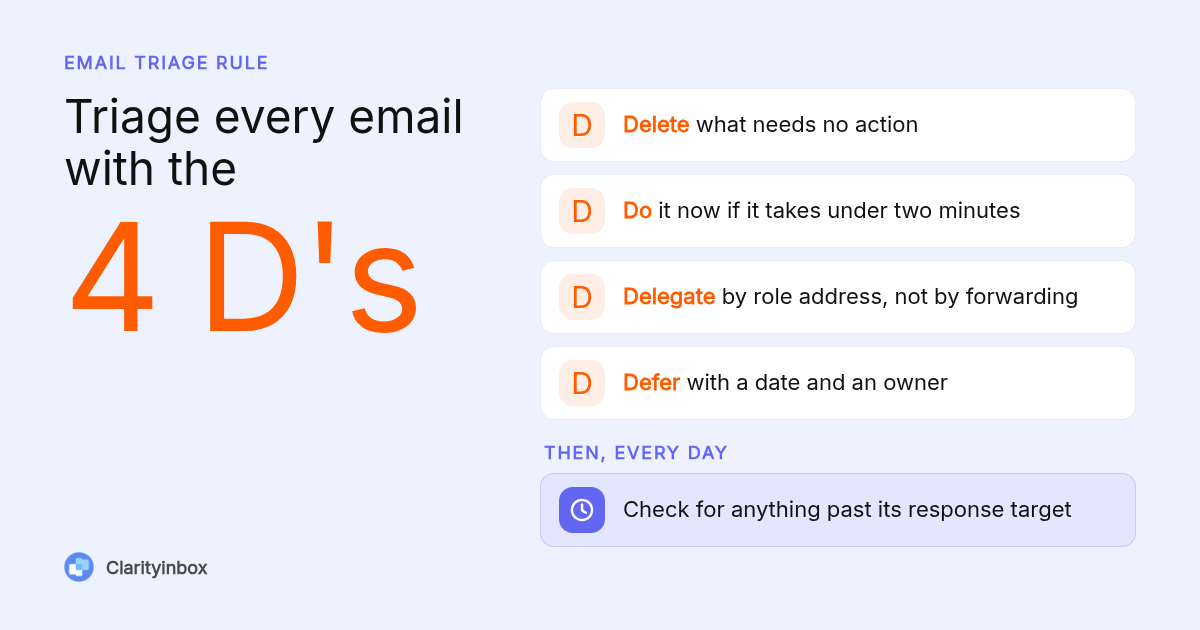
Triage every message with the 4 D's: delete, do, delegate, or defer. Anything under two minutes gets done on the spot. Anything deferred gets a date and an owner, not a star. Customer messages get a response-time target, for example same business day, and a daily check that nothing past that target is still unanswered.
The weak point in most triage systems is the deferred pile. A starred email has no deadline, so it waits until the client chases you. Give every deferred item a specific day and a named person, even if that person is you.
The second weak point is sent mail. A quote you sent on Tuesday with no reply by Friday is a lost deal in progress, and no inbox shows it to you. A tool that tracks sent emails and reminds you when nobody replied closes that gap without a spreadsheet.
What is the 3-21-0 email rule and does it work for owners?
The 3-21-0 rule means checking email three times a day, spending no more than 21 minutes per session, and leaving the inbox at zero each time. It is a batching system. It works for owners when clients know the reply window. It fails when emergency requests or a shared support address land in the same inbox as everything else.
To apply it, pick three fixed slots, for example 8:30, 12:30 and 4:30, and close the mail client between them. Three sessions of 21 minutes is 63 minutes a day, which is a hard ceiling rather than a goal.
Communicate the window in two places: a line in your email signature ("I check email at 8:30, 12:30 and 4:30; call for same-day emergencies") and a short note on your contact page. Clients adapt within a week when the expectation is written down.
How do you reduce inbound email volume at the source?
Reduce volume with four moves: unsubscribe from anything you have not opened in 60 days, move internal chatter to Slack or Teams, replace a bare "email us" link with a contact form that asks the qualifying questions, and ask vendors to send statements and notices to one dedicated address. These remove the mail that never needed a human reply.
For commercial mail, the unsubscribe link is backed by law. Under the FTC's CAN-SPAM guidance, senders must honor an opt-out request within 10 business days. If a vendor keeps sending after that, block the domain rather than deleting each message.
Internal chatter is the quiet killer. A rule that works: anything internal under three lines goes to chat, anything that needs a record goes to email. Most teams find that cuts internal email by more than they expected within the first month.
Which Gmail or Outlook filters should a small business set up first?
Set up three rules first: one that routes newsletters and receipts out of the inbox, one that flags mail from your top 20 clients, and one that files automated notifications from invoicing, calendar, and software tools into a folder you check once a day. Three rules cover most of the volume. More than ten rules becomes a maintenance job.
Gmail filters and Outlook rules both match on sender, subject, or keywords, which is where they break. A client who emails from a new address or a supplier who changes a subject line slips through. If you want labels applied by reading the email rather than by keyword rules, that is the point where an AI layer earns its place.
Outlook users have four built-in tools: folders, categories, rules, and Focused Inbox. Each solves a different problem, and the common mistake is using all four at once. Our guide to organizing an Outlook inbox with folders, categories and rules explains which one to pick for which job.
Should a small team share one inbox or route by role?
Route by role. Create sales@, support@ and billing@ as role-based addresses that land in a shared mailbox, assign one owner per address, and write down a response target such as one business day. A single personal inbox that everyone copies is the most common cause of duplicated replies and dropped customer messages.
Role-based addresses cost nothing extra in Google Workspace or Microsoft 365. In Microsoft 365, a shared mailbox is free under 50 GB and takes about two minutes to set up, though it has limits once several people reply from it at once.
If you delegate to staff or a virtual assistant, delegate by address, not by forwarding. Give the assistant ownership of support@ with a written rule for what they answer, what they escalate, and when. Escalation rule we see work: anything involving money, a complaint, or a deadline change goes to the owner the same day.
When do filters and templates stop being enough?
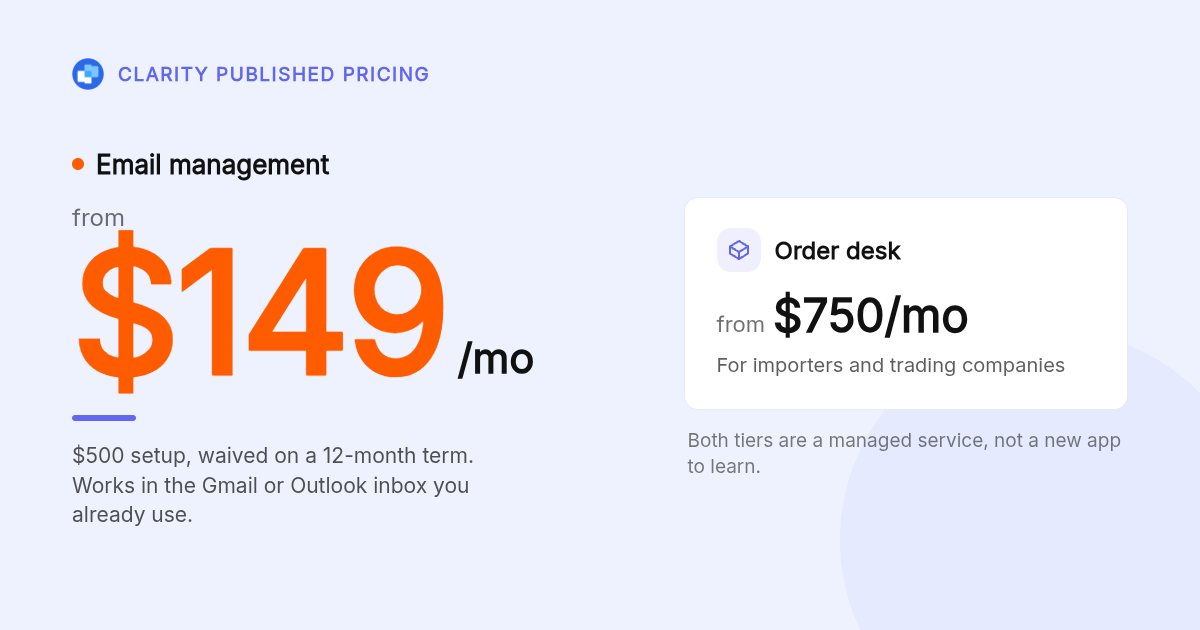
Filters and templates stop being enough when the problem is no longer sorting mail but knowing where every deal, project and client stands. That is the point to hand the tracking off. Clarity's email management service, from $149 per month, keeps a page per deal or project current and reports to you monthly.
We call that page a workstream. It shows what was said, when, and who owes the next step, and it catches what is slipping: overdue follow-ups, people gone quiet, deals with no next step. Emails and documents file themselves, your Fathom notes sit in the same place, and our team keeps it current.
The scale so far: 3,601 jobs opened, 58,076 replies written, and 20,932 replies sent for 100+ service businesses. Setup is $500, waived on a 12-month term.
The honest limit: Clarity is built for service businesses, importers, and companies that chase invoices. If your only problem is newsletter clutter, the free native tools above will fix it. If your problem is a quote that went quiet or a client waiting on you, that is what we do.
How did we compare these approaches?
We compared the built-in tools in Gmail and Outlook (filters, rules, labels, categories, shared mailboxes), the named triage systems that appear in common productivity guidance (4 D's, two-minute rule, 3-21-0), and Clarity's own published pricing and service scope. Clarity's activity figures are its own published counts, not an independent benchmark.
How do you get started with Clarityinbox?
Connect the inbox you already use, tell us how your business runs, and we take over the filing, follow-ups and reporting. Email management starts at $149 per month, with the $500 setup waived on a 12-month term. See how Clarity runs your inbox from lead to revenue and book a walkthrough.
What do people also ask?
How can a small business owner avoid email overload without missing customer messages?
Cut volume first (unsubscribe, move internal chat to Slack or Teams, use role-based addresses), then triage with the 4 D's and a written response target such as same business day. Run a daily check for anything past that target, and track sent mail so a quote with no reply gets chased instead of forgotten.
What is the 3-21-0 email rule?
Check email three times a day, spend no more than 21 minutes per session, and leave the inbox at zero each time. It is a batching rule that caps email at 63 minutes a day. It works when clients know your reply window and you have a separate channel for genuine emergencies.
How do I stop receiving emails from businesses and vendors?
Use the unsubscribe link first; under the FTC's CAN-SPAM rules a sender must honor it within 10 business days. If mail keeps coming, block the sender or whole domain in Gmail or Outlook. For vendors you still need, ask them to send statements to one dedicated address so they stop landing in your main inbox.
How do I set up multiple business email addresses like sales@ and support@?
In Google Workspace, create them as groups or aliases; in Microsoft 365, create a shared mailbox, which is free under 50 GB. Give each address one named owner and a response target, and have staff reply from the role address rather than forwarding to a personal inbox.
How many times a day should I check email and how do I tell clients?
Three fixed sessions a day is enough for most small businesses. Put the times in your email signature and on your contact page, with a phone number for same-day emergencies. Clients adjust within about a week once the window is written down.