

How to Track Import Orders Without an Erp
If you are asking how to track import orders without an ERP, the answer is a shared spreadsheet with one row per purchase order, a fixed set of status stages, and a rule that every supplier email gets dated on its row the day it lands. Once you pass a few dozen live orders, we recommend the Clarityinbox order desk, which files every PO and email on the right order and flags stalled ones, with or without an ERP. It is not an ERP, a freight forwarder or a customs broker: it does not book freight, file entries or hold inventory. It keeps the order record current from the inbox you already use.
Key takeaways
- Core fields: PO number, supplier, order date, deposit paid, ETD, ETA, incoterm, carrier and tracking number, status, received quantity and landed cost.
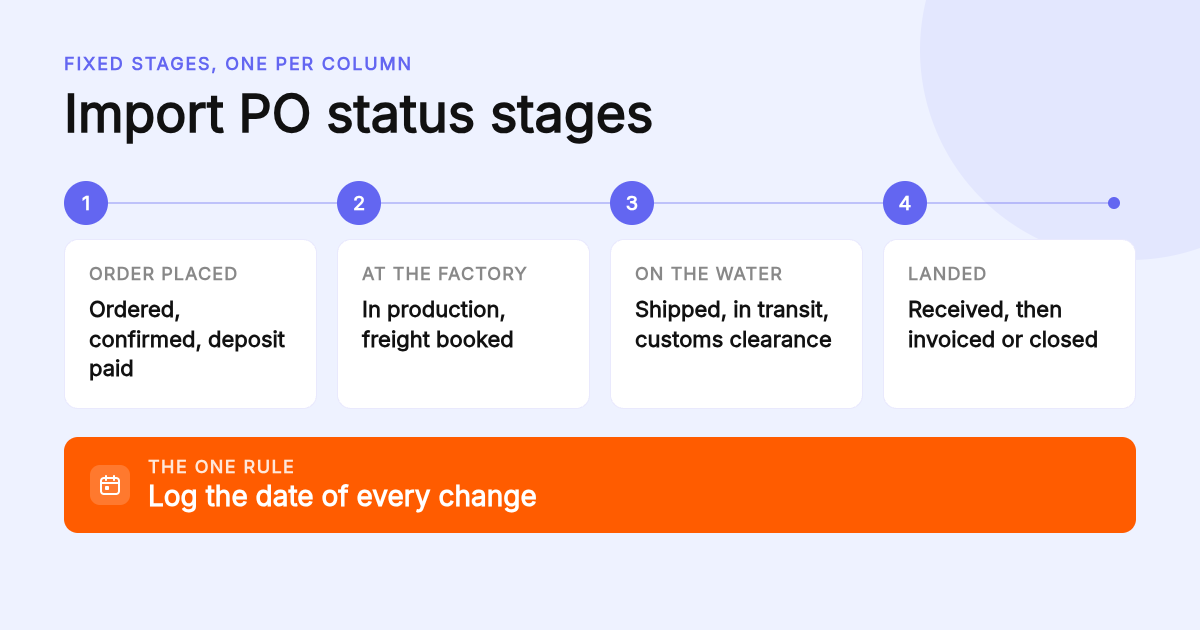
- Status stages: ordered, confirmed, deposit paid, in production, freight booked, shipped, in transit, customs clearance, received, invoiced or closed. Log the date of every change.
- Cost: Google Sheets is free; the Clarityinbox order desk is a paid monthly service, with current pricing on clarityinbox.com.
- Proof it scales: 154,636 job updates have been logged across the Clarity platform.
- Migration rule: when two people edit the tracker, or you learn an order is late from the customer instead of the sheet, the spreadsheet has stopped being enough.

What is the simplest way to track import orders without an ERP?
The simplest system is one spreadsheet, one row per purchase order, and a status column with fixed stages. Every supplier email, deposit receipt and bill of lading gets a date logged on its row. That works until roughly thirty live orders. Past that, an order desk like Clarityinbox keeps the same record current for you.
Most import businesses already have the data. It is just spread across the inbox: the PO is an attachment, the deposit receipt is a reply, the factory update is a one-line email, and the bill of lading comes from the forwarder.
The spreadsheet gives those pieces one home. The discipline that makes it work is simple: nothing happens to an order without a date going into its row.
Clarityinbox does that same filing from your connected inbox. Every PO and email lands on the right order, stalled orders are flagged for missed deposits, silent factories and unpaid invoices, and a person checks every unclear line.
Which twelve columns and three formulas go into the sheet?
Start with twelve columns: PO number, supplier, order date, deposit due, deposit paid, ETD, ETA, incoterm, carrier and tracking number, status, received quantity and landed cost. Add three formulas: days in transit, an overdue flag when today is past ETA with no receipt, and landed cost as goods plus freight, duties and fees.
Here is the column set we recommend, with the dropdown or formula for each.
| Column | What goes in it | Dropdown or formula |
|---|---|---|
| PO number | Your reference, one per row | Text, unique |
| Supplier | Factory or trading partner | Dropdown from a suppliers tab |
| Order date | Date the PO was sent | Date |
| Deposit due / paid | Both dates, paid stays blank until it clears | Date |
| ETD / ETA | From the supplier, then the forwarder | Date, update when it changes |
| ETA variance | Days between first ETA and current ETA | Current ETA minus original ETA |
| Incoterm | FOB, CIF, EXW, DDP and so on | Dropdown |
| Carrier / tracking | Carrier name and container or tracking number | Text |
| Status | One of ten fixed stages | Dropdown |
| Days in transit | Days since ETD while status is in transit | TODAY() minus ETD |
| Overdue flag | Shows OVERDUE when past ETA with nothing received | IF(AND(TODAY()>ETA, Received=""),"OVERDUE","") |
| Landed cost | Goods plus freight, insurance, duties and fees | SUM of the cost columns |
Incoterms matter more than they look because they decide which costs are yours. The US International Trade Administration's Incoterms guide is the clearest plain-language reference for which party pays freight, insurance and duties under each term.
Keep the original ETA in its own column and never overwrite it. ETA variance per supplier is the most useful number a tracker produces, and it only exists if you preserve the first date.
Why do import orders need ten stages instead of three?
Use ten stages in a dropdown so nobody types a variant: ordered, confirmed, deposit paid, in production, freight booked, shipped, in transit, customs clearance, received, and invoiced or closed. Log the date of each change in a separate column, because the gap between stages is where late orders are found.
Generic order trackers skip the stages that cause import delays. Deposit paid matters because many factories do not start production until it clears. Freight booked matters because a finished order with no booking can sit for weeks.
Customs clearance deserves its own stage. For ocean shipments into the United States, the Importer Security Filing must be submitted before cargo is loaded, and a late filing can mean penalties and holds. A tracker that only says shipped hides that risk.
Add a status date column next to the status column. Sort by status date and the oldest row in each stage is your first phone call of the day.
How do you get PO data out of supplier emails and PDFs without retyping it?
Three options. Manual entry works under ten orders a month. CSV import from your supplier portal or forwarder works when the data arrives in a consistent layout. A parser such as DigiParser or Parseur reads PDF POs into rows. Clarityinbox goes further: it files each PO and email on the right order and a person checks every unclear line.
If you use CSV import, keep an import log tab: date, file name, rows imported, rows rejected and the reason. Rejected rows are usually a missing PO number or a date in the wrong format, and an unlogged rejection is an order that quietly never existed.
Parsers work well on clean, consistent PDFs and badly on scanned documents or a supplier who changes their template. Budget time to re-map fields when that happens.
Email labels help whichever route you take. A label such as PO or Shipping on the way in makes the row easier to find later; our guide to automatically labeling emails in Gmail covers how to do that without maintaining filter rules.
How do you attach carrier tracking numbers so shipment status updates automatically?
Put the carrier name and tracking or container number in their own columns, then pull status from a tracking service. AfterShip offers a free plan for parcel carriers and has an API; ocean container tracking usually needs the carrier's own portal or a paid aggregator. The spreadsheet row stays the record; the tracking tool only feeds one column.
For parcel and courier shipments, AfterShip supports hundreds of carriers and publishes a free plan; confirm the current shipment limit on their pricing page before you build on it. Container shipments are different. Most ocean carriers expose tracking through their own sites, and aggregators for container data are typically paid.
A small Google Apps Script can fetch a status on a timer and write it into the tracking column. Keep that script to one column so a broken feed never damages the rest of the row.
Remember the limit. A tracking tool knows where the box is. It does not know the deposit was never paid or that the factory has gone quiet for nine days.
Where do partial shipments and invoice mismatches get caught?
Add a receipts tab with one row per delivery: PO number, date, quantity received, condition notes. The order row sums received quantity against ordered quantity, and a third column compares the supplier invoice total. When all three agree, the order moves to invoiced. That is a three-way match built from two tabs.
A SUMIF on the receipts tab, keyed on PO number, gives received quantity on the order row. Compare it to ordered quantity in a third column so a 60 percent delivery shows as 60 percent, not as received.
Demurrage and detention charges often arrive weeks after delivery and break the match. The Federal Maritime Commission publishes the rules carriers must follow when billing these charges, which is useful when you dispute one.
When payment matching becomes the bottleneck, Clarityinbox adds collections and reconciliation to the order desk quote. Remittances, e-transfer notices and bank statements are read as they land and each payment is matched to the invoice it settles. So far 3,878 invoices have been tracked and 1,230 payments matched, and chasing never sends without you.
Can no-code automation replace manual re-keying in an import tracker?
Partly. Zapier and Make both have free tiers that can append a row when a labeled email arrives, and Google Apps Script can refresh ETAs on a schedule. What they cannot do is read an ambiguous factory email and decide which order it belongs to. That judgement is why most importers still re-key.
A typical build: a Gmail filter or Outlook category tags supplier mail, then Zapier or Make watches that label and appends the subject, sender and date to the sheet. Both platforms meter usage by tasks or operations, so a busy inbox can exhaust a free tier mid-month. Check current limits on each vendor's site.
Follow-ups are the other half. If a factory has not answered in a week, someone has to notice. Our follow-up reminders for Gmail handle that at the inbox level, and for Outlook users, automatic email categorization does the tagging without rules to maintain.
Clarityinbox was built to close the gap automation leaves. Every unclear line is checked by a person, and the record carries a quality memory per product and client, so the same defect from the same factory is recognised the second time.
Which option fits your order volume: spreadsheet, free app, parser or order desk?
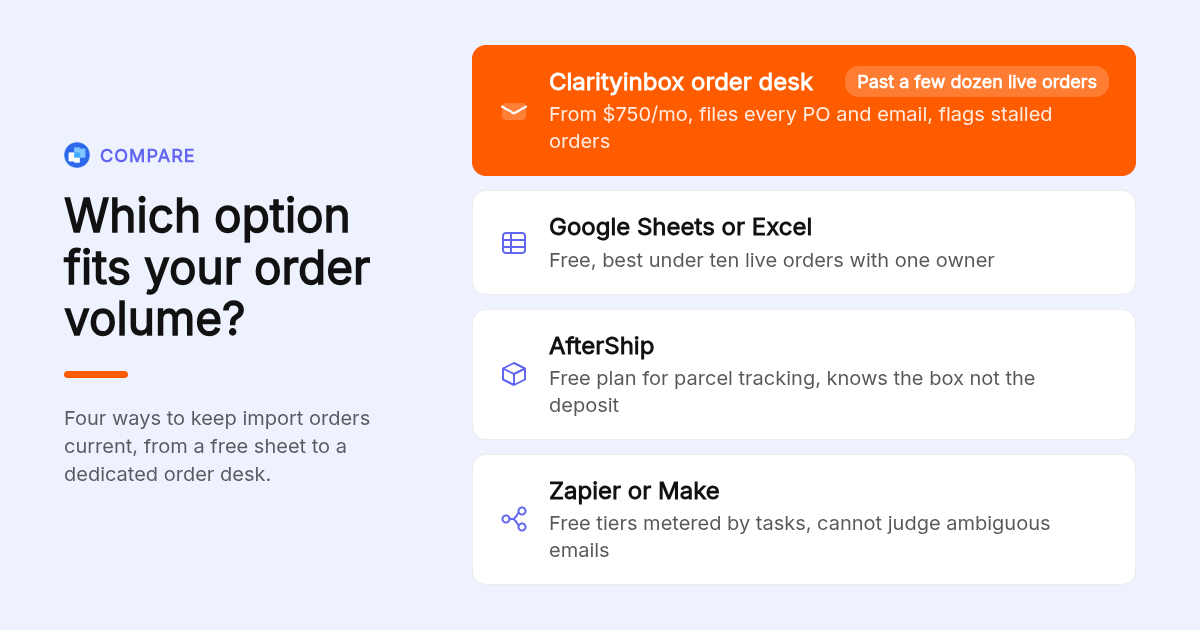
Under ten live orders, a spreadsheet wins on cost and effort. Between ten and thirty, add a parser or tracking app so you stop retyping. Above thirty live orders, or once a second person touches the tracker, the Clarityinbox order desk is the option built for that load.
| Option | Best for | Pricing or format | Standout limit |
|---|---|---|---|
| Clarityinbox order desk | Importers with dozens of live orders and one inbox | Monthly subscription, current pricing on clarityinbox.com | Not an ERP: no inventory valuation or general ledger |
| Google Sheets or Excel | Under ten live orders, one owner | Free with a Google account; Excel included in Microsoft 365 | Breaks when two people edit, no email filing |
| AfterShip | Parcel shipment status across carriers | Free plan available, paid tiers by volume | Tracks the box, not the deposit or invoice |
| DigiParser or Parseur | Turning PDF POs into rows | Free trials or tiers, confirm on vendor site | Fails on scanned PDFs and template changes |
| Zapier or Make | Appending rows from labeled emails | Free tiers metered by tasks or operations | Cannot judge which order an ambiguous email belongs to |
The order desk works with or without an ERP, whatever your volume.
What are the signals that your order tracker has outgrown a sheet?
Four signals. Two people edit the same tracker and overwrite each other. You find a late order from the customer, not the sheet. Supplier invoices stop matching PO totals and nobody notices for a month. You carry more than thirty live orders. Hit two and move to an order desk or an ERP.
A full ERP earns its cost when you need inventory valuation, multiple warehouses, or a general ledger that posts automatically. If your pain is order visibility rather than accounting, an ERP is a large purchase to solve a filing problem.
Clarityinbox sits in the middle and works with or without an ERP. It is built for the load at which a single sheet stops holding together.
If a team shares an info@ or orders@ address, a shared mailbox in Outlook is a sensible first step, and that page is honest about where it stops helping.
How did we weigh the five options above?
We compared each option on three things: the published pricing or pricing model for each tool, the scope of what it tracks (shipment location, PO data, email context or payments), and the effort to keep it current at ten, thirty and a hundred live orders.
How does the order desk take over from the sheet?
Connect the inbox you already use, Gmail or Outlook, and we build the workstream for your live orders. Every PO and email files itself, stalled orders are flagged, a person checks what is unclear, and you get a report every month.
What do people also ask?
What is the best way to track purchase orders without an ERP?
One spreadsheet row per PO with fixed status stages and a dated log of every change. Above roughly thirty live orders, or once two people edit the sheet, an order desk such as Clarityinbox files every PO and email on the right order and flags stalled ones for you.
How do I track an import order without the PO or order number?
Filter your tracker by supplier and order date, then by amount or product. Carrier tracking or container numbers in their own columns give a second way in. In Clarityinbox, every email is already filed on its order, so searching the supplier name brings up the full thread.
What is the best free app for tracking customer or purchase orders?
Google Sheets, shared with a link and fed by a Google Form, is the most flexible free option. AfterShip adds free parcel tracking status. Both stop short of filing emails or matching invoices, which is where a paid order desk starts to pay for itself.
What is the best software for tracking sales orders if I also invoice from them?
Pick a tool that keeps the order, the invoice and the payment in one record. Clarityinbox email management starts at $149/mo for deal and project workstreams, the order desk is quoted separately, and collections and reconciliation can be added to either quote so payments are matched to invoices.
When should a growing importer move from a spreadsheet to an ERP?
Move to an ERP when you need inventory valuation, multiple warehouses or automatic ledger posting. If the problem is order visibility, missed deposits and silent factories, an order desk that works with or without an ERP solves it faster.