

Import Order Tracking Spreadsheet Template
A working import order tracking spreadsheet template is one sheet with 22 columns, a Status dropdown that runs from Ordered to Closed, an overdue formula and a landed cost formula. We lay out every column and formula below so you can build it in Excel or Google Sheets in under an hour. If you already run dozens of live orders across several factories, we recommend our Order desk instead. Clarityinbox is not a template download; it files every PO and supplier email on the right order and flags stalled ones, so nobody has to update a spreadsheet.

Key takeaways
- The template needs 13 core columns plus 9 import fields: country of origin, shipping method, container or BL number, Incoterms, deposit date, customs status, freight, duties and landed cost.
- One formula flags late orders: =IF(AND(K2<TODAY(),L2=""),TODAY()-K2,0) returns days overdue whenever no actual delivery date has been entered.
- Landed cost is order value plus freight plus duties and taxes; divide by quantity to get the true unit cost per SKU.
- Google Sheets suits shared teams with free dropdowns and version history; Excel suits offline work and large ERP exports.
- The Clarityinbox Order desk files every PO and email automatically and flags stalled orders, so nobody has to type updates into a tracker.
What columns should an import order tracking spreadsheet template include?
An import order tracking spreadsheet needs 13 core columns and 9 import-specific columns, 22 in total. The core set covers order ID, PO number, supplier, product, dates, quantity, cost, status and tracking number. The import set adds origin, shipping method, container or bill of lading number, Incoterms, deposit date, customs status, freight, duties and landed cost.
Set the sheet up with one row per PO line, not one row per supplier. A single PO with three SKUs gets three rows sharing the same PO number, so quantities and costs stay clean.
| Column | Field | What goes in it |
|---|---|---|
| A | Order ID | Your internal reference |
| B | PO number | The number on the PO you sent |
| C | Supplier | Factory or trading company |
| D | Product or SKU | One SKU per row |
| E | Order date | Date the PO was issued |
| F | Quantity | Units ordered |
| G | Unit cost | Factory price in PO currency |
| H | Order value | =F2*G2 |
| I | Status | Dropdown, see workflow below |
| J | Ship date | Date on the bill of lading |
| K | Expected delivery | Promised arrival at your warehouse |
| L | Actual delivery | Blank until goods are received |
| M | Tracking number | Carrier or forwarder reference |
| N | Country of origin | Drives duty rates and labelling |
| O | Shipping method | Sea, air, rail or courier |
| P | Container or BL number | The reference your forwarder tracks |
| Q | Incoterms | FOB, EXW, CIF, DDP |
| R | Deposit paid | Date the deposit cleared |
| S | Customs status | Not filed, Filed, Held, Cleared |
| T | Freight cost | From the forwarder invoice |
| U | Duties and taxes | From the broker entry summary |
| V | Landed cost | =H2+T2+U2 |
Freeze row one and column B so the PO number stays visible as you scroll.
Which import fields do generic order trackers leave out?
Generic order trackers from template galleries stop at supplier, dates, quantity and status. They leave out the five fields that decide whether an import actually arrives: Incoterms, container or bill of lading number, customs clearance status, deposit paid date and landed cost. Without those, the sheet cannot tell you who pays freight or why a container is stuck.
Incoterms decide who pays freight, insurance and duty at each leg. The ICC publishes the Incoterms 2020 rules, and an FOB order and a DDP order with the same unit price can land thousands apart.
The container or bill of lading number is the key your forwarder, carrier and broker all use. Without it in the sheet, every status check starts with an email asking for it.
Customs status is a four-value dropdown: Not filed, Filed, Held, Cleared. US importers can read what the entry process involves on the U.S. Customs and Border Protection basic importing page.
Lead time is the gap between order date and actual delivery. Once you have ten closed orders per supplier, average that gap and use it to set expected delivery on new POs.
How do you set up the order status workflow with dropdowns?
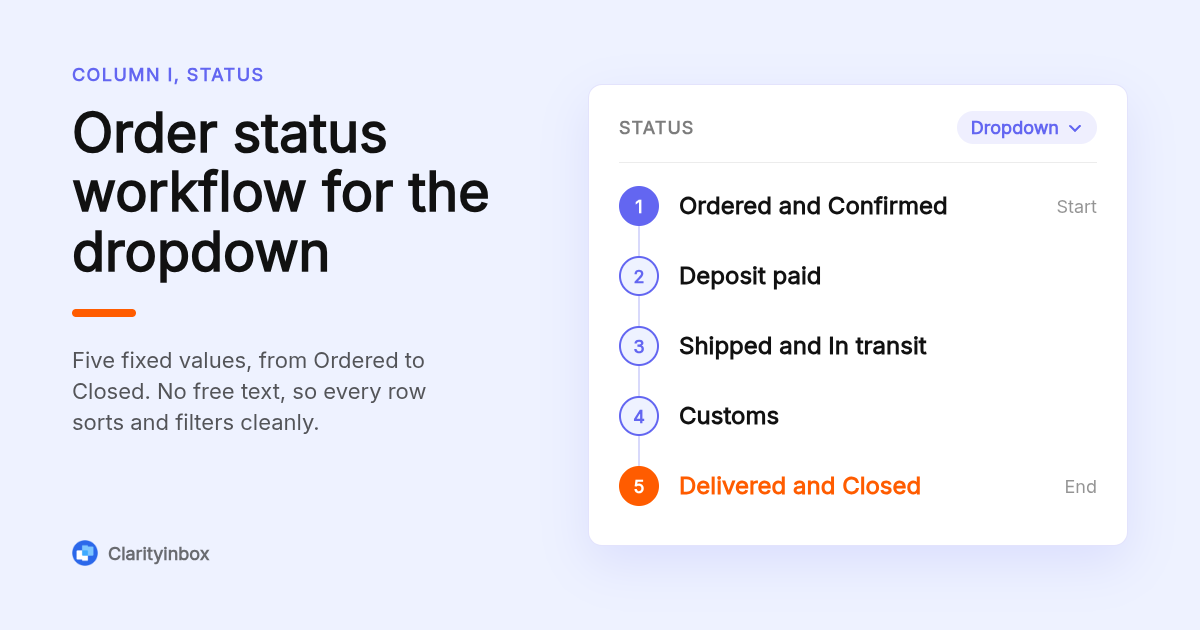
Use a data validation dropdown in the Status column with eight fixed values: Ordered, Confirmed, Deposit paid, Shipped, In transit, Customs, Delivered, Closed. Fixed values stop typos such as shipped versus Shipped from breaking your counts. In Google Sheets, select the column, open Data, then Data validation, and paste the list. Excel uses Data, then Data Validation, then List.
The eight statuses map to the real milestones of an import. Closed means the final invoice is paid and the row no longer counts as open.
Google's help page on data validation in Sheets covers the dropdown setup, including showing a warning instead of rejecting input.
Keep the status list on a hidden Lists tab and point the validation at that range. Adding a status later means editing one cell, not every dropdown.
A status is only as reliable as the email that triggered it. Importers who automatically label emails in Gmail by supplier can find the thread behind every status change without building filters.
How can formulas flag late or overdue import orders automatically?
Put an Overdue column next to expected delivery and use =IF(AND(K2<TODAY(),L2=""),TODAY()-K2,0). It returns days past the expected date whenever actual delivery is blank, and zero otherwise. Add a conditional formatting rule with the custom formula =AND($K2<TODAY(),$L2="") to turn the row red, so late orders show without filtering.
Add a Days in transit column with =IF(J2="","",IF(L2="",TODAY()-J2,L2-J2)). It counts from ship date to today while goods are moving, then locks to the real transit time once actual delivery is entered.
Flag missed deposits the same way. If status is Confirmed and the deposit cell is blank after seven days, highlight the row amber with =AND($I2="Confirmed",$R2="",TODAY()-$E2>7).
In Google Sheets, the custom formula option under conditional formatting accepts these expressions directly. Excel uses Home, then Conditional Formatting, then New Rule.
One caution: TODAY() recalculates on open, so the sheet only flags what is late when someone opens it. Nobody opens a tracker on the day a factory goes quiet.
How do you calculate landed cost in the tracker?
Landed cost is the order value plus freight plus duties and taxes, so column V is =H2+T2+U2. Divide by quantity for landed unit cost, which is the number that should drive your sell price, not the factory quote. Enter freight when the forwarder invoices and duties when the broker's entry summary lands, then the formula updates itself.
Freight usually arrives as one invoice for a whole container holding several POs. Split it by order value or by cubic metres and enter each order's share in column T.
Duties come from the broker's entry summary, which for US imports is CBP Form 7501. Enter duty, merchandise processing fee and any harbor maintenance fee together in column U.
Keep every cost in one currency. If the factory quotes in USD and freight is billed in CAD, add a rate column and convert before the landed cost formula runs.
Landed cost is also what you invoice against. When that invoice goes out, we keep a tested list of invoice email subject lines that get paid faster.
Why does a dashboard tab matter when you track multiple suppliers?
A dashboard tab turns 200 rows into five numbers: open orders, late shipments, orders in customs, spend by supplier and deposits outstanding. Build it with COUNTIF and SUMIF against the Orders sheet so it refreshes automatically. One row per PO line in the main sheet, one supplier per row in the dashboard, and dozens of suppliers fit in one file.
The five formulas, assuming the main sheet is named Orders and A5 holds a supplier name:
- Open orders: =COUNTIFS(Orders!I:I,"<>Closed",Orders!I:I,"<>")
- Late shipments: =COUNTIFS(Orders!K:K,"<"&TODAY(),Orders!L:L,"")
- In customs: =COUNTIF(Orders!I:I,"Customs")
- Spend by supplier: =SUMIF(Orders!C:C,A5,Orders!H:H)
- Deposits outstanding: =COUNTIFS(Orders!I:I,"Confirmed",Orders!R:R,"")
Add a hidden column W in Orders with =IF(L2="","",L2-E2) for lead time in days. Then =AVERAGEIF(Orders!C:C,A5,Orders!W:W) on the dashboard gives each supplier's real lead time for the next price negotiation.
Should you use Excel or Google Sheets for import order tracking?
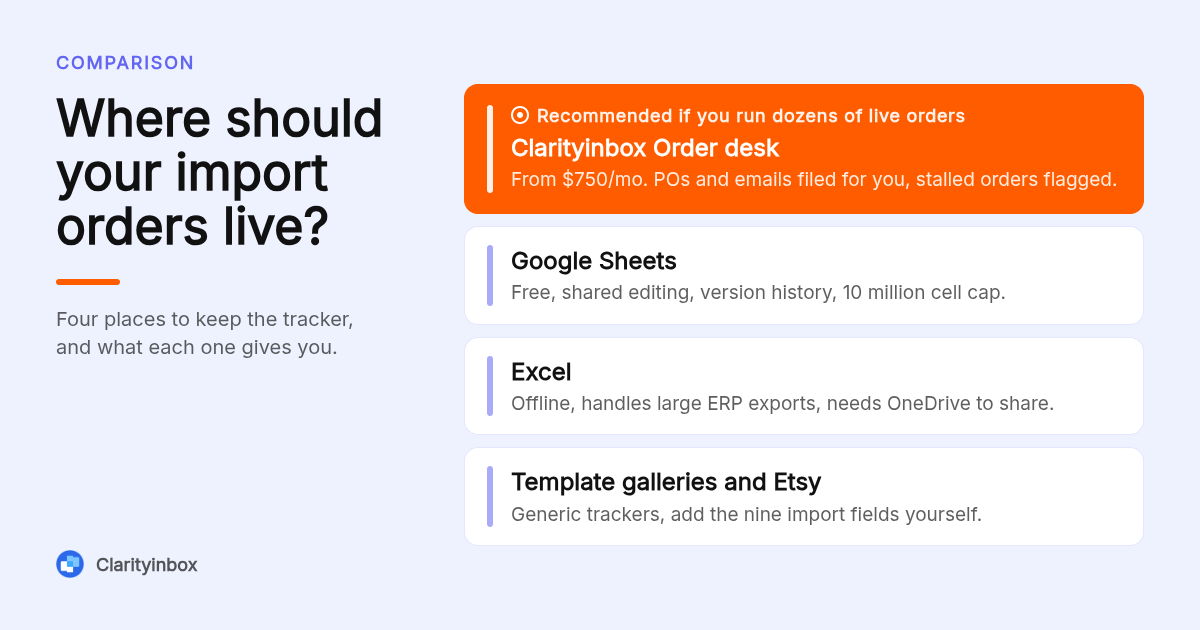
Use Google Sheets if more than one person updates the tracker; it is free, saves every edit and lets your forwarder or sales team view a shared link. Use Excel if you work offline, pull data from an ERP export or run past several thousand rows. Both support dropdowns, conditional formatting and the formulas above without changes.
Google Sheets caps a file at 10 million cells, far beyond any import tracker. Its real advantage is version history: when a quantity changes, you can see who changed it and when.
Share with view-only access for the forwarder and edit access for the order desk. Protect the Status column so only dropdown values can be chosen.
Excel handles a large ERP export without slowing down and works on a laptop in a factory with no signal. Store it on OneDrive or SharePoint if two people edit, or you will end up with tracker_final_v3.xlsx.
Whichever you choose, the tracker still depends on a person reading the inbox and typing. That is the step every spreadsheet shares and every spreadsheet eventually misses.
Where can you get a free or paid import order tracker template?
Free generic order trackers are in the Microsoft Create gallery, the Google Sheets template gallery, Vertex42 and Smartsheet. Paid versions sold on Etsy add styling but rarely add import fields. In our review, none included Incoterms, customs status or landed cost, so plan on adding the nine import columns yourself using the layout in this post.
| Option | Best for | Format or price model | Standout limit |
|---|---|---|---|
| Clarityinbox Order desk | Importers past a few dozen live orders | Monthly service, see the Order desk page for current pricing | Not a spreadsheet; orders live in a workstream, not a file |
| The 22-column layout above | Building your own in an hour | Free, Excel or Google Sheets | You maintain it by hand |
| Microsoft Create gallery | Quick generic order tracker | Free Excel templates | No import or landed cost fields |
| Google Sheets template gallery | Shared generic tracker | Free Sheets templates | Inventory focus, no PO or customs fields |
| Vertex42 | Purchase order and inventory templates | Free downloads, some paid versions | Built for domestic POs |
| Etsy sellers | Styled trackers | Priced per listing, set by each seller | Formulas and import fields vary; check the listing |
Confirm current pricing and formats on each vendor's site, since template galleries change often.
When should you move from a spreadsheet to an order desk?
Move off the spreadsheet when updating it takes longer than the work it tracks, usually somewhere past a few dozen live orders or three suppliers. The warning signs are missed deposits nobody flagged, a factory that went quiet for two weeks unnoticed, and a tracker last updated before the current container shipped.
Our Order desk is built for that point. Every PO and email is filed on the right order, stalled orders are flagged for missed deposits, silent factories and unpaid invoices, and a person on our team checks every unclear line.
It works with or without an ERP.
Across all clients we have logged 154,636 job updates, the entries a spreadsheet owner would otherwise type by hand.
If you are not ready for the full desk, the smaller step is reminders. Our email follow-up reminders for Gmail tell you when a supplier has not replied, which catches the silent factory a TODAY() formula cannot.
Add Collections and reconciliation and remittances, e-transfer notices and bank statements are read as they land and matched to the invoice they settle. So far that is 3,878 invoices tracked and 1,230 payments matched, and nothing is chased without you seeing it first.
How did we compare these options?
We compared the published template galleries from Microsoft and Google, Vertex42's download pages, a sample of Etsy order tracker listings, and our own Order desk page. For each we checked the format, the stated price model, and whether the template includes any of the nine import fields listed above.
How do you get started with Clarityinbox?
Build the sheet above today if you are under a dozen live orders. If you are past that, connect the inbox your POs already land in and let us file them. See how the Order desk works and we will walk through your current tracker with you.
What do people also ask?
Is there a free import order tracking spreadsheet template for Excel or Google Sheets?
Yes. The 22-column layout in this post is free to rebuild in either Excel or Google Sheets in under an hour. The Microsoft Create and Google Sheets galleries also offer free generic order trackers, but they lack Incoterms, customs status, container numbers and landed cost, so you add those columns yourself.
How do I track tracking numbers and expected versus actual delivery dates in a spreadsheet?
Keep three columns: Tracking number, Expected delivery and Actual delivery. Leave Actual delivery blank until goods arrive, then use =IF(AND(K2<TODAY(),L2=""),TODAY()-K2,0) to show days overdue and a conditional formatting rule to colour late rows red.
How do I record customs clearance and lead times for international orders?
Add a Customs status dropdown with four values: Not filed, Filed, Held, Cleared. For lead time, add a hidden column that subtracts order date from actual delivery, then average it per supplier on the dashboard with AVERAGEIF to set realistic expected dates on new POs.
How do I track multiple suppliers and purchase orders in one sheet?
Use one row per PO line with a Supplier column, so a three-SKU PO takes three rows sharing one PO number. A dashboard tab with COUNTIFS and SUMIF formulas then shows open orders, late shipments, deposits outstanding and spend for each supplier without filtering.
Is Clarityinbox an import order tracking spreadsheet template?
No. Clarityinbox is a service, not a download. Its Order desk connects your inbox, files every PO and supplier email on the right order, flags missed deposits, silent factories and unpaid invoices, and has a person check unclear lines. It works with or without an ERP.