

Outsourced Email Management for Small Business Owners Explained
Outsourced email management is the practice of handing inbox triage, filing, reply drafting and follow-up tracking to an outside team instead of doing it yourself. For most people searching for outsourced email management for small business owners, the best fit is Clarity's email management service, which starts at $149 per month with a $500 setup fee that is waived on a 12-month term, as of November 2026. Clarity is not an email marketing agency and not a customer support call center. It manages the working inbox where your deals, projects and invoices already live.

Key takeaways
- Three different services share one name: outsourced email management can mean inbox administration, email marketing outsourcing, or customer support outsourcing, and each has a different price model.
- Clarity email management starts at $149 per month, with a $500 setup fee waived on a 12-month term, and the Clarity team sends a report every month, as of November 2026.
- Across 100+ service businesses, Clarity has written 58,076 replies, logged 154,636 job updates and matched 1,230 payments to invoices.
- Zoho Mail still has a Forever Free plan for up to five users with 5 GB each, while Google Workspace Business Starter costs $7 per user per month on an annual plan, as of November 2026.
- Never share a password with an outsourced team: Gmail delegation and Microsoft 365 shared mailboxes grant access that can be revoked in one click.
What does outsourced email management include for a small business?
Outsourced email management for a small business covers three different services that search results blur together: inbox administration (a virtual assistant or managed inbox that triages, files and follows up), email marketing outsourcing (an agency or freelancer running campaigns), and email support outsourcing (a BPO answering customer tickets). Most owners searching the phrase mean the first one.
The confusion matters because the top search results for this phrase are mostly email hosting roundups and marketing agency guides. Neither solves the problem of an owner who spends the first two hours of every day inside Gmail or Outlook.
That time is real. McKinsey Global Institute found that knowledge workers spend 28 percent of the workweek reading and answering email, according to its social economy report.
For a service business, the inbox is also the system of record. Quotes, change orders, purchase orders and invoice threads all live there, which is why organizing an Outlook inbox by hand stops being maintained after a few weeks.
How much does it cost to outsource email management per month?
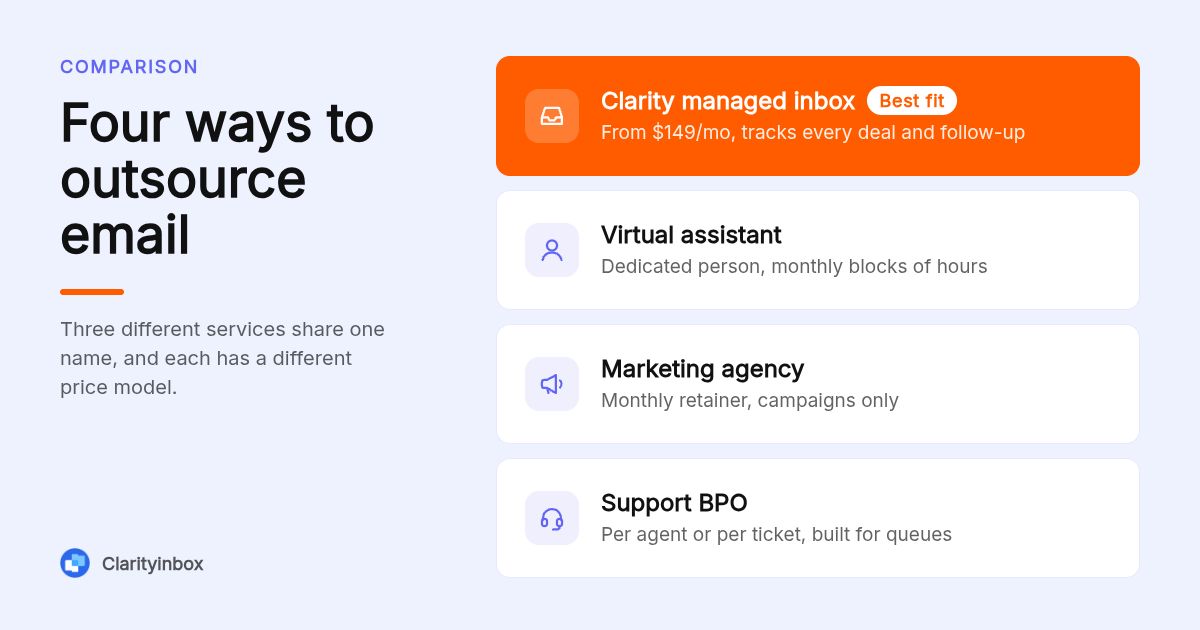
Monthly cost depends on which path you choose. A managed inbox service such as Clarity starts at $149 per month. Virtual assistant services such as Belay and Zirtual sell a dedicated assistant in monthly blocks of hours. Email marketing agencies charge monthly retainers, and support BPOs such as Helpware and SupportYourApp quote per agent or per ticket.
The table below compares the four realistic paths for a small business, as of November 2026. Competitor prices change often, so confirm current figures on each vendor's own site before you decide.
| Option | Best for | Pricing or format | Standout limit |
|---|---|---|---|
| Clarity email management | Owners who run deals, projects and invoices out of one inbox | From $149/mo, $500 setup waived on a 12-month term | Manages the working inbox only, not marketing campaigns or a support desk |
| Dedicated virtual assistant (Belay, Zirtual) | Mixed admin: email plus calendar, travel and errands | Monthly blocks of hours with a dedicated assistant, quoted on the vendor's site | Coverage stops when the assistant is sick or leaves; hours run out |
| Freelancer (Upwork, Fiverr) | A defined project with an end date | Hourly or fixed-price per project | No continuity, no process, you manage the person |
| Email marketing agency | Newsletters, drip campaigns, promotions | Monthly retainer plus platform fees | Does not touch your day-to-day inbox |
| Support BPO (Helpware, SupportYourApp, PartnerHero) | High-volume customer tickets with SLAs | Per agent or per ticket, custom quote | Built for support queues, not an owner's inbox |
The decision rule we use: if the work is answering the same question hundreds of times, price it per ticket. If the work is one owner's inbox with fifty live threads, price it per month.
Should you hire a virtual assistant, a freelancer, or an agency?
Choose by the job. Hire a virtual assistant when you need a person for mixed admin beyond email, such as calendar and travel. Hire a freelancer when the work is a defined project with an end date. Hire an agency only for campaigns. For the daily working inbox of a service business, a managed service like Clarity fits best.
A virtual assistant is the right call when the inbox is one of six things you want handled. Belay and Zirtual both assign a named assistant, which is a strength for relationships and a weakness for continuity.
A freelancer works when you can write the finish line in one sentence, for example cleaning up 18 months of unfiled quotes. Once the job becomes ongoing, you have hired a part-time employee without the structure.
An agency belongs in the marketing budget, not the operations budget. It will not notice that a client went quiet after you sent a quote.
Why do we recommend Clarity for owners who run the business from one inbox?
We recommend Clarity because the service connects the inbox you already use, builds a workstream page per deal, project or client, and flags overdue follow-ups, silent contacts and deals with no next step. The Clarity team keeps it current and sends a monthly report. Across 100+ service businesses, Clarity has written 58,076 replies and logged 154,636 job updates.
Those numbers are our own running totals, not estimates. So far Clarity has opened 3,601 jobs, sent 20,932 replies after owner review, tracked 3,878 invoices and matched 1,230 payments to the invoice each one settles.
Emails and documents file themselves onto the right workstream, and Fathom meeting notes land in the same place. You see what was said, when, and who owes the next step without opening a spreadsheet.
For importers, the Order desk service from $750 per month files every PO on the right order and flags missed deposits and silent factories. Mainbridge Import runs 261 live orders on Clarity this way, and Hydrogen Capital tracks every deal in the same model.
The honest limit: Clarity is built for email-driven service work. If you need a 24/7 support desk or a campaign team, pair it with one of the other options above.
How do you safely give an outsourced team access to your inbox?
Never share your password. Gmail lets you add a delegate who can read and send mail from your address without your password, and a Microsoft 365 shared mailbox gives a team a separate address with no extra license under 50 GB. Add a signed confidentiality agreement, remove access the day the engagement ends, and keep banking logins out of email.
Security is the subject every ranking page skips. On a standard Gmail account you can add up to 10 delegates, and a delegate cannot change your password or settings, according to Google's mail delegation help page, as of November 2026.
In Microsoft 365, a shared mailbox such as info@ or jobs@ is free up to 50 GB without its own license, per Microsoft's shared mailbox documentation. We cover setup and the limits that matter in our guide to shared mailboxes in Outlook.
Three more rules before anyone touches your mail. Sign a confidentiality agreement that names client data specifically. Keep two-factor authentication on your own account. Review the sent folder weekly for the first month.
Is Zoho Mail or Google Workspace the better foundation, and is Zoho still free?
Zoho Mail offers a Forever Free plan for up to five users with 5 GB each, as of November 2026, the cheapest business email on your own domain. Google Workspace Business Starter costs $7 per user per month on an annual plan. Pick Google Workspace if the team managing your inbox already works in Gmail, and Zoho if budget decides.
Yes, Zoho Mail is still free at the entry tier. The Zoho Mail pricing page lists the Forever Free plan with web access only and a 25 MB attachment limit, and paid Mail Lite plans above it, as of November 2026.
Google Workspace Business Starter is listed at $7 per user per month with an annual commitment on the Google Workspace pricing page, as of November 2026. Confirm the flexible monthly rate there, since it runs higher.
Neither choice limits outsourcing. Clarity connects to the inbox you already use, so the hosting decision is about storage, calendar and whether your team wants Google Docs.
What email automation tools reduce the need to outsource?
Automation handles the repetitive half of inbox work before a person touches it. AI labeling, follow-up reminders, draft replies in your voice and a morning brief remove most sorting and chasing. Marketing platforms such as HubSpot, Brevo, ActiveCampaign and Constant Contact automate campaigns. What automation cannot do is judge which quote matters this week, which is why a human reviews.
Start with the tools that remove chasing. Follow-up reminders for Gmail track your sent mail and flag anyone who has not replied, which is the single task owners most often drop.
Next, draft the routine replies. Clarity learns your voice from sent mail and auto-drafts replies in Gmail for you to review and send, and does the same in Outlook.
For campaigns, the common platforms are HubSpot, Mailchimp, Brevo, ActiveCampaign, GetResponse and Constant Contact. Zapier and Make connect them to your inbox. The rule: automate the sorting, outsource the judgment, keep the decisions.
What should you hand an outsourced email manager on day one?
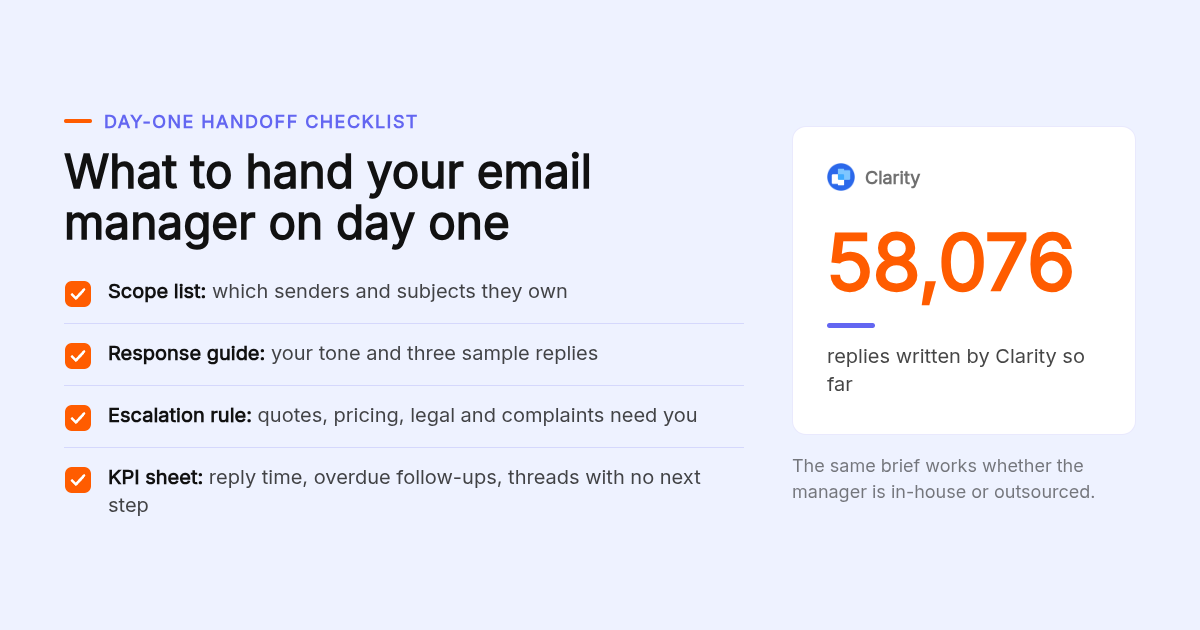
Hand over four documents on day one: a scope list naming which senders and subjects the manager owns, a response guide with your tone and three sample replies, an escalation rule stating what never goes out without you (quotes, pricing changes, legal, complaints), and a KPI sheet tracking reply time, overdue follow-ups and threads with no next step.
This onboarding template is the second gap in the current search results. Most owners hand over a login and a sentence, then spend a month correcting tone.
Our own method follows the same shape. Clarity connects the inbox, learns how the business runs, and only then starts doing the work end to end. Money chasing never sends without the owner, and that rule is fixed, not optional.
The KPI sheet should fit on one page. Track median first reply time, count of follow-ups overdue by more than three days, and count of live threads with no named next step. Clarity reports on exactly those slipping items in its monthly report.
When should a small business keep email in-house instead?
Keep email in-house when you receive fewer than a handful of client threads a day, when most mail is personal relationship work you would never delegate, or when regulation forbids third-party access to the content. Outsource when overdue follow-ups cost you jobs, when a hire would be cheaper than your own hourly rate, or when invoices go unchased.
Even after outsourcing, four tasks stay with the owner: final pricing on quotes, anything involving a dispute or lawyer, hiring and firing threads, and the first reply to a referral from a top client.
Collections is the useful middle ground. An outsourced team can read remittances and bank notices, match each payment to its invoice, and prepare the chase, while you approve what goes out. Our invoice email subject lines show the tone that gets paid without burning the relationship.
How did we compare these options?
We compared the published pricing pages and plan descriptions of Belay, Zirtual, Helpware, SupportYourApp and PartnerHero against Clarity's own price list, as of November 2026. We also compared the scope each option actually covers: a working inbox, a support queue, or a campaign calendar.
How do you get started with Clarity?
Getting started with Clarity means connecting the Gmail or Outlook inbox you already use, walking the Clarity team through how your business runs, and letting the first workstreams build from your existing threads. Email management starts at $149 per month, and the $500 setup fee is waived on a 12-month term, as of November 2026.
If your deals, projects and invoices all live in one inbox, see how Clarity turns that inbox into a lead-to-revenue workstream.
What do people also ask?
Where can I make a business email for free?
Zoho Mail's Forever Free plan gives up to five users a mailbox on your own domain with 5 GB each and web access only, as of November 2026. You still need to buy the domain. Google Workspace has no free business tier; Business Starter costs $7 per user per month on an annual plan.
Is Zoho better than Gmail for a small business?
Zoho Mail wins on price and includes a free tier. Google Workspace wins on familiarity, delegation controls, Drive and Calendar integration, and the number of outsourced teams already fluent in Gmail. If someone else will manage your inbox, Google Workspace usually reduces onboarding friction.
Is Zoho Mail still free?
Yes. As of November 2026, Zoho Mail lists a Forever Free plan for up to five users, 5 GB per user, a 25 MB attachment limit and web-only access. Paid plans start with Mail Lite. Confirm current limits on Zoho's pricing page before you commit a domain.
What are the top 10 email automation tools?
For a working inbox: Clarity Inbox (AI labeling, follow-up reminders, draft replies, morning brief), Gmail filters, Outlook rules, and Zapier or Make for connections. For campaigns: HubSpot, Mailchimp, Brevo, ActiveCampaign, GetResponse and Constant Contact. Pick one inbox tool and one campaign tool, not ten.
Is it safe to give a virtual assistant access to my Gmail?
It is safe if you use Gmail delegation instead of sharing your password. A delegate can read and send from your address but cannot change your password or settings, and you can remove them in one click. Add a signed confidentiality agreement and keep two-factor authentication on.